Short-User Buying Guide · Malaysia
Best Ergonomic Chair for Short People Below 158 cm in Malaysia
Find a chair that fits your legs, reaches your back, and works with your desk.
If you are around 145–158 cm tall, choosing an ergonomic chair can be difficult—even when it has plenty of adjustments. The seat may still feel too deep, your feet may struggle to reach the floor, or the support may sit too high.
This guide helps you shortlist Niture chairs using seat measurements, prices, and the fit checks that matter most, so you know what to compare before buying.
Height is a starting point. A chair’s suitability depends on your proportions and working setup; this guide does not guarantee a fit for everyone within the stated height range.
Quick Shortlist · Start Here
Which Niture Chairs Should You Test First?
For users around 145–158 cm tall, begin by comparing SINC and SINC 2. Add SINC Lite if a lower price is your priority, or UltraSinc if you want the flagship option. These are chairs to test; confirm the fit before choosing by price or features.
Compare First · Balanced Support
SINC
RM1,850–RM1,999
Why test it: A starting point if you prefer balanced support for desk work, posture changes and recline.
Check first: Can you sit fully back with comfortable knee clearance and supported feet? Then check lumbar and headrest position.
View SINC details →Compare First · Defined Lumbar Contact
SINC 2
RM1,850–RM1,999
Why test it: Compare with SINC if you prefer more noticeable lower-back contact and additional support adjustment.
Check first: Confirm that the seat fits your legs and the lumbar support meets your lower back comfortably, without excessive pressure.
View SINC 2 details →Lower-Priced Alternative
SINC Lite
RM1,650
Why test it: Consider it if you want Smart-Glide™ movement support at a lower price than SINC or SINC 2.
Check first: Its general height guidance starts around 155 cm. Below that, test seat depth, foot support and upper-body reach carefully.
View SINC Lite details →Flagship Alternative
UltraSinc
RM2,499
Why test it: Consider the flagship model if you want more adjustment options and have confirmed that its seat and support positions fit.
Check first: Its general height guidance starts around 155 cm. The higher price does not establish a better fit for a shorter user.
View UltraSinc details →Around 145–149 cm? Start with an individual fitting before ordering. Check whether you can sit fully against the backrest with comfortable knee clearance and supported feet. A shortlist alone cannot establish that any of these models fits you.
Prices checked: . Listed prices may change; ranges reflect available configurations. Follow each product link to check the current price and selected options.
Published Dimensions · Source-Checked
Compare Actual Chair Dimensions
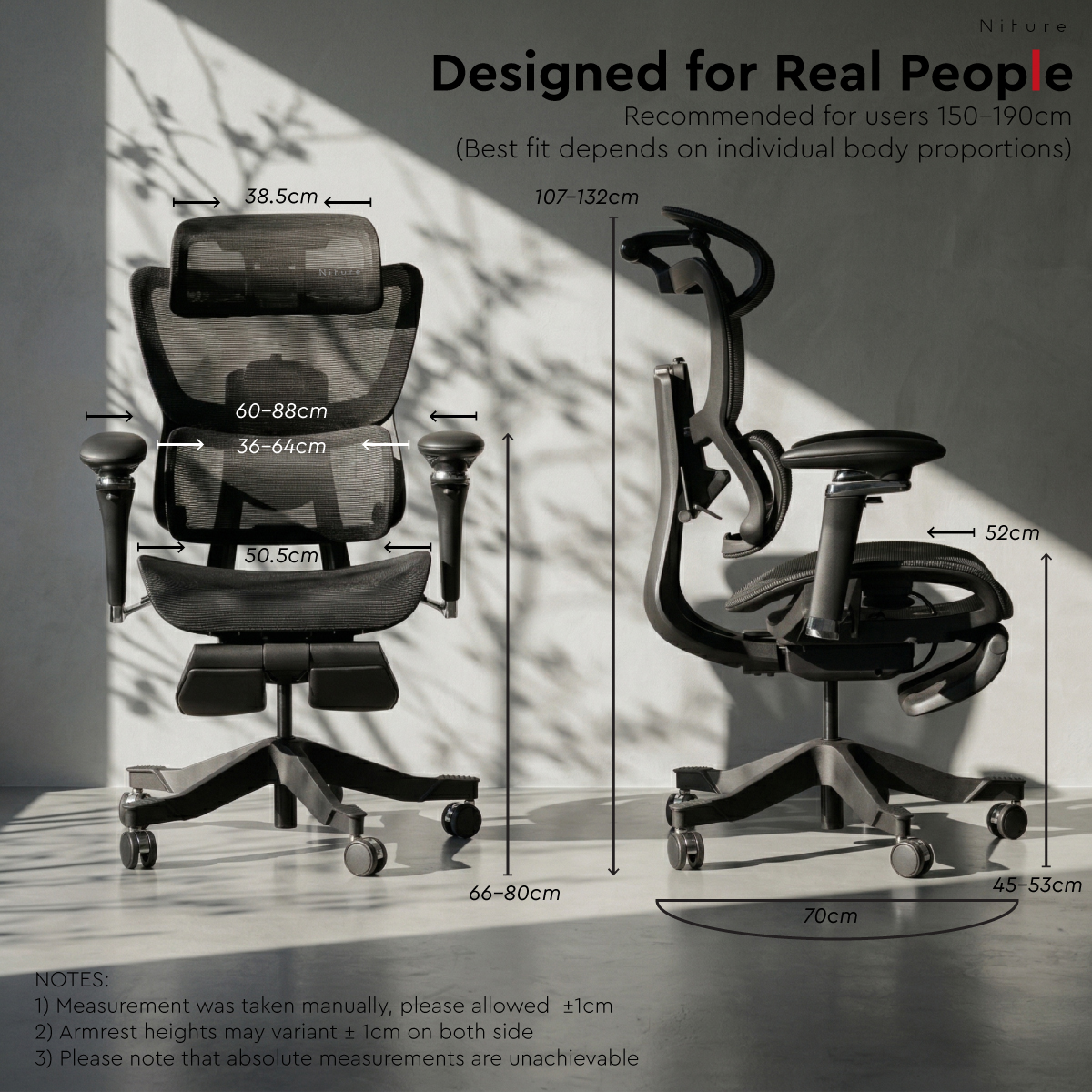
Start with minimum seat height and minimum usable seat depth. These help you compare the chair with your leg measurements. Seat width is a separate check; a wider seat does not necessarily provide more usable sitting depth.
On a smaller screen, scroll the table sideways to see every measurement.
| Model / source |
Seat height Floor to seat |
Usable seat depth Adjustable sitting depth |
Physical seat width |
|---|---|---|---|
| SINC | 45–53 cm Minimum: 45 cm | 44–50 cm Minimum: 44 cm | 50.5 cm |
| SINC 2 | 45–53 cm Minimum: 45 cm | 44–50 cm Minimum: 44 cm | 53 cm |
| SINC Lite | 44–56 cm Minimum: 44 cm | 44–50 cm Minimum: 44 cm | 51 cm |
| UltraSinc | 45–52 cm Minimum: 45 cm | 44–50 cm Minimum: 44 cm | 53 cm |
Seat height
Floor to sitting surface. The published minimum is a starting reference; check foot support while actually seated.
Usable seat depth
The sitting distance available to support your thighs at the selected adjustment. This differs from the overall physical depth of the seat pan.
Physical seat width
The published width of the seat. This does not tell you how closely the armrests can support your forearms.
The key limit: all four list a minimum usable depth of approximately 44 cm. SINC Lite lists a seat height 1 cm lower than the other three, but that alone does not establish a better overall fit. If the shortest depth still presses behind your knees while you sit fully back, the seat may remain too deep for you.
Sources checked: . SINC seat height and width are shown in its published dimension chart ; its product text lists the adjustable seat depth. The other measurements appear in the linked product specifications.
Measurement note: These are approximate published product specifications, not results from documented customer fittings. A common occupied-seat measurement method has not been established for this comparison. Confirm the actual chair and selected settings during fitting.
Measure Before Shortlisting
Take Two Measurements Before You Choose
Your height helps identify where to start. Your lower-leg height and seated thigh length give you more useful references for comparing seat height and usable seat depth.
Before you begin: Use a tape measure and ask someone to help. Sit on a firm, level seat with your feet fully supported, thighs roughly horizontal and knees bent around a right angle. Wear your usual working footwear, or measure barefoot if that is how you normally work. Record which you used.
Lower-Leg Height
Popliteal height · For checking seat height
- Keep your feet flat and your lower legs approximately vertical.
- Measure vertically from the floor to the underside of your thigh, just behind the knee. Measure to the underside, rather than the top of the kneecap.
- Record the distance in centimetres. If your feet are on a raised support, measure from its top surface instead of the floor and note that setup.
Use it: Compare this reference with the chair’s minimum seat height. If the seat sits higher, check whether suitable foot support and desk height allow a comfortable working setup.
Seated Thigh Length
Buttock-to-knee-crease length · For checking seat depth
- Sit upright with your buttocks gently against a vertical backboard or wall, keeping your feet supported.
- Ask your helper to measure horizontally from the rearmost point of your buttocks to the crease behind your knee.
- Keep the measurement straight and level, rather than following the curve of your thigh. Record it in centimetres.
Use it: Compare this length with usable seat depth. Allow clearance behind the knees; your full thigh-length measurement is not the seat-depth setting to copy.
Save these notes for your fitting:
Lower-leg height: ______ cm
·
Seated thigh length: ______ cm
Footwear: ______
·
Feet on floor or raised support: ______
Check the chair while seated. Home measurements help narrow your options. During fitting, confirm supported feet, backrest contact and comfortable clearance behind your knees together. Mesh compression and support position can change how the published dimensions feel.
Chair-fit reference: CCOHS ergonomic chair guidance recommends supported feet and thighs, backrest support and no pressure behind the knees.
Choose Within Your Budget
What Does the Extra Spending Add?
Once you have confirmed which chairs fit, compare what you would use every day. Spend more when the difference improves your support or adjustment experience. A higher price alone cannot tell you whether a chair suits your proportions.
RM1,650
Essential Smart-Glide™ Support
The lowest-priced option in this four-model shortlist includes Smart-Glide™, adjustable seat and back support, and a retractable footrest for reclined sitting.
Worth choosing when: It fits your legs and torso, and you are comfortable with its support feel. If those checks pass, there is no need to increase your budget simply to move up the range.
Choose the Support Feel You Prefer
Starting at RM200 more than SINC Lite, these models offer two support approaches with Wintex Mesh. SINC provides balanced, adaptive support. SINC 2 provides more defined lower-back contact and additional lumbar adjustment.
Worth the extra when: A side-by-side fitting shows that one supports you more comfortably or gives you adjustment you need. Both have the same listed price range; choose by fit and support preference. Check the selected footrest configuration before comparing totals.
RM2,499
More Control Over Back Support
At RM649 above the RM1,850 starting price of SINC or SINC 2, UltraSinc adds features such as a forward-tilting upper backrest and adjustable adaptive lumbar movement, alongside Premium Wintex Mesh.
Worth the extra when: You can feel a useful improvement from those controls during fitting. Confirm that its seat depth, foot support and headrest reach work for you before paying for the flagship features.
Budget for the complete working setup. If fitting shows you need an external footrest, allow for that separately. A chair’s retractable leg rest is mainly for reclined sitting. Confirm the selected chair options and any applicable delivery charge before ordering.
Budget below RM1,650? These four shortlisted models currently start at RM1,650. Ask Niture to check other options against your measurements before stretching your budget; a lower price alone does not establish a suitable short-user fit.
Prices checked: . Prices and available configurations may change. Use the linked product pages to confirm your selected model and options.
Know the Adjustment Limits
When the Chair Still Feels Too Large
A chair can have plenty of adjustments and still exceed your proportions. Check what is causing the mismatch before deciding whether a different setting, workstation change or another model is the better answer.
Your Feet Remain Unsupported
Try: Adjust seat height together with desk or keyboard height. If the working position requires a higher seat, test a stable external footrest that supports both feet.
Check the whole setup: Your feet should rest securely without uncomfortable pressure under your thighs, while your shoulders stay relaxed at the desk.
The Seat Still Reaches Your Knees
Try: Set the seat to its shortest usable depth, then sit fully against the backrest and check the space behind your knees.
Compare another model if: The edge still presses behind your knees, or you must sit forward and lose back support to avoid it.
Back or Neck Support Sits Too High
Try: Adjust the backrest and available lumbar settings, then reposition the headrest for your preferred sitting position.
Compare another model if: Lower-back contact remains misplaced, or the headrest keeps pushing your head forward despite adjustment.
Armrests Feel Too High or Wide
Try: Adjust armrest height, width and pad position with your shoulders relaxed. Check that you can move close enough to the keyboard and mouse.
Compare another model if: Useful arm support still requires raised shoulders, widely spread elbows or excessive reach toward the desk.
What an external footrest can help with: It bridges the gap between your feet and the floor at the selected working height. It does not shorten the seat or reposition the chair’s lumbar support. The retractable leg rest on a chair is mainly for reclined sitting; test upright working foot support separately.
A suitable setup should meet these needs together. If improving one contact point makes another uncomfortable, ask the fitter to reassess the setup and compare alternatives before buying.
Further guidance: choosing an ergonomic chair and adjusting a chair to your workstation from CCOHS.
Confirm Your Shortlist
Compare the Chairs After They Are Adjusted to You
Use your shortlist to begin the fitting. Compare each chair in the positions you actually use , then choose based on fit, support preference and the complete working setup.
Bring your notes: Lower-leg height, seated thigh length, desk height and your usual working footwear. A photo of your desk and keyboard setup can help explain what needs to work at home.
-
Set Up Each Chair Before Comparing
Start with two shortlisted models. Ask the consultant to adjust each around your legs, torso and arms. Compare the fitted settings rather than the position left by the previous visitor.
-
Try Your Normal Desk Tasks
Spend time typing, reaching for a mouse and sitting back. Check feet, knee clearance, back contact and relaxed shoulders together. Tell the consultant how your own desk differs from the showroom setup.
-
Check Movement and Recline
Try natural posture changes, a comfortable recline and the return to upright. Ask for help setting the resistance. On a SINC model, compare Smart-Glide™ movement with the backrest locked.
-
Keep a Note of What Worked
Record your preferred model, useful settings, any external footrest and remaining limitations. If neither chair fits comfortably, ask to compare another option before deciding.
Free Chair Fitting at Niture Puchong
All current Niture chair models are available to test. A typical fitting takes approximately 30 minutes and may take longer depending on your needs. Walk in during showroom operating hours; no appointment is required for a general fitting. An appointment may be needed if you request a particular consultant.
See Free Fitting Details →Short-User Buying Questions
Frequently Asked Questions
Quick answers to help you make the final choice.
What is the best Niture chair for someone around 145–158 cm tall?
Can a chair fit someone below its published height range?
Possibly. Published height guidance is a starting reference, and people of the same height can have different proportions. A recommendation below that range should be based on an individual fitting and the working setup. One successful customer example does not establish a minimum height for everyone.
Does needing an external footrest mean the chair does not fit?
No. An external footrest can be part of a suitable working setup, particularly when the seat needs to be raised to match a fixed desk. Check that both feet are supported comfortably. It will not correct excessive seat depth or misplaced back support.
Should I consider Hammock 1 or Hammock 2 if I am below 158 cm?
The Hammock Series has general height guidance of approximately 160–180 cm, so it is not the first shortlist in this guide. Someone below that range should test the complete fit in person before choosing it. A lower price and adjustable seat depth alone do not establish suitability.
What if I cannot visit the showroom before ordering?
Share your height, lower-leg height, seated thigh length, desk height and preferred sitting style with Niture before ordering. A photo of your current workstation can also help the discussion. Remote guidance can narrow the options, but it cannot confirm comfort in the same way as trying an adjusted chair.
Can Niture help if the chair feels different at my home desk?
Yes. Niture provides model-specific adjustment videos where available and further setup assistance. Share your chair model, the issue and relevant workstation photos or a short video. See Niture’s fitting and adjustment support for details.
Niture Puchong Showroom · Free Chair Fitting
Words Lie. Body Doesn’t.
Sit, adjust and compare before you decide.
If you are around 145–158 cm tall, bring your measurements and shortlist to Niture. Try the chairs with our team, check how the support meets your body and discuss what needs to work at your own desk.
- Free fitting
- Walk-ins welcome
- Typically around 30 minutes
Bandar 16 Sierra, Puchong
Monday–Sunday, 11:00 AM–5:00 PM.
Closed on public holidays.
No appointment is required for a general fitting. Requesting a particular consultant may require an appointment. Your fitting may take longer depending on your needs.