(20 customer reviews)

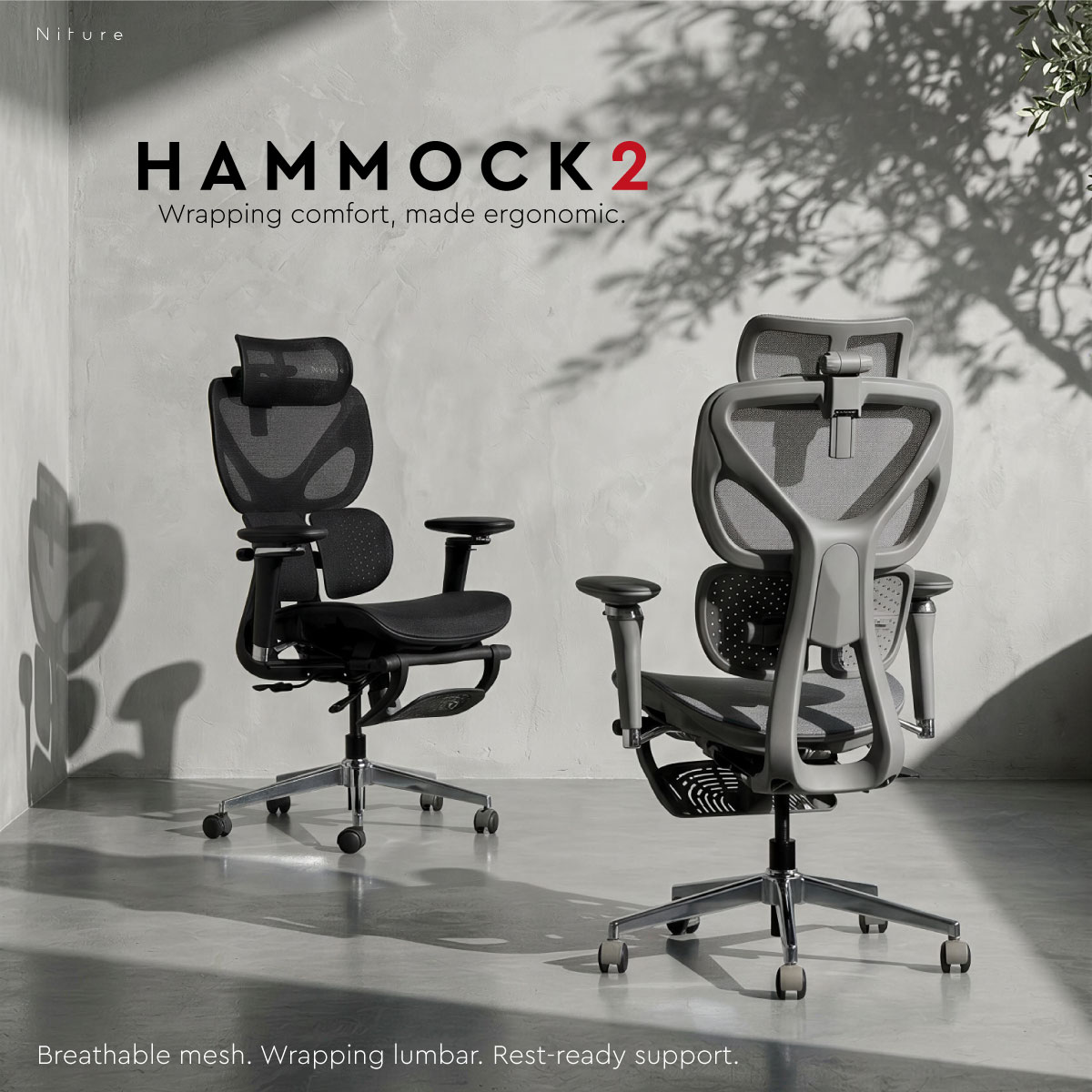
Hammock 2 Ergonomic Chair

Niture HAMMOCK Series

HAMMOCK 2

Wrapping Lumbar Support for Everyday Sitting

An accessible ergonomic chair designed for everyday work, study and home-office use.

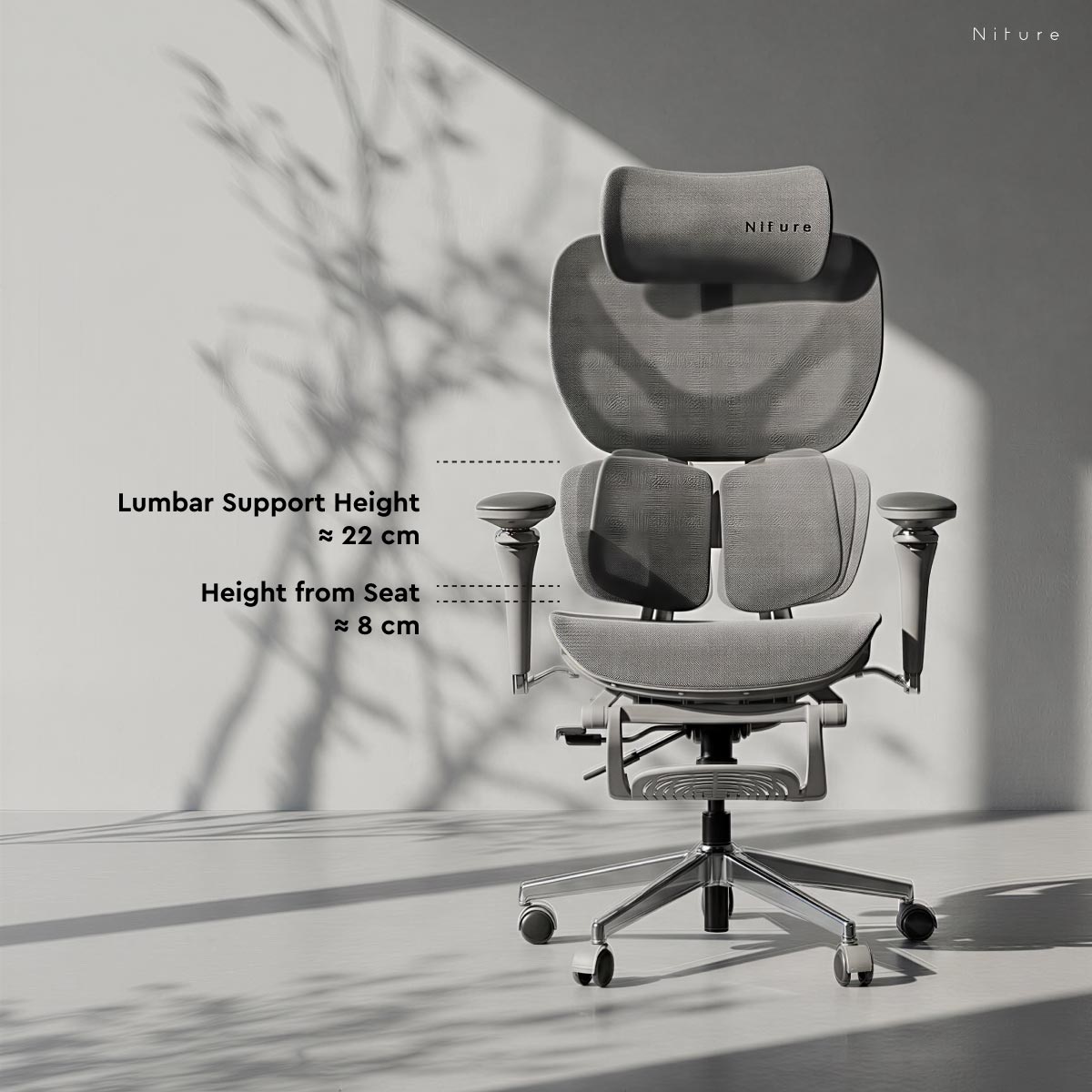
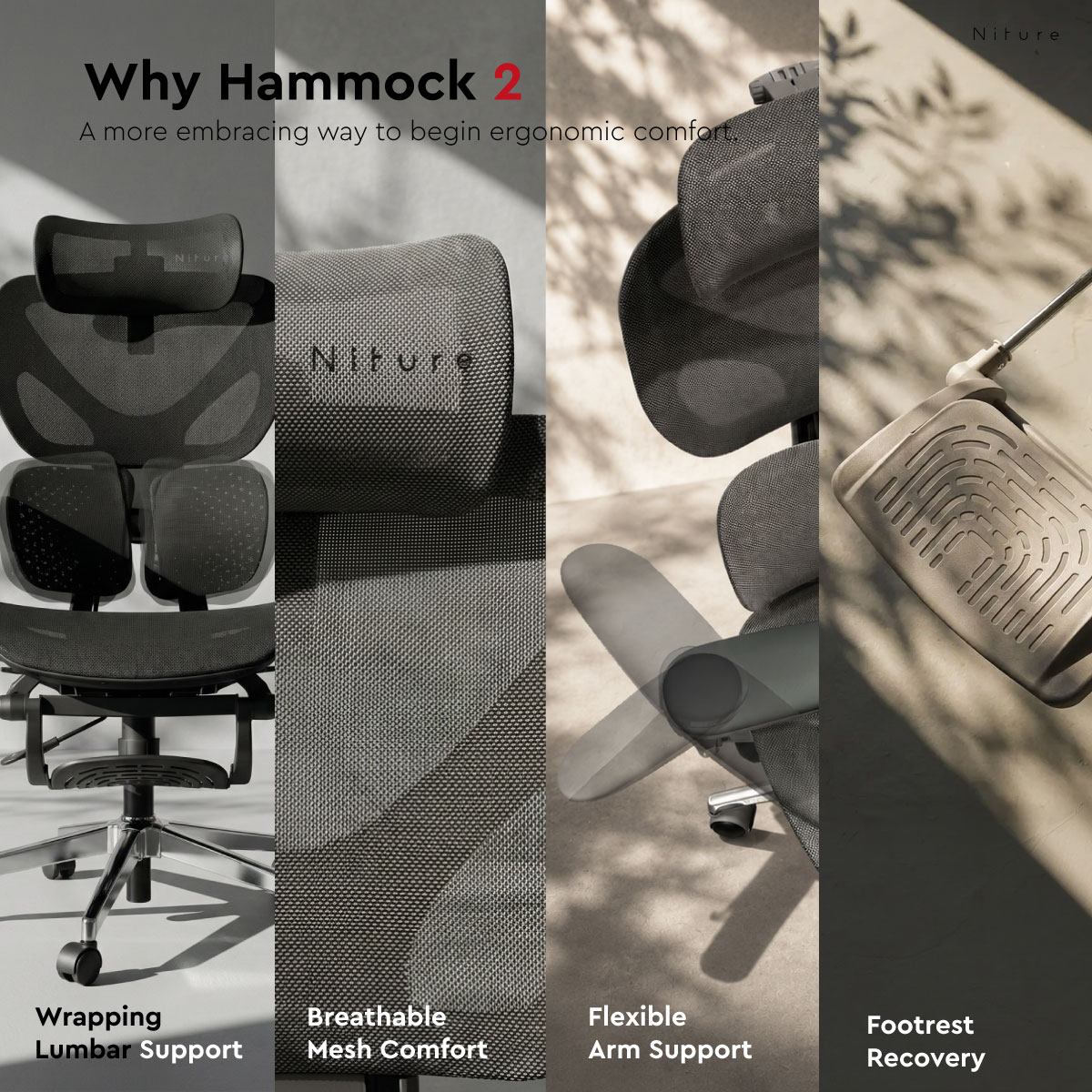
Hammock 2 is built around Twin Dynamic Lumbar Support — two flexible lumbar sections designed to create a more embracing contact around the lower back.

Combined with adjustable seat depth, 5D Dual-Axis armrests, a 4D neck-focused headrest and breathable mesh, Hammock 2 gives users practical ways to adjust the chair around their body proportions and sitting position.

Primary Support Twin Dynamic Lumbar Support
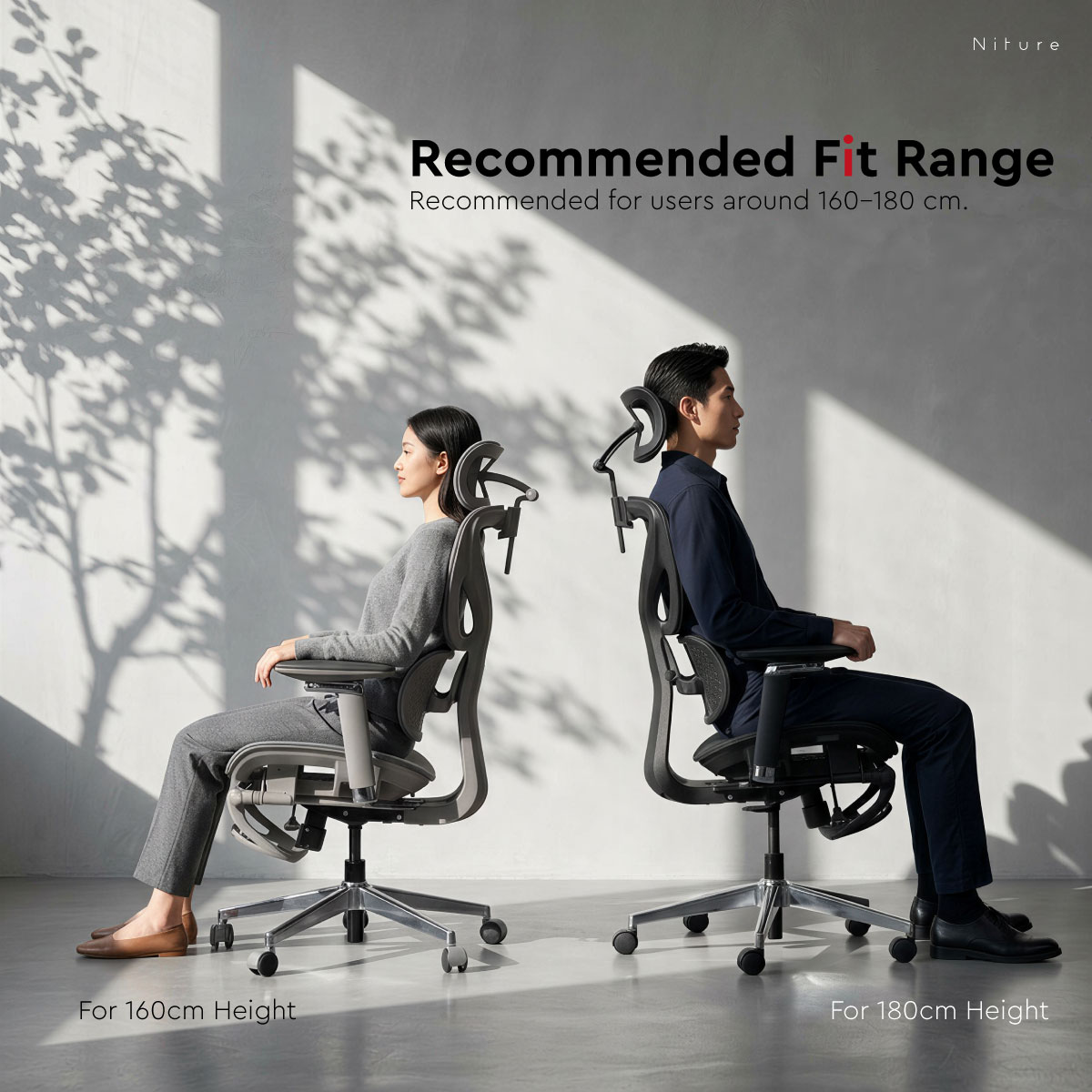
Recommended Fit Approx. 160–180 cm
Maximum Load 110 kg
Best For Work · Study · Home Office
Niture Hammock 2 ergonomic chair with Twin Dynamic Lumbar Support
Body Fit & Everyday Use

Who Is Hammock 2 Designed For?

Hammock 2 is designed for users who want practical ergonomic adjustment, breathable comfort and more noticeable lower-back support for everyday sitting.

Best Suited For

Everyday Work, Study and Home Office

Hammock 2 works best for users who want an ergonomic chair that can be adjusted around common working, studying and relaxed sitting positions.

  • Home-office and hybrid workers
  • Students and study-room users
  • Everyday office work
  • Casual gaming and browsing
  • Shared office and staff seating
  • Users who prefer noticeable lumbar contact
  • First-time ergonomic-chair buyers
Check Your Fit

Height Is Only the Starting Point

Hammock 2 is generally recommended for users around 160–180 cm, but height alone does not determine whether an ergonomic chair fits correctly.

  • Seat depth: your thighs should be supported without pressure behind the knees.
  • Lumbar position: the support should meet the natural curve of your lower back.
  • Headrest reach: the headrest should support the neck without pushing the head forward.
  • Armrest position: your elbows should be supported without lifting the shoulders.

Users near or outside the recommended height range should test the chair whenever possible, because torso length, thigh length and sitting proportions can vary significantly between people.

Recommended Fit Approx. 160–180 cm
Maximum Load 110 kg
Primary Support Twin Dynamic Lumbar Support
Best Use Everyday Sitting

A suitable chair setting should support your body without creating excessive pressure. The following sections explain how each Hammock 2 adjustment changes the way the chair fits and supports you.

Official Product Video

See Hammock 2 in Motion

Explore the Twin Dynamic Lumbar Support, 5D Dual-Axis armrests, sliding seat depth, synchronized recline, and integrated footrest through the official Hammock 2 product presentation.

Featured product Hammock 2 Ergonomic Chair
Hammock 2 Twin Dynamic Lumbar Support with two flexible lumbar sections
Twin Dynamic Lumbar Support

Wrapping Support That Can Be Fine-Tuned to Your Lower Back

Hammock 2 uses two flexible lumbar sections to create a more embracing contact around the lower back instead of relying on one flat support surface.

The two sections can respond independently as your body shifts, helping the support remain in contact during normal changes in sitting position.

01 · Support Shape

More Wrapping Contact

Two separate lumbar sections sit around both sides of the lower back to create a more embracing support feel.

02 · Flexible Response

Responds as You Move

Each lumbar section can respond independently as your body changes position during everyday sitting.

Adjustable Lumbar Contact

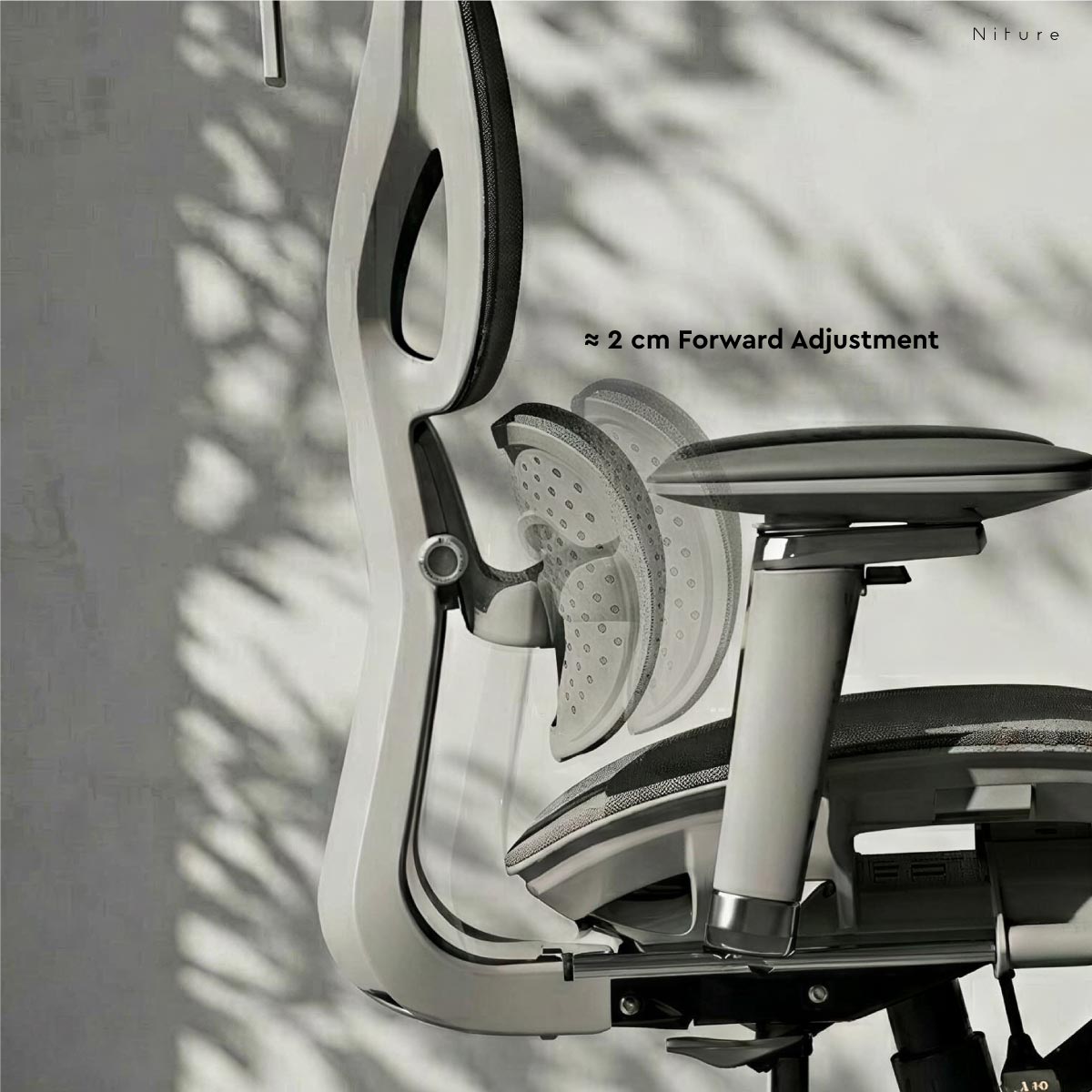
Adjust the Support Approximately 2 cm Forward

The lumbar contact angle can be adjusted to move the support approximately 2 cm forward, allowing you to change how closely the lumbar sections meet your lower back.

Moving the support forward creates more noticeable lumbar contact. Reducing the forward position produces a gentler support feel.

Gentler Contact Less Forward

Suitable when you prefer lighter lumbar contact or feel excessive pressure at a stronger setting.

More Noticeable Contact More Forward

Brings the lumbar sections closer to the lower back for a stronger and more noticeable support feel.

Hammock 2 adjustable lumbar contact angle moving approximately 2 centimetres forward
How to Adjust

Set the Lumbar Support Around Your Body

Start with a comfortable setting and adjust gradually. More forward pressure is not automatically better.

  1. 1
    Sit fully back in the chair.

    Allow your pelvis and lower back to settle naturally against the backrest before changing the lumbar setting.

  2. 2
    Adjust the lumbar contact angle.

    Move the support forward gradually if you want stronger lower-back contact. The adjustment range provides approximately 2 cm of forward movement.

  3. 3
    Check where the support meets your back.

    The lumbar sections should meet the natural curve of your lower back rather than pressing too high, too low, or only against one concentrated area.

  4. 4
    Fine-tune by feel.

    Reduce the forward setting if the support feels too aggressive. Increase it slightly if there is still a noticeable gap between your lower back and the lumbar support.

The goal is contact — not maximum pressure.

A suitable lumbar setting should comfortably meet the natural lower-back curve while allowing you to sit fully against the chair. The strongest setting is not necessarily the most suitable setting.

Hammock 2 5D Dual-Axis armrests with height, depth, width, rotation and pivot adjustment
5D Dual-Axis Armrests

Position Your Arms Around the Way You Work

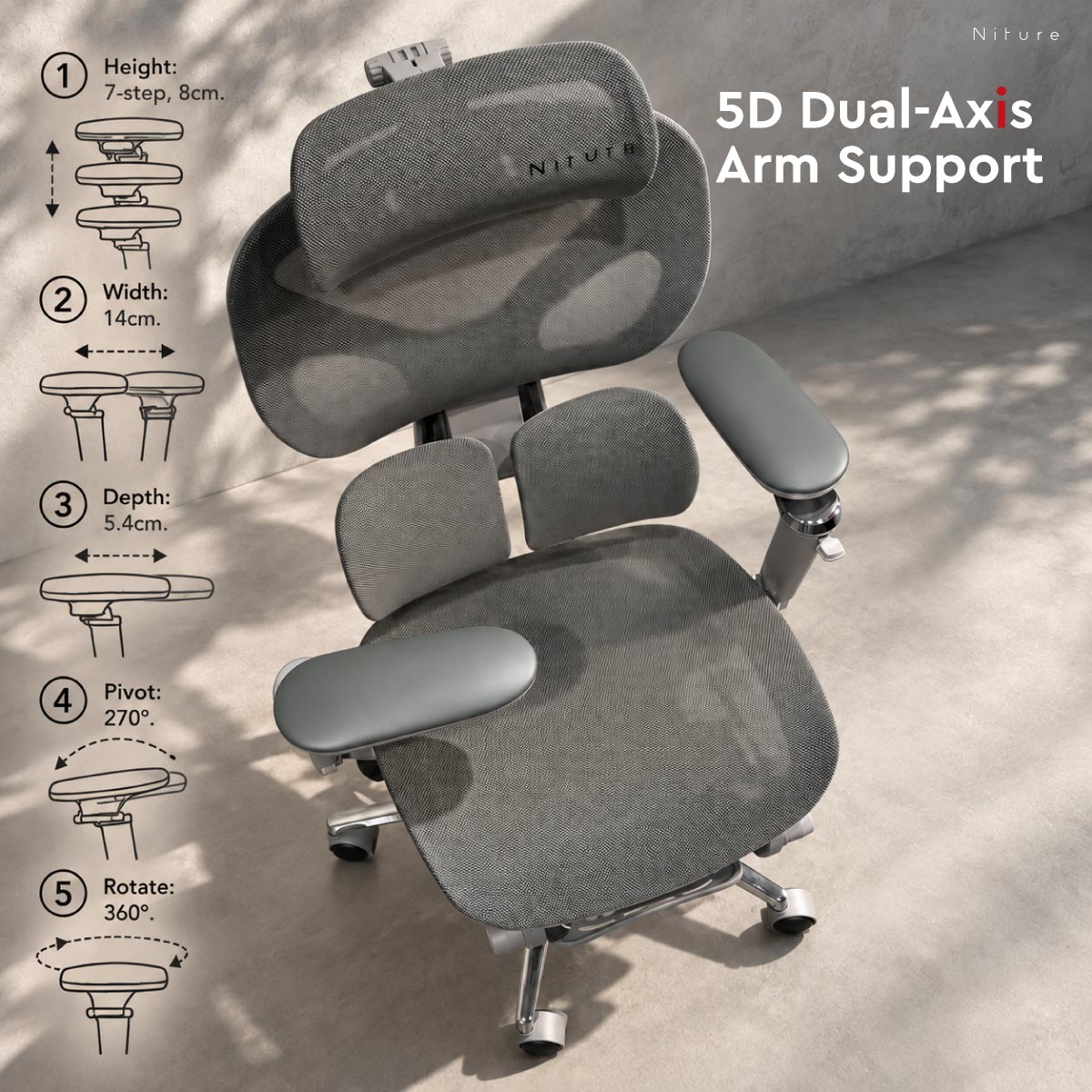
Hammock 2 uses a 5D Dual-Axis armrest system designed to support different arm positions during typing, browsing, gaming, mobile-device use and relaxed sitting.

Unlike a conventional armrest that relies mainly on linear sliding, Hammock 2 uses two articulated rotational axes. Turning these two joints allows the armrest to move through a much wider range of forward and rearward positions while the arm pad can also be rotated and pivoted around different activities.

Height

8 Steps · 9 cm

Raise or lower the armrests to support your elbows while keeping the shoulders in a relaxed position.

Dual-Axis Fore–Aft Reach

Up to Approx. 54 cm

The armrest does not slide forward and backward. Two articulated rotational axes allow the armrest to be turned through successive positions, creating a wide front-to-back support range of up to approximately 54 cm.

Width

Up to 14 cm

Adjust the armrest position inward or outward to better match different shoulder widths and arm positions.

Pad Rotation

360°

Rotate the arm pad through a full circle to support different forearm directions and working positions.

Pad Pivot

Up to 270°

Pivot the support through a wide angular range for typing, device use, wider sitting positions or relaxed support.

How to Adjust

Start with Your Shoulders, Then Fine-Tune the Arm Pads

  1. 1
    Set the armrest height first.

    Adjust through the 8 height positions until your elbows can rest on the pads without lifting your shoulders or forcing your arms downward.

  2. 2
    Rotate the Dual-Axis structure to set the fore–aft reach.

    Turn the articulated armrest through its two rotational axes to bring the support farther forward for desk work or farther back toward the body for relaxed and reclined positions.

  3. 3
    Match the width to your shoulders.

    Move the armrests inward or outward so your upper arms can remain close to their natural resting position rather than being pushed too far apart.

  4. 4
    Rotate and pivot the pads.

    Fine-tune the 360° pad rotation and up to 270° pivot until the pads follow the direction of your forearms comfortably.

  5. 5
    Recheck the setting when your posture changes.

    Your ideal armrest position for upright typing may be different from the position you prefer while reclining, browsing or using a mobile device.

Focused Work Closer to the Desk

Position the armrests so the elbows and forearms remain supported while the shoulders stay relaxed during keyboard and mouse use.

Relaxed Sitting Follow Your Reclined Position

Use the wider Dual-Axis range, rotation and pivot to bring the arm support closer to your body as your sitting position changes.

Adjust the armrests to support your arms — not to raise your shoulders.

A suitable armrest position should allow the shoulders to remain relaxed while providing comfortable support beneath the elbows and forearms. Re-adjust the armrests whenever your working or reclined position changes significantly.

Body-Fit Adjustments

Adjust Hammock 2 Around Your Body Proportions

Seat depth, headrest position and seat height affect how naturally the chair fits your legs, neck, shoulders and working posture. Hammock 2 provides practical adjustment ranges for everyday sitting.

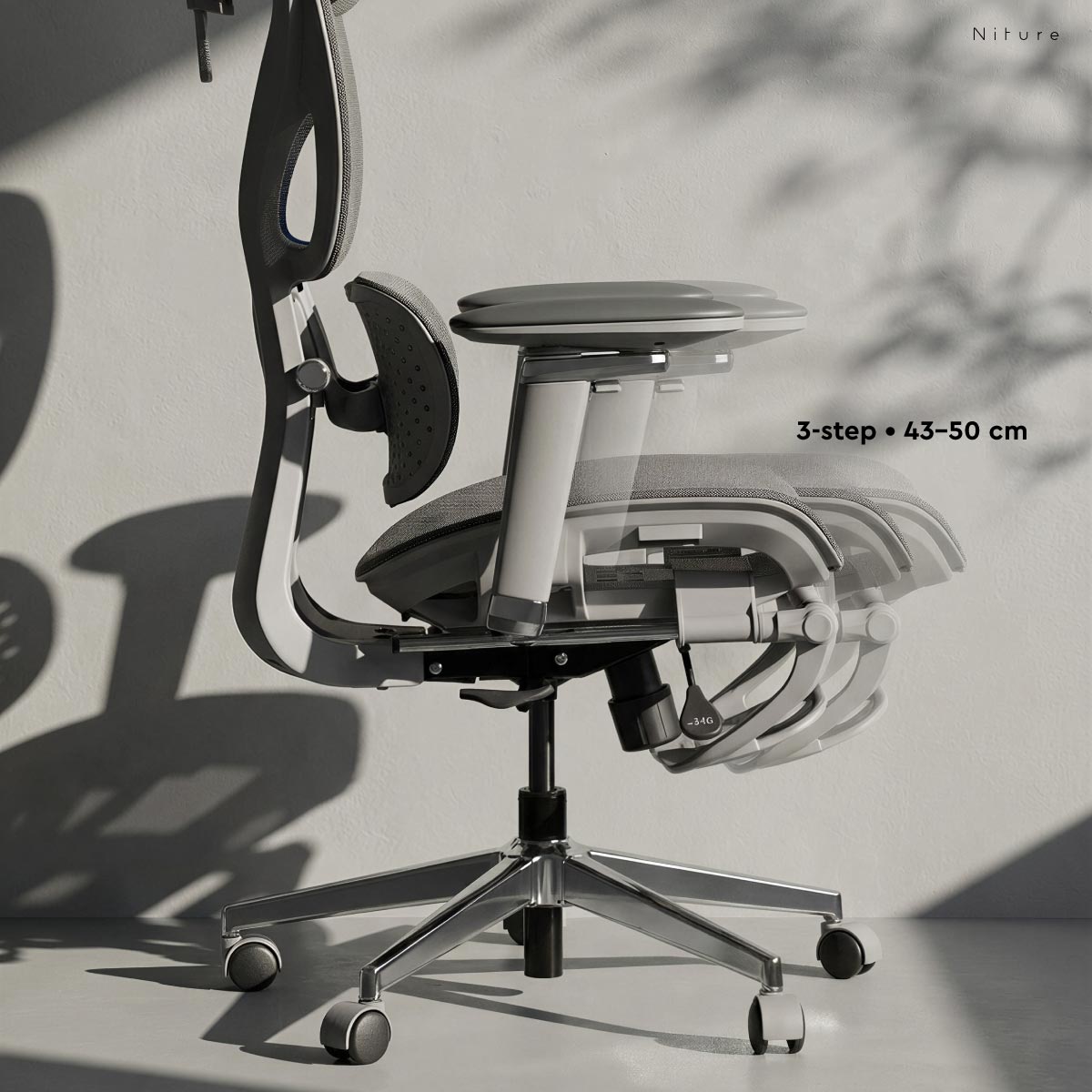
3-Step Seat Depth Adjustment

Support Different Thigh Lengths

The seat depth adjusts through 3 positions from approximately 44–50 cm, allowing the seat to better match different leg and thigh lengths.

Moving the seat forward increases thigh support for users with longer legs. Moving it backward creates more clearance behind the knees for users with shorter thigh lengths.

Adjustment 3 Steps
Seat Depth Range Approx. 44–50 cm
Total Range Approx. 6 cm
How to Set Your Seat Depth
  1. 1
    Sit fully back against the lumbar support.

    Settle your pelvis against the backrest before judging whether the seat is too long or too short.

  2. 2
    Slide the seat forward or backward.

    Choose one of the three positions until most of your thighs are supported comfortably.

  3. 3
    Check the space behind your knees.

    The seat should support the thighs without pressing directly into the back of the knees.

More seat depth is not always better.

The goal is to support the thighs while maintaining comfortable clearance behind the knees and allowing you to sit fully back against the chair.

Hammock 2 three-step seat depth adjustment from approximately 44 to 50 centimetres
Upgraded 4D Headrest

Position the Headrest Around Your Neck

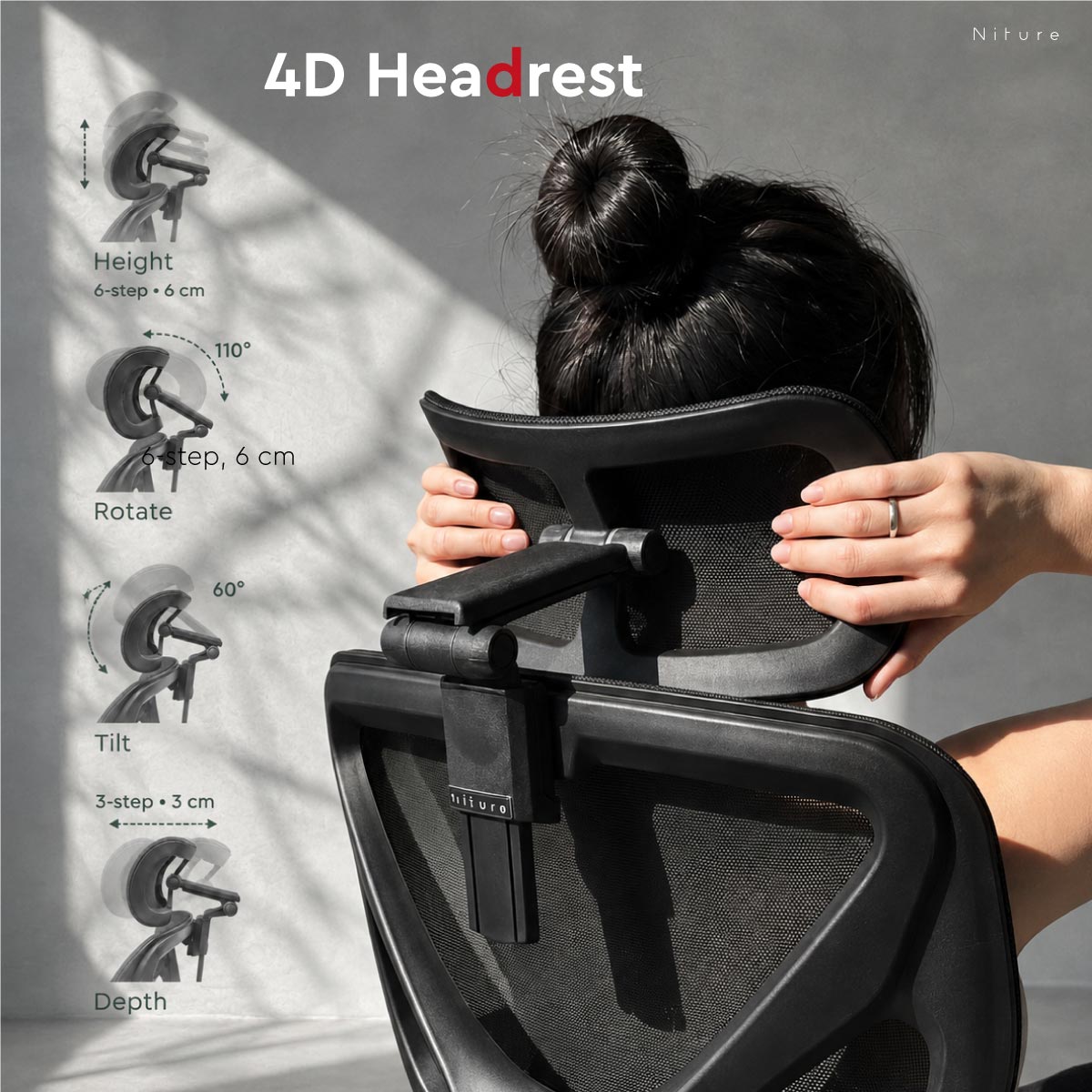
The upgraded 4D headrest provides adjustment in height, depth, tilt and rotation, allowing users to position the support more precisely around their neck and head.

Height

6 Steps · 6 cm

Raise or lower the headrest to align the support with your neck height and upper-body proportions.

Depth

3 Steps · 3 cm

Move the headrest forward or backward to change how closely it meets the neck and head.

Tilt

Up to 60°

Adjust the support surface angle to follow different neck and head positions.

Rotation

Up to 110°

Rotate the headrest through a wider range for upright, reclined and relaxed sitting positions.

How to Set Your Headrest
  1. 1
    Start with the height.

    Raise or lower the headrest until the support reaches your neck rather than only contacting the back of your head.

  2. 2
    Adjust the depth.

    Bring the headrest closer if there is a gap, or move it backward if it pushes your head forward.

  3. 3
    Fine-tune the tilt and rotation.

    Change the support angle until it follows your preferred upright or reclined neck position comfortably.

The headrest should support your neck — not push your head forward.

Correct positioning depends on torso length, neck position and recline angle, which is why users of the same height may require different headrest settings.

Hammock 2 4D headrest with six-step height, three-step depth, 60 degree tilt and 110 degree rotation adjustment
Seat Height Adjustment

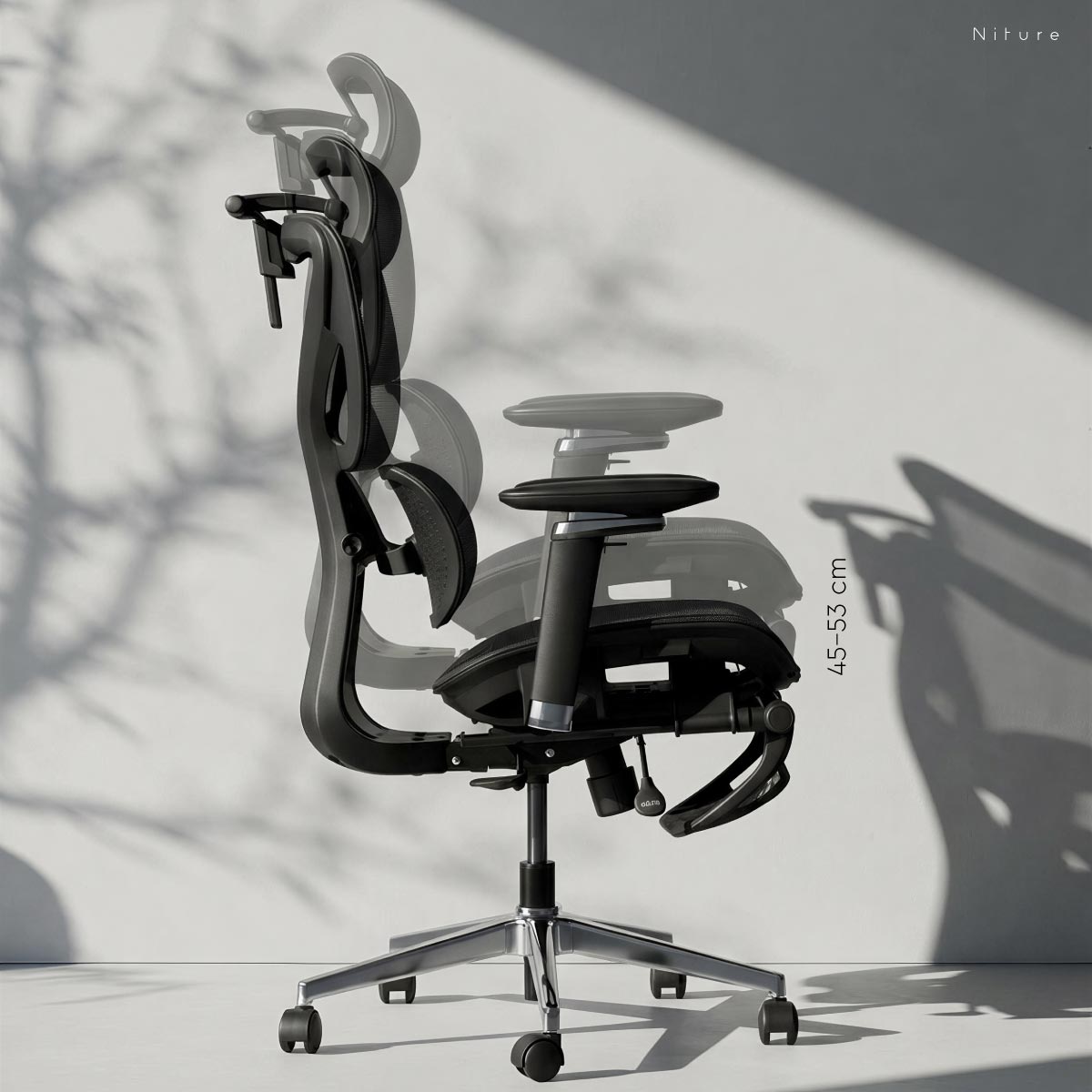
Set Your Sitting Height from Approximately 45–53 cm

Hammock 2 provides an approximately 45–53 cm seat-height range to accommodate different lower-leg lengths and desk heights.

A suitable seat height allows your feet to rest naturally on the floor while keeping the knees and hips in a comfortable position.

Lowest Approx. 45 cm
Highest Approx. 53 cm
Adjustment Range Approx. 8 cm
How to Set Your Seat Height
  1. 1
    Place both feet comfortably on the floor.

    Avoid setting the chair so high that your feet lose stable floor contact.

  2. 2
    Check your knees and thighs.

    Your thighs should feel naturally supported without excessive pressure underneath them.

  3. 3
    Match the chair to your desk.

    After setting the lower body correctly, adjust the desk height or armrests so your shoulders can remain relaxed while working.

Hammock 2 ergonomic chair seat height adjustable from approximately 45 to 53 centimetres
Breathable Mesh Comfort

Airflow for Everyday Sitting

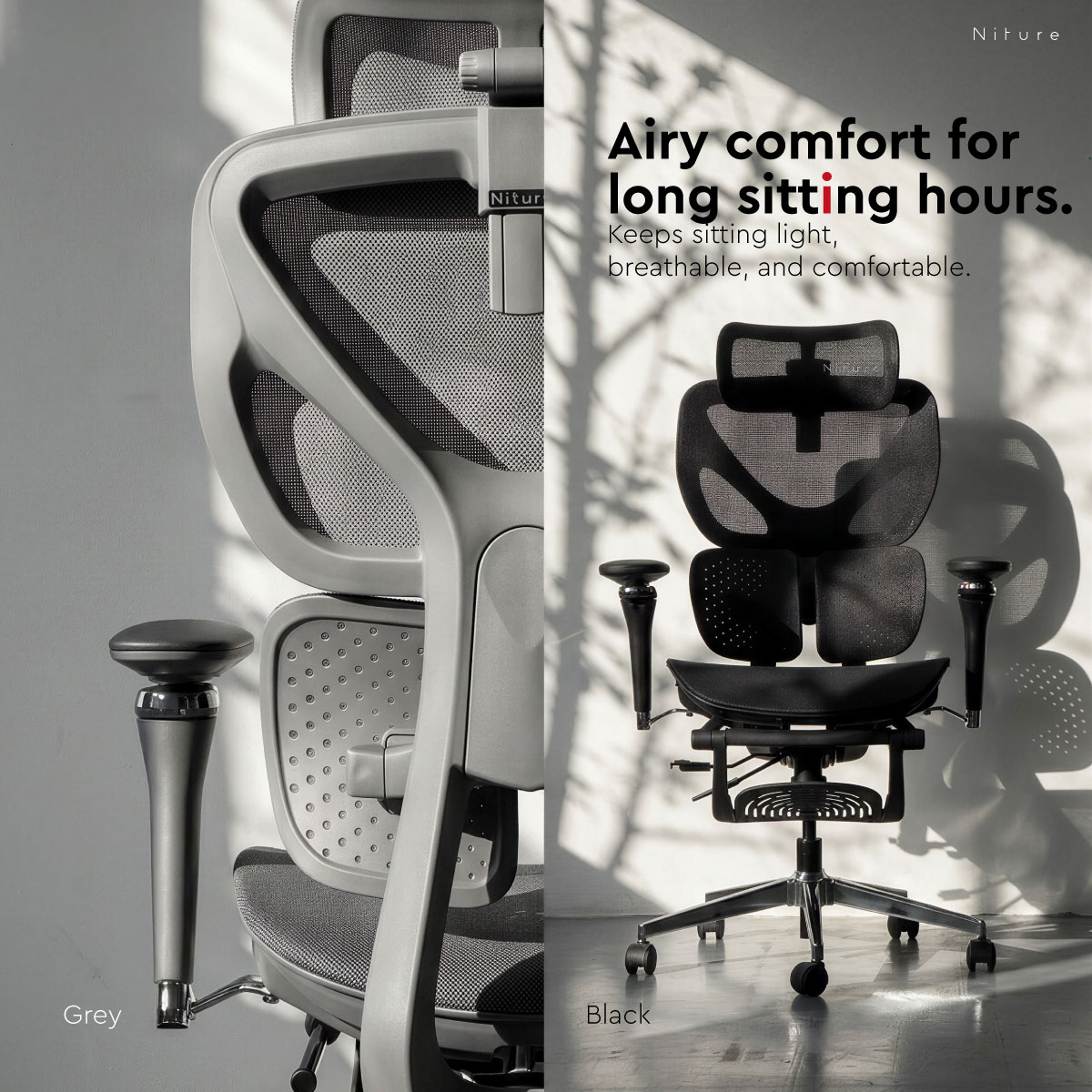
The mesh seat and backrest allow airflow around the body, helping reduce heat buildup during longer desk sessions and in warmer working environments.

Adjust the chair to your body — not your body to the chair.

Height is only a starting point. Seat depth, lower-leg length, torso length, neck position and desk height all influence how an ergonomic chair should be adjusted.

Recline & Recovery

Move Between Focused Work and Relaxed Sitting

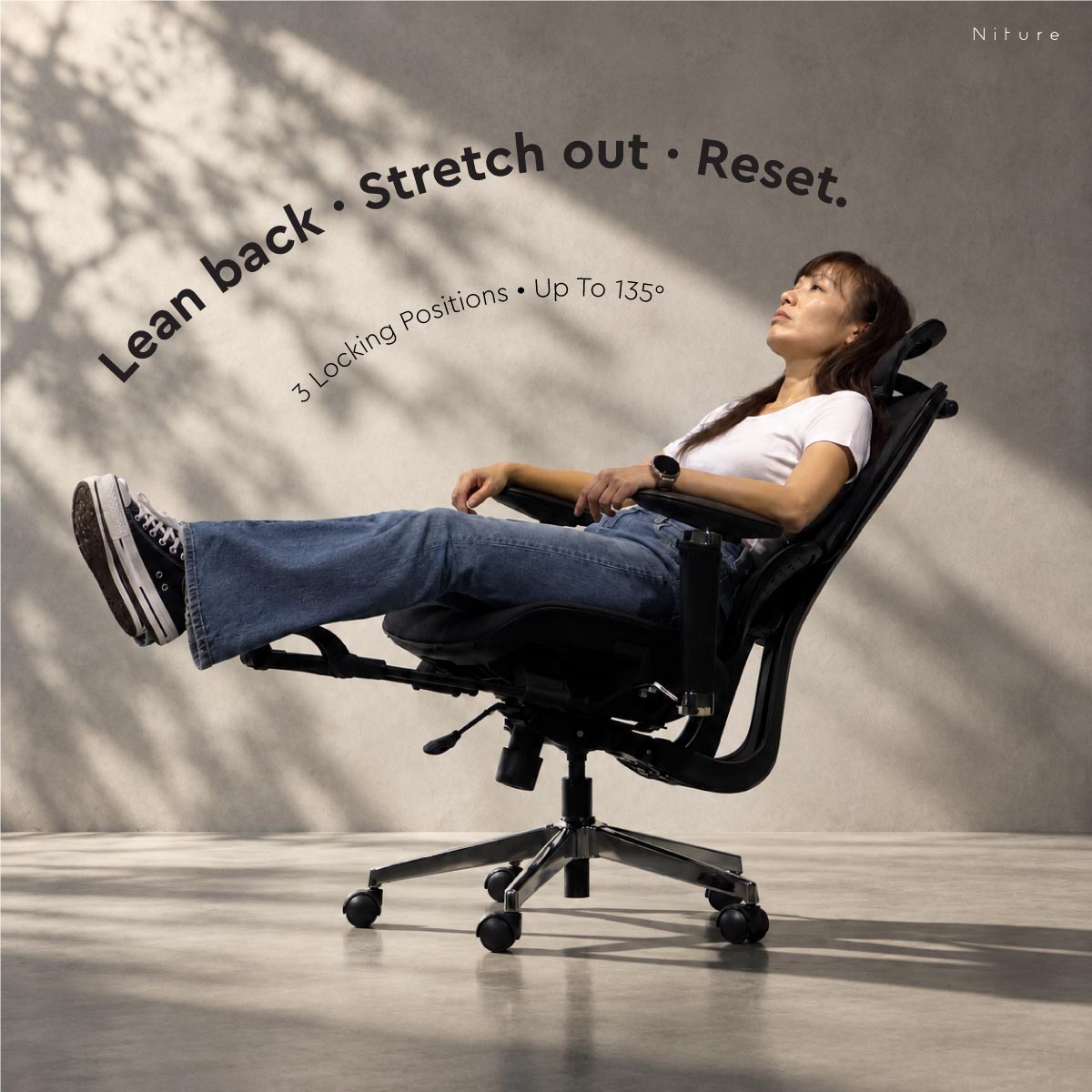
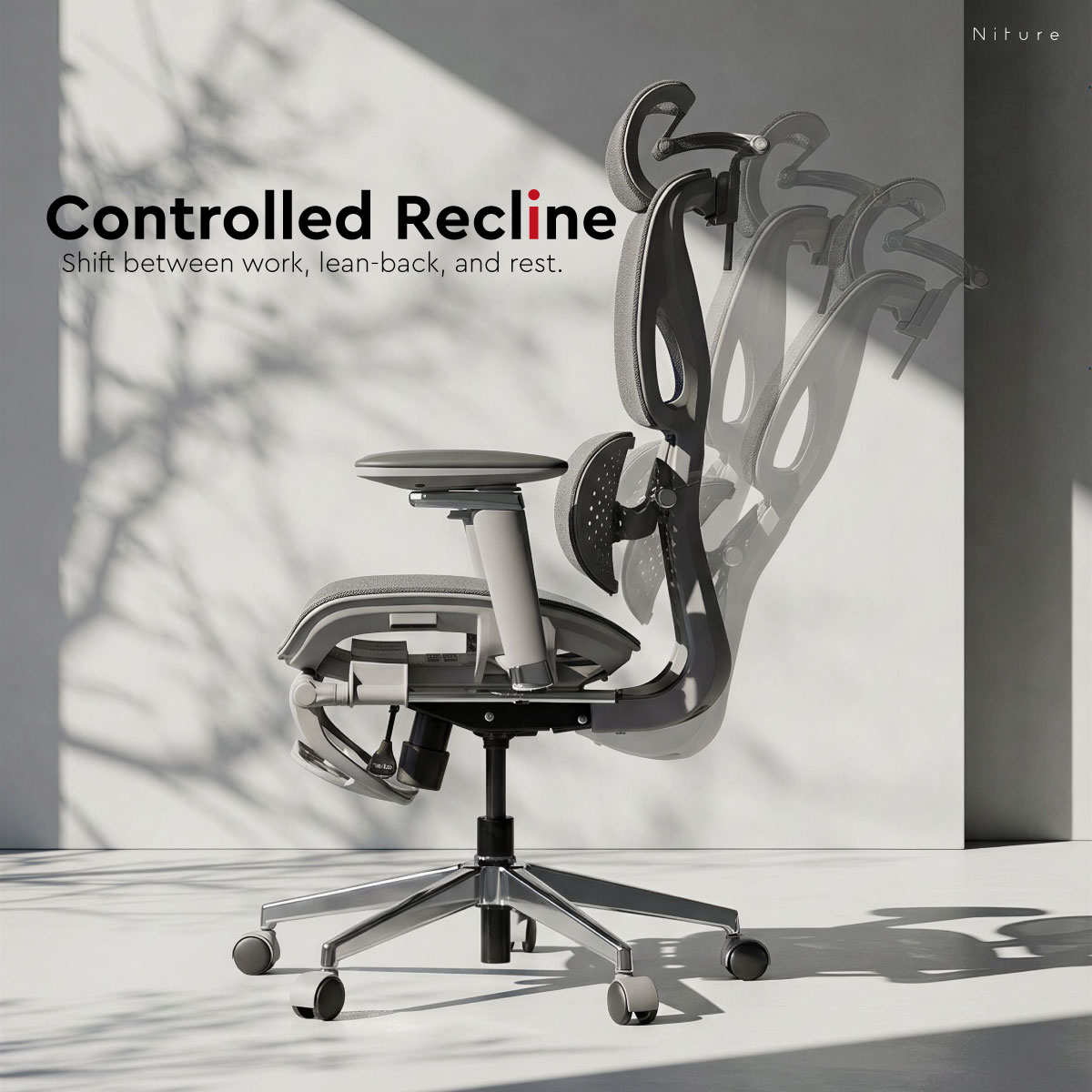
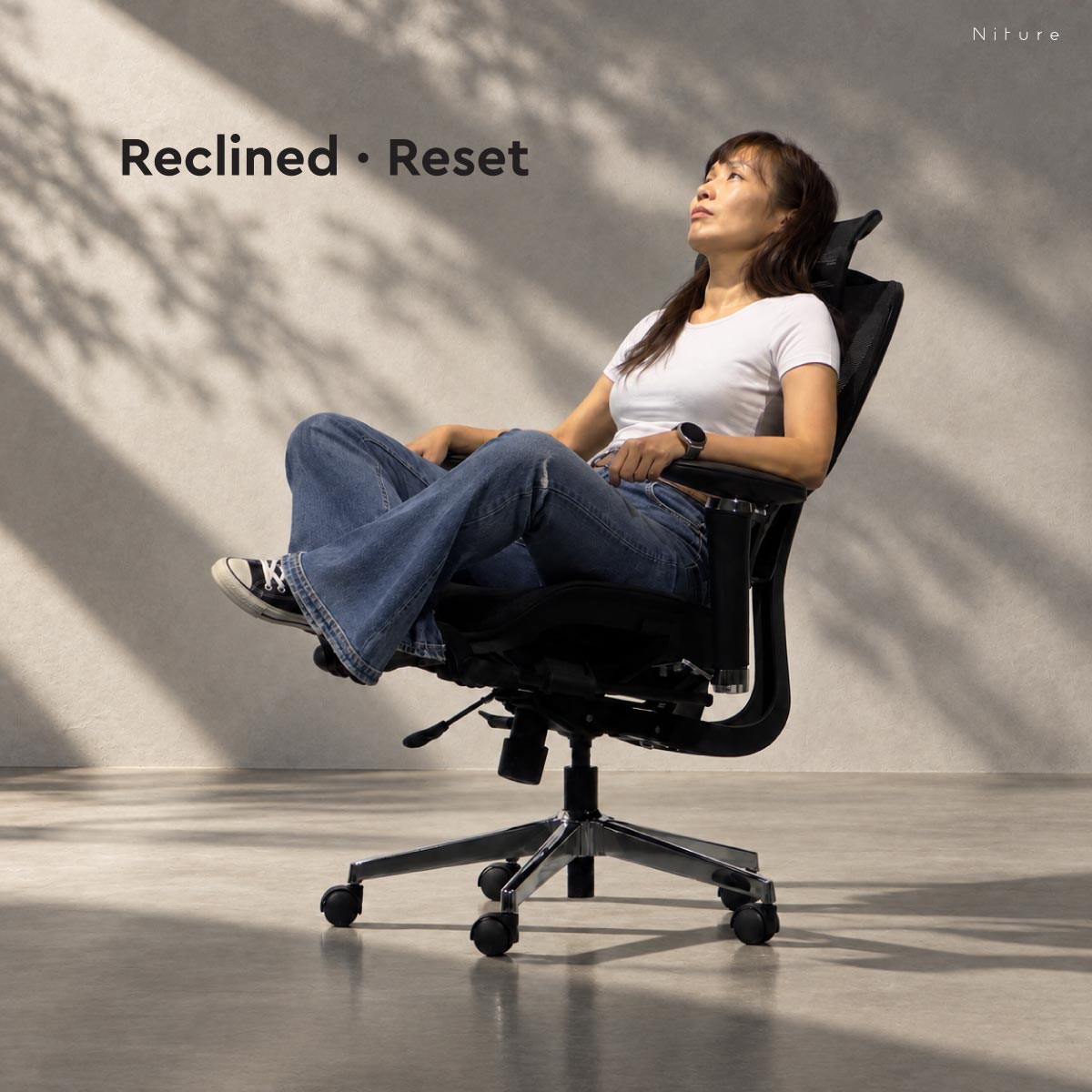
Hammock 2 uses a synchronized recline mechanism with 3 locking positions and a maximum recline angle of approximately 135°, allowing you to move from upright work into more relaxed sitting.

The integrated footrest can be extended when you want to stretch your legs during a short break, then stored beneath the seat when returning to normal desk work.

Recline

3 Locking Positions · Up to 135°

Choose a more upright position for focused work or recline progressively up to approximately 135° for reading, browsing, viewing or short recovery periods.

Footrest

Retractable Leg Support

Extend the footrest during relaxed sitting to support the lower legs, then retract it fully beneath the seat when returning to desk work.

How to Use the Recline

Adjust Your Recline Around the Activity

  1. 1
    Start from your normal working position.

    Sit fully back against the lumbar support and make sure your seat height and seat depth are already comfortable.

  2. 2
    Unlock the recline and lean back naturally.

    Allow the synchronized mechanism to move with your body rather than forcing your upper body backward.

  3. 3
    Choose one of the 3 locking positions.

    Select a position that matches your activity. Hammock 2 can recline up to approximately 135°, giving you a wider range between focused desk work and relaxed sitting.

  4. 4
    Recheck your headrest and armrests.

    Reclining changes your upper-body position, so small headrest and armrest adjustments may help maintain comfortable support.

Using the Footrest

Extend It for Short Recovery Periods

Pull the footrest out when reclining and rest your lower legs comfortably on the support. Retract it completely before returning to your normal upright working position.

  • Short breaks between work sessions
  • Relaxed reading or browsing
  • Casual gaming or content viewing
  • Stretching the legs after prolonged sitting
Reclining changes your posture — it does not replace movement.

Changing sitting positions can reduce the time spent in one fixed posture, but regular standing, walking and movement breaks should still be part of longer sitting sessions.

Hammock 2 ergonomic chair with three recline locking positions, up to 135 degree recline and retractable footrest
Choose by Support Style

Where Hammock 2 Fits in the Niture Ergonomic Chair Range

Different Niture chairs are designed around different support priorities. Hammock 2 focuses on accessible everyday ergonomics, wrapping lumbar contact and practical body-fit adjustment.

HAMMOCK Series

Hammock 1

A simpler entry point into ergonomic seating for users who want essential everyday adjustment and support.

  • Everyday ergonomic sitting
  • Simpler support system
  • Essential adjustment
  • Accessible starting point
SINC Series

Movement-Based Ergonomic Support

The SINC Series is designed for users who place greater emphasis on support that responds as posture changes during more demanding or prolonged sitting.

  • Smart-Glide™ support technology
  • Closer support during posture changes
  • More movement-oriented ergonomics
  • Designed for more demanding sitting use
Choose Hammock 2 if you prioritise
  • A more embracing lower-back support feel
  • Practical adjustment for different body proportions
  • Breathable mesh for everyday sitting
  • Adjustable seat depth, headrest and arm support
  • Recline and footrest for relaxed sitting
  • Accessible everyday ergonomic comfort
Consider the SINC Series if you prioritise
  • More advanced support during movement
  • Frequent changes between sitting positions
  • More posture-following back support
  • More demanding professional sitting
The higher-spec chair is not automatically the better-fitting chair.

Choose based on your body proportions, preferred support feel, sitting habits and adjustment needs. Whenever possible, compare different models through an in-person chair fitting.

Technical Specifications

Hammock 2 Adjustment Range & Product Specifications

Hammock 2 combines practical body-fit adjustment with Twin Dynamic Lumbar Support, a 5D Dual-Axis armrest system, 4D headrest, adjustable seat depth and synchronized recline.

Adjustment Range

Body-Fit Adjustments at a Glance

Adjustment Range / Positions Purpose
Twin Dynamic Lumbar Support Approx. 2 cm forward adjustment Changes how closely the lumbar support meets the natural curve of the lower back.
Seat Width Approx. 51 cm Physical width of the seat surface, providing lateral sitting space for different body proportions.
Usable Seat Depth 3 steps · Approx. 44–50 cm Measured from the lumbar support contact point to the front edge of the seat. Adjusts the effective thigh-support depth for different leg lengths.
Physical Seat Depth Approx. 50 cm Overall physical depth of the seat surface. This is different from usable seat depth because the lumbar support position affects the effective sitting area.
Seat Height Approx. 45–53 cm Helps accommodate different lower-leg lengths and working-height requirements.
Headrest Height 6 steps · Approx. 6 cm Positions the headrest around different neck and upper-body proportions.
Headrest Depth 3 steps · Approx. 3 cm Moves the headrest forward or backward to adjust neck and head contact.
Headrest Tilt Up to 60° Adjusts the support-surface angle around different neck and head positions.
Headrest Rotation Up to 110° Provides a wider positioning range for upright and reclined sitting.
Armrest Height 8 steps · Approx. 9 cm Helps support the elbows while allowing the shoulders to remain relaxed.
Dual-Axis Fore–Aft Reach Up to approx. 54 cm front-to-back positioning range Two articulated rotational axes reposition the armrest forward or rearward without using a linear sliding mechanism.
Armrest Width Up to approx. 14 cm Allows the armrests to better accommodate different shoulder widths and arm positions.
Arm Pad Rotation 360° Rotates the arm pad around different forearm directions and working positions.
Arm Pad Pivot Up to 270° Provides a wider angular range for typing, device use and relaxed arm support.
Recline 3 locking positions · Up to approx. 135° Supports transitions between focused work and more relaxed sitting positions.
Product Details

General Specifications

Product Niture Hammock 2 Ergonomic Chair
Product Series Niture HAMMOCK Series
Product Positioning Accessible everyday ergonomic chair with wrapping lumbar support and practical body-fit adjustment
Primary Support System Twin Dynamic Lumbar Support
Headrest 4D adjustable neck-focused headrest
Armrests 5D Dual-Axis adjustable armrests
Seat Breathable mesh seat with 3-step sliding seat-depth adjustment
Backrest Breathable mesh backrest with Twin Dynamic Lumbar Support
Recline Mechanism Synchronized recline with 3 locking positions and maximum recline of approximately 135°
Footrest Integrated retractable footrest
Recommended User Height Approximately 160–180 cm
Maximum Load 110 kg
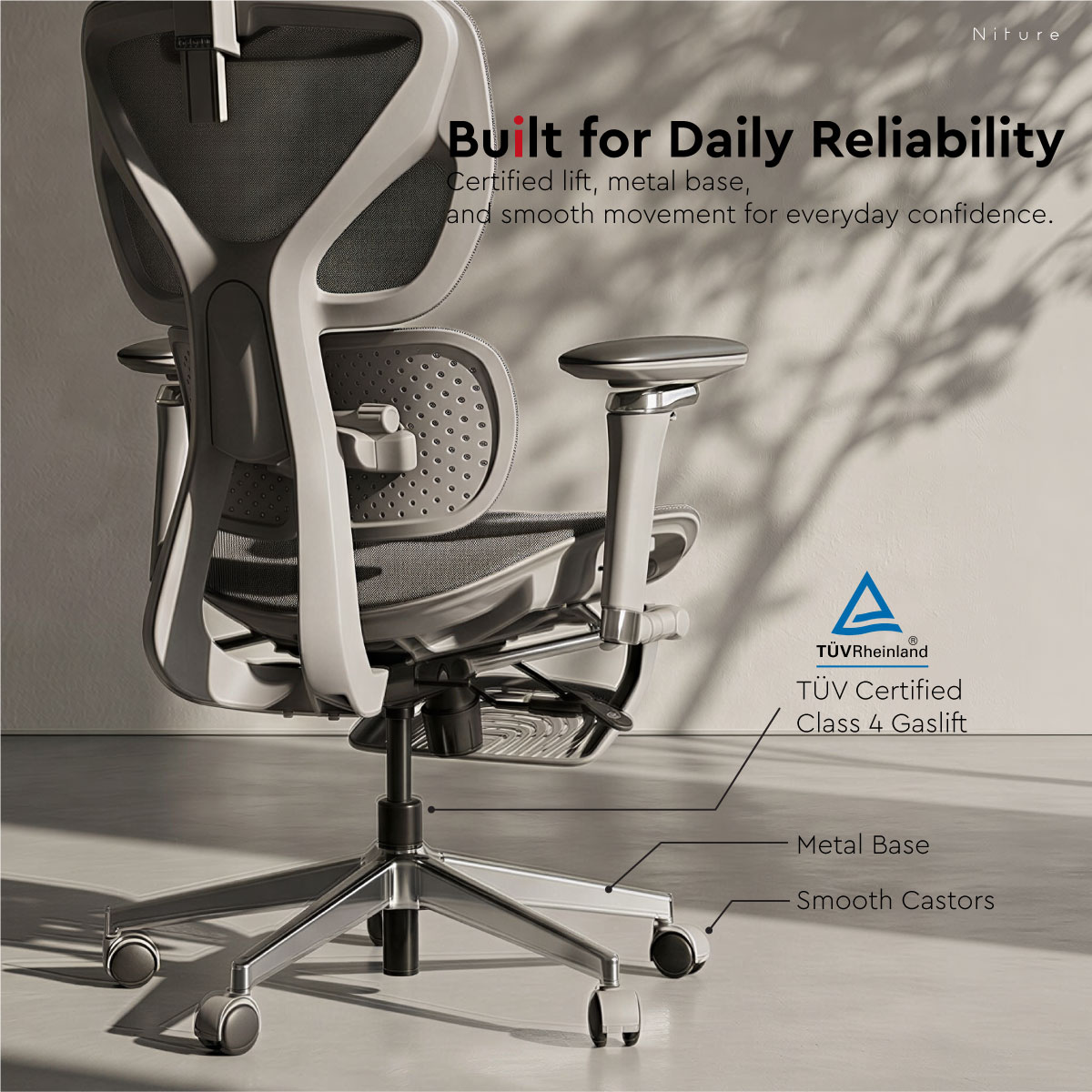
Gas Lift Class 4 gas lift
Base Chrome-finished metal base
Castors 50 mm twin-wheel castors
Warranty 3 years
Showroom Trial Available at the Niture Puchong showroom
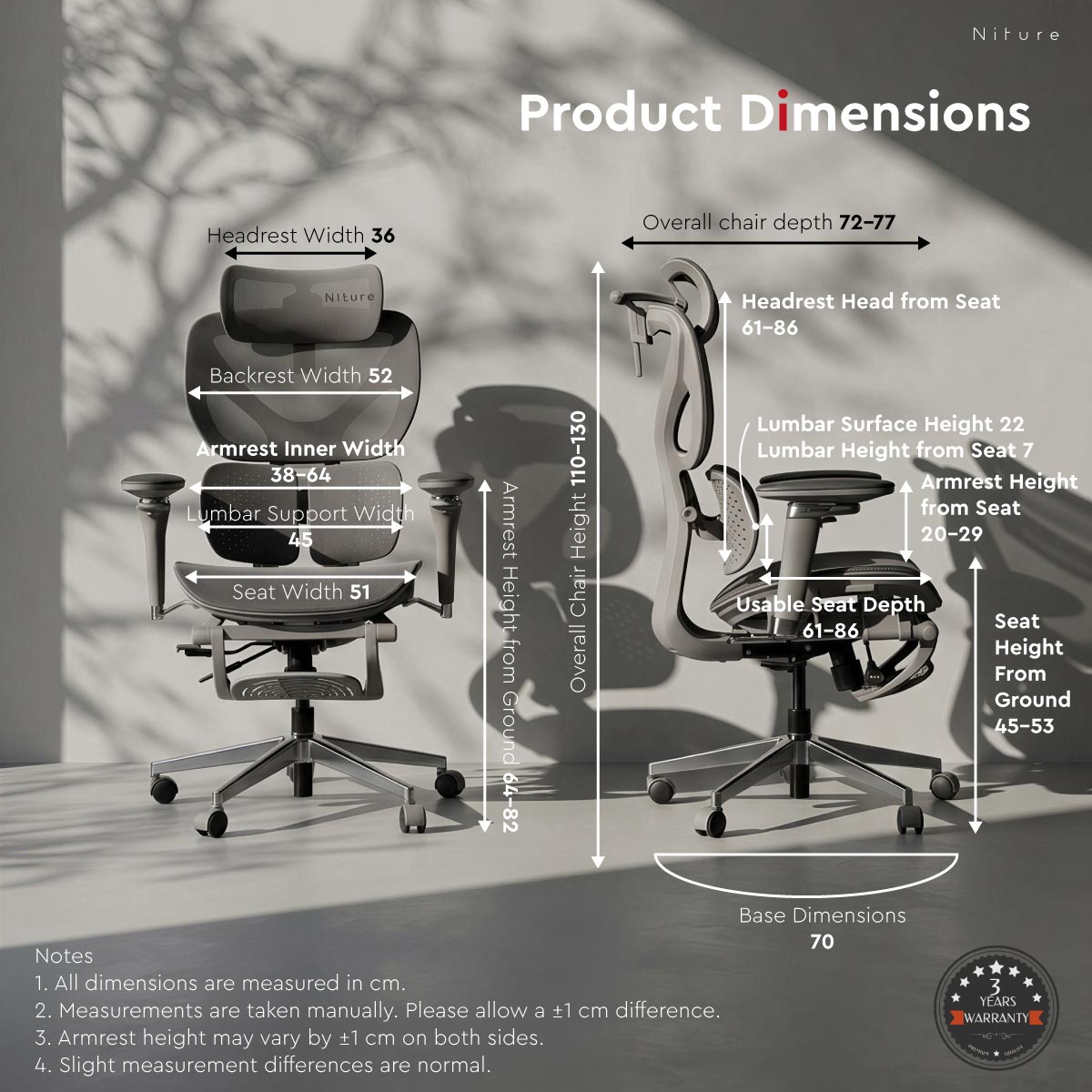
Niture Hammock 2 ergonomic chair dimensions and adjustment measurements
Product measurements are taken manually. Small differences between production batches may occur.
How Measurements Are Defined

Understanding the Adjustment Values

Measurement definitions help make chair specifications comparable and reduce ambiguity when evaluating ergonomic fit.

Usable Seat Depth

Approx. 44–50 cm

Measured from the lumbar support contact point to the front edge of the seat. This represents the effective thigh-support depth available to the user.

Physical Seat Depth

Approx. 50 cm

Measured across the physical seat surface. This value describes the seat itself and should not be confused with usable seat depth.

Seat Height

Approx. 45–53 cm

Measured vertically from the floor to the top of the unloaded seat surface.

Recline Angle

Up to Approx. 135°

Measured as the included angle between the seat plane and backrest at the maximum reclined position.

Dual-Axis Fore–Aft Reach

Up to Approx. 54 cm

Measured across the armrest's available front-to-back positioning range. The movement is created by rotating two articulated axes; the arm pad itself does not slide 54 cm.

Specifications describe adjustment range — fit still depends on the user.

Body height is only a starting point. Thigh length, lower-leg length, torso length, lumbar position, shoulder width and headrest reach should also be considered when evaluating ergonomic-chair fit.

Video Guides & Support

See How Hammock 2 Adjusts in Real Use

Use the adjustment guide to understand how Hammock 2 can be set around your body proportions, then watch the supporting feature video for a quicker overview of the chair in motion.

01

How to Adjust Hammock 2

A complete walkthrough of the main adjustment points and how they affect body fit, support and sitting position.

Complete Adjustment Guide

Set Hammock 2 Around Your Body

Learn how to adjust the lumbar support, seat depth, seat height, 4D headrest, 5D Dual-Axis armrests, recline and footrest.

Lumbar Support

Approx. 2 cm Forward

See how the Twin Dynamic Lumbar Support contact angle can be adjusted to change lower-back contact.

Seat Depth

3 Steps · 44–50 cm

Learn how to set the usable seat depth according to thigh length and knee clearance.

4D Headrest

Height · Depth · Tilt · Rotation

See how the headrest can be positioned around different neck, head and reclined positions.

5D Dual-Axis Armrests

Wide Fore–Aft Positioning

See how the two articulated axes reposition the armrests for desk work, relaxed sitting and reclined use.

Recline

3 Positions · Up to 135°

Learn how to move between focused working positions and more relaxed reclined sitting.

Footrest

Retractable Support

See how to extend and retract the footrest for short recovery and relaxed sitting periods.

02

Hammock 2 Feature Overview

A shorter supporting video showing the chair’s main support systems, adjustment movement and everyday-use features.

Supporting Feature Video

Hammock 2 in Motion

A quick visual overview of Twin Dynamic Lumbar Support, body-fit adjustments, Dual-Axis armrest movement, recline and footrest use.

Use the videos together with the adjustment ranges above.

The videos demonstrate how each mechanism moves, while the specification and fitting sections explain how to use those adjustments around different body proportions and sitting positions.

Frequently Asked Questions

Hammock 2 Questions & Adjustment Guide

Key answers about Hammock 2 fit, adjustment range, support feel, recline and everyday use.

What type of ergonomic chair is Hammock 2?

Hammock 2 is an accessible everyday ergonomic chair built around Twin Dynamic Lumbar Support, adjustable seat depth, a 4D headrest, 5D Dual-Axis armrests, synchronized recline and a retractable footrest.

It is designed primarily for everyday work, study, home-office use and relaxed sitting.

What height range is Hammock 2 recommended for?

Hammock 2 is generally recommended for users approximately 160–180 cm tall.

Height is only a starting point. Thigh length, lower-leg length, torso length, lumbar position, shoulder width and headrest reach also affect whether the chair fits correctly.

How does the Twin Dynamic Lumbar Support adjust?

Hammock 2 uses two flexible lumbar sections designed to create a more wrapping contact around the lower back.

The lumbar contact angle can be adjusted to move the support approximately 2 cm forward. Moving it forward creates more noticeable lower-back contact, while reducing the forward position creates a gentler support feel.

The goal is comfortable contact with the natural lower-back curve, not maximum pressure.

What is the usable seat depth of Hammock 2?

Hammock 2 has a 3-step usable seat-depth adjustment from approximately 44–50 cm.

Usable seat depth is measured from the lumbar support contact point to the front edge of the seat. This represents the effective thigh-support depth available to the user.

The physical seat depth is approximately 50 cm.

How should I set the seat depth?

Sit fully back against the lumbar support, then choose one of the three seat-depth positions until most of your thighs are comfortably supported.

The front edge of the seat should not press directly into the back of your knees. Users with shorter thighs generally require a shorter usable seat depth, while longer-legged users may benefit from a deeper setting.

What adjustments does the 4D headrest provide?

The upgraded Hammock 2 4D headrest provides:

  • Height: 6 steps · approximately 6 cm
  • Depth: 3 steps · approximately 3 cm
  • Tilt: up to 60°
  • Rotation: up to 110°

The headrest should meet the neck comfortably without pushing the head forward.

How do the 5D Dual-Axis armrests move?

Hammock 2 uses articulated Dual-Axis armrests rather than a conventional linear sliding mechanism.

The armrest structure rotates through two articulated axes, allowing the support to reposition over a wide front-to-back range.

  • Height: 8 steps · approximately 9 cm
  • Dual-Axis fore–aft reach: up to approximately 54 cm
  • Width: up to approximately 14 cm
  • Pad rotation: 360°
  • Pad pivot: up to 270°

The arm pad itself does not slide 54 cm. The wide fore–aft range is created by rotating the two articulated armrest axes.

What is the seat-height range?

Hammock 2 has an approximate seat-height range of 45–53 cm.

A suitable setting should allow your feet to rest naturally on the floor while keeping your thighs comfortably supported. Your desk and armrest height should then be adjusted around that lower-body position.

How far can Hammock 2 recline?

Hammock 2 uses a synchronized recline mechanism with 3 locking positions and a maximum recline angle of approximately 135°.

The recline angle is measured as the included angle between the seat plane and backrest at the maximum reclined position.

Does Hammock 2 include a footrest?

Yes. Hammock 2 includes an integrated retractable footrest that can be extended during relaxed sitting or short recovery periods and stored beneath the seat when not in use.

The footrest is intended for temporary relaxed sitting and does not replace regular standing, walking and movement breaks.

Is Hammock 2 suitable for long sitting hours?

Hammock 2 provides practical body-fit adjustment, breathable mesh and multiple sitting positions for everyday use.

Suitability for prolonged sitting still depends on body fit, preferred lumbar support, working habits and how frequently the user changes position.

Users who place greater emphasis on movement-based back support during more demanding professional sitting should also compare Niture’s SINC Series.

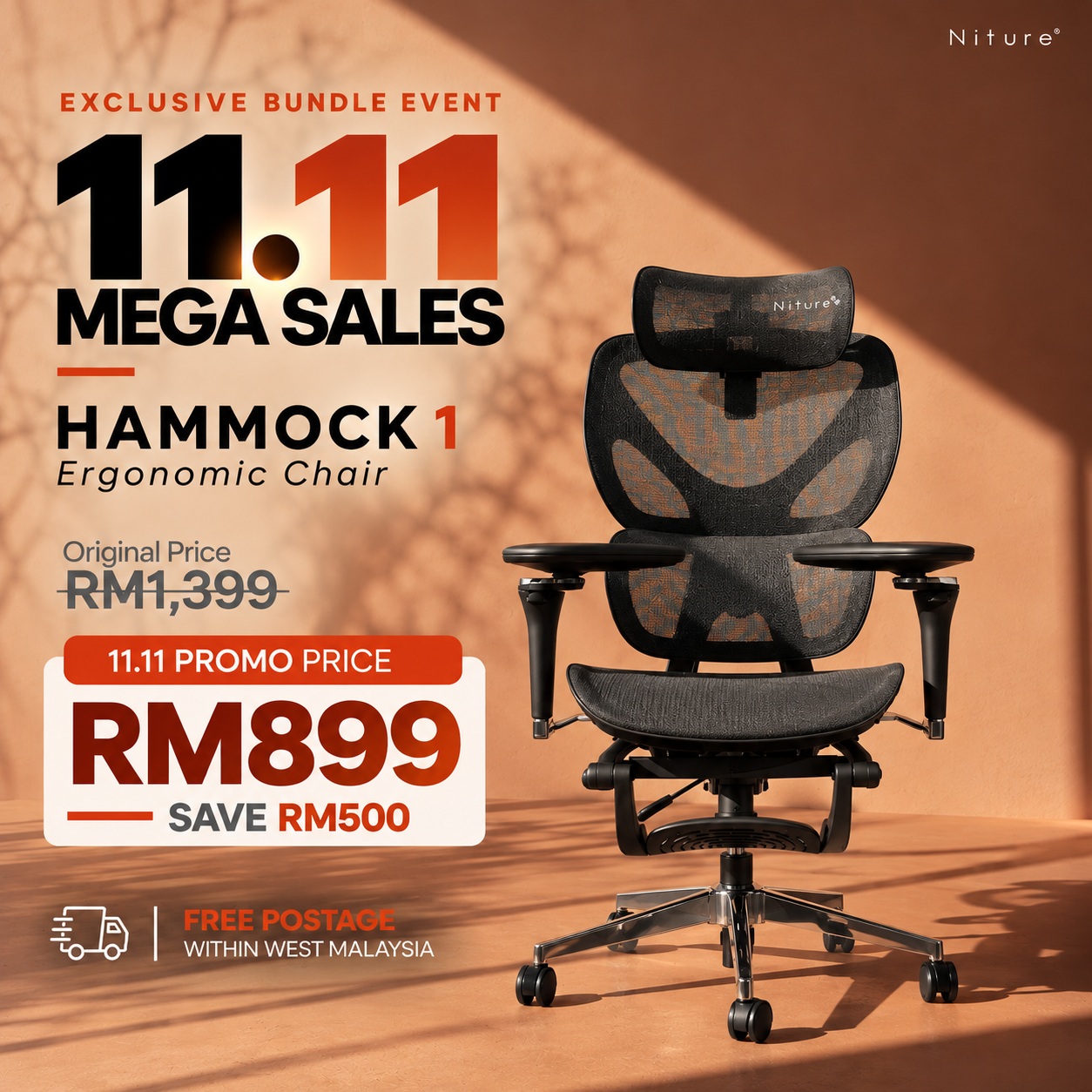
What is the difference between Hammock 2 and Hammock 1?

Hammock 1 provides a simpler everyday ergonomic seating experience with a lower-back support focus.

Hammock 2 adds Twin Dynamic Lumbar Support for a more wrapping lumbar feel together with a wider range of practical body-fit adjustments.

What is the difference between Hammock 2 and the SINC Series?

Hammock 2 focuses on accessible everyday ergonomics, wrapping lumbar contact and practical manual body-fit adjustment.

The SINC Series uses Niture’s Smart-Glide™ support system, which is designed to maintain closer support as the user changes posture and reclines.

The right choice depends on body proportions, preferred support feel and sitting habits rather than product tier alone.

Should I try Hammock 2 before buying?

A showroom trial is recommended whenever possible, especially if you are near the edge of the recommended height range.

During a fitting, check usable seat depth, lumbar contact, seat height, headrest reach, armrest position, mesh feel and recline comfort against your own body proportions.

Free Ergonomic Chair Fitting · Puchong

The Final Fit Should Be Decided by Your Body

Specifications can narrow down your choices, but they cannot fully predict how a chair will fit your body proportions.

At the Niture Puchong showroom, you can try Hammock 2 and adjust the chair around your own seat depth, lumbar position, headrest reach, armrest position and recline preference.

The fitting is free, walk-ins are welcome, and you can compare Hammock 2 with other Niture ergonomic chairs before deciding.

Fitting Service Free Personalized Ergonomic Chair Fitting
Typical Duration Around 30 Minutes
Appointment Walk-In Welcome
Showroom Hours Monday–Sunday · 11:00 AM–5:00 PM
What We Check Seat · Lumbar · Headrest · Armrests · Recline
Compare In Person Hammock 1 · Hammock 2 · SINC Series
What to Check During Your Trial

Five Fit Points That Matter More Than Height Alone

01 Usable Seat Depth

Check that your thighs are supported while maintaining comfortable clearance behind the knees.

02 Lumbar Contact

Adjust the Twin Dynamic Lumbar Support until it comfortably meets your lower-back curve without excessive pressure.

03 Headrest Reach

Make sure the 4D headrest can support your neck without pushing your head forward.

04 Armrest Position

Check that the 5D Dual-Axis armrests can support your elbows while allowing your shoulders to remain relaxed.

05 Recline Comfort

Test the different locking positions and headrest setting to see how the chair supports you as your posture changes.

Recommended height is a starting point — not a guarantee of fit.

Two users of the same height can have different thigh lengths, torso lengths, shoulder widths and lumbar positions. A physical trial remains the most reliable way to confirm chair fit.

Hammock 2 Summary

Wrapping Lumbar Support with Practical Everyday Adjustment

Hammock 2 is an accessible ergonomic chair designed for everyday work, study and home-office use.

Its Twin Dynamic Lumbar Support creates a more embracing lower-back contact, while adjustable seat depth, a 4D headrest, 5D Dual-Axis armrests, synchronized recline and a retractable footrest allow the chair to adapt around different body proportions and sitting positions.

Primary Support Twin Dynamic Lumbar Support
Best For Everyday Work · Study · Home Office
Recommended Fit Approx. 160–180 cm
Maximum Load 110 kg
Key Adjustments
Lumbar Approx. 2 cm forward
Usable Seat Depth 3 steps · Approx. 44–50 cm
Seat Height Approx. 45–53 cm
Headrest 4D adjustment
Armrests 5D Dual-Axis
Recline 3 positions · Up to approx. 135°
Designed for users who want practical body-fit adjustment, breathable comfort and more noticeable lower-back support for everyday sitting.
Niture — Words lie, body doesn’t.

20 reviews for Hammock 2 Ergonomic Chair

  1. Ruth

    Ruth –

    After long waiting, I finally got my Hammock2, it is a good chair and most important is price worthy! Love the armrest, very versatile.

  2. Hazni

    Hazni –

    Good price, good chair & excellent service. High quality chair, no weird sound while sitting.

  3. JeanieChing

    JeanieChing –

    Thank you Niture, so happy to receive my new chair. It is hard to resist Hammock chair, the pricing is very attempted with all of the necessary feature. I highly recommend Hammock,. Plan to get second unit for my bf.

  4. Gido

    Gido –

    Long waiting for the chair, at first say will deliver around early of September , then delay for a week. The delivery is not flexible, they cant deliver on weekend. The showroom service was good, chair is within my budget, the headrest adjustment is too tight.

  5. Latt Zaifizzan

    Latt Zaifizzan –

    Armrest – Super Good
    Headrest – Big & Good
    Lumbar Support – Comfortable
    Mesh – Normal
    Footrest – Normal
    Seat Depth – Super good, can adjust in/out
    Price : Super Good

  6. Osman

    Osman –

    Harga mmg berbaloi, 5D armrest sgt cun, boleh main game, hp atat kerja laptop. Cuma tempat duduk, mesh tu bg saya keras sikit, yg lain2 mmg puas hati.

  7. Naz Ali

    Naz Ali –

    Finally dpt kerusi ni, beli waktu pre-order ada free delivery tapi kena tunggu hampir 1 bulan. Pemasangan senang shj, customer service pon very helpful. Quality mantap klo compare dgn X & Y brand, pakai 5hari dah bunyi kuat. Kerusi ni saya dah pakai 2 minggu, sgt puas hati.

  8. ECTing

    ECTing –

    Found some scratches on the leg, they replace it immediately but why the QC didnt check properly before packing? It is hassle to dismantle and re-assemble.

  9. Choong DY

    Choong DY –

    Niture is a very decent local brand company, too bad not many ppl know this brand, their chair are mostly very comfortable and at reasonable price, pleasant showroom experience, staff are friendly and no hard sell.

  10. Akmal Bin Ahmad

    Akmal Bin Ahmad –

    Hammock2 ni sgt sedap, lumbar support cun, yg paling attrak saya – 5D armrest. Quality mmg mantap.

  11. Sabrini Arshad

    Sabrini Arshad –

    Been use it for a month, quite happy with this chair but the mesh is a bit too hard for me, good thing is the ventilation is good, I dont feel warm after long hours sitting

  12. Sebastian

    Sebastian –

    Niture is the best showroom I’ve ever been, all of the staffs are super friendly, been to many showroom but none of them can compete with Niture, the team is very professional and lot of comfortable chair are available, love Niture tagline – Words lie, body doesn’t. they will only help you to shortlist the suitable chair for you and share the tips of ergonomic.

  13. Zainudin

    Zainudin –

    Kerusi Hammock ni sgt berbaloi, kukuh dan ada semua fungsi2. Lumbar support and 5D armrest is helpful for me.

  14. Louise

    Louise –

    Quality : High
    Functionality : Excellent, especially the armrest is super great. Seat pan can move in-out
    Sturdiness : Very good, I am 105kgs, dont feel the chair is shanky
    Mesh : Medium
    Price : Very good deal (but if will be great if it does include free delivery)
    Comfort Level : if 5 is top, I rate it at 4 (SINC chair is far more comfort but due to budget constraint,I’ve to stick to Hammock)

  15. Joseph

    Joseph –

    Found some scratches upon unbox the chair, glad that Niture customer service is very responsive and ship out the replacement part is next day. My previous chair took a month to reply my warranty claim, I’ve to keep follow up to chase the replacement part till I give up.

  16. GT Lee

    GT Lee –

    After trying a few ergonomic chairs, the Niture Hammock2 really stands out. The seat can pull in and out and is breathable mesh, and the lumbar support follows every movement naturally. I can sit for hours without feeling any pressure on my lower back. Definitely worth the investment if you spend long hours working

  17. Saiful

    Saiful –

    Niture Hammock2 is surprisingly comfortable! 5D Dual Axis is most impressive, can be transform as my need and provide great support.

  18. Mike

    Mike –

    This chair made a huge difference in my work-from-home setup. The lumbar support is exactly where I need it, and the breathable mesh keeps me cool all day. The build feels solid and premium, better than most chairs in the same price range.

  19. Elaine

    Elaine –

    I didn’t expect such good quality at this price. The chair feels light, supportive, and easy to adjust. My back doesn’t feel tired even after long study hours. Highly recommended for students or anyone who spends long hours sitting.

  20. Ginnie

    Ginnie –

    Please check the chair before delivery, I am disappointed to receive a defect unit, I’ve to work, not always have time to wait for you, promise to come at 3pm, end up 3..40pm. Not recommended to buy from Niture.

Only logged in customers who have purchased this product may leave a review.

Not sure which ergonomic chair to choose? Use our smart filter to quickly narrow down options by features, materials, and comfort preferences. Search Now...

Payment Options

Choose the payment method that suits you best. We accept Visa, Mastercard, FPX, and Buy Now Pay Later (BNPL) options.

Enjoy peace of mind with our reliable warranty coverage. Our dedicated support team is always ready to assist with after-sales service. Learn More...

Shipping & Delivery

Get your ergonomic furniture delivered safely and on time. We provide fast, secure, and trackable shipping options to ensure your order reaches you in perfect condition.

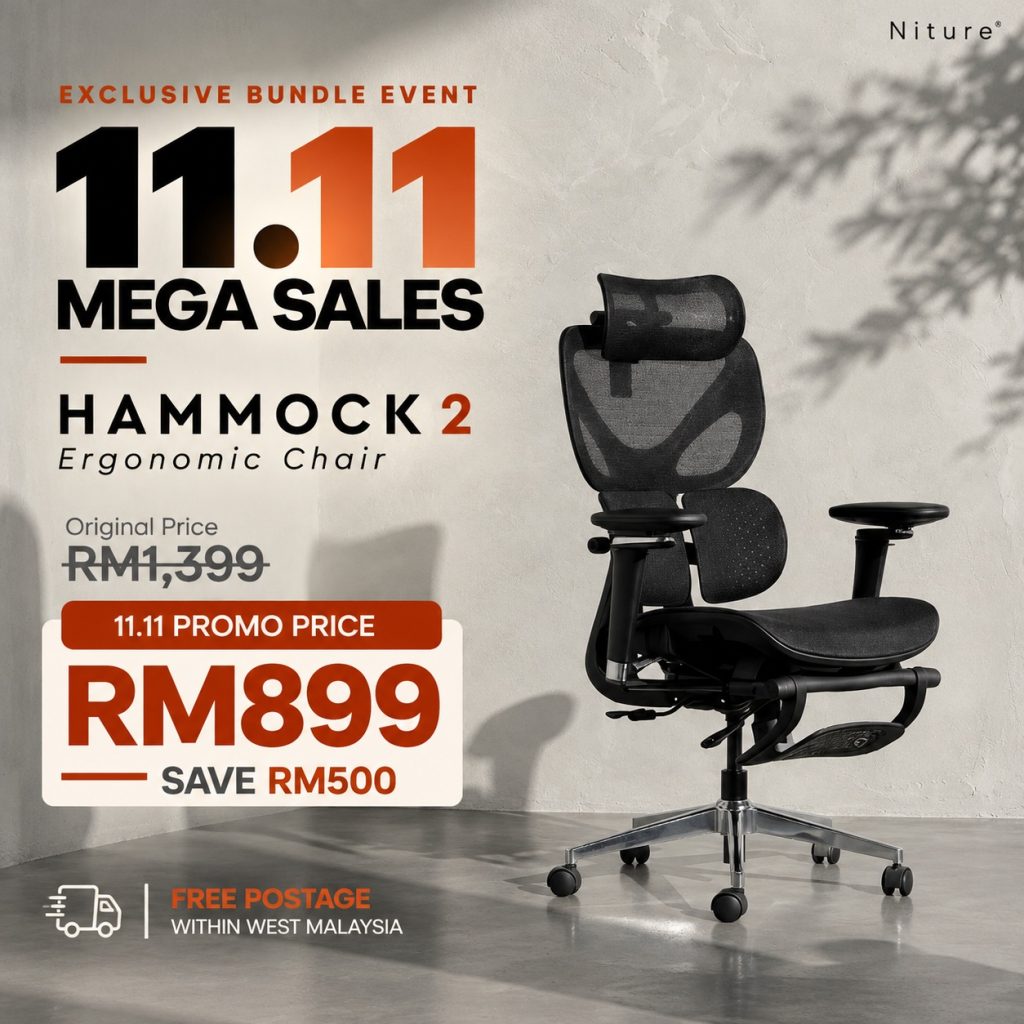
36% OFF

Price range: RM899.00 through RM999.00

Not sure which ergonomic chair to choose? Use our smart filter to quickly narrow down options by features, materials, and comfort preferences. Search Now...

Payment Options

Choose the payment method that suits you best. We accept Visa, Mastercard, FPX, and Buy Now Pay Later (BNPL) options.

Enjoy peace of mind with our reliable warranty coverage. Our dedicated support team is always ready to assist with after-sales service. Learn More...

Shipping & Delivery

Get your ergonomic furniture delivered safely and on time. We provide fast, secure, and trackable shipping options to ensure your order reaches you in perfect condition.