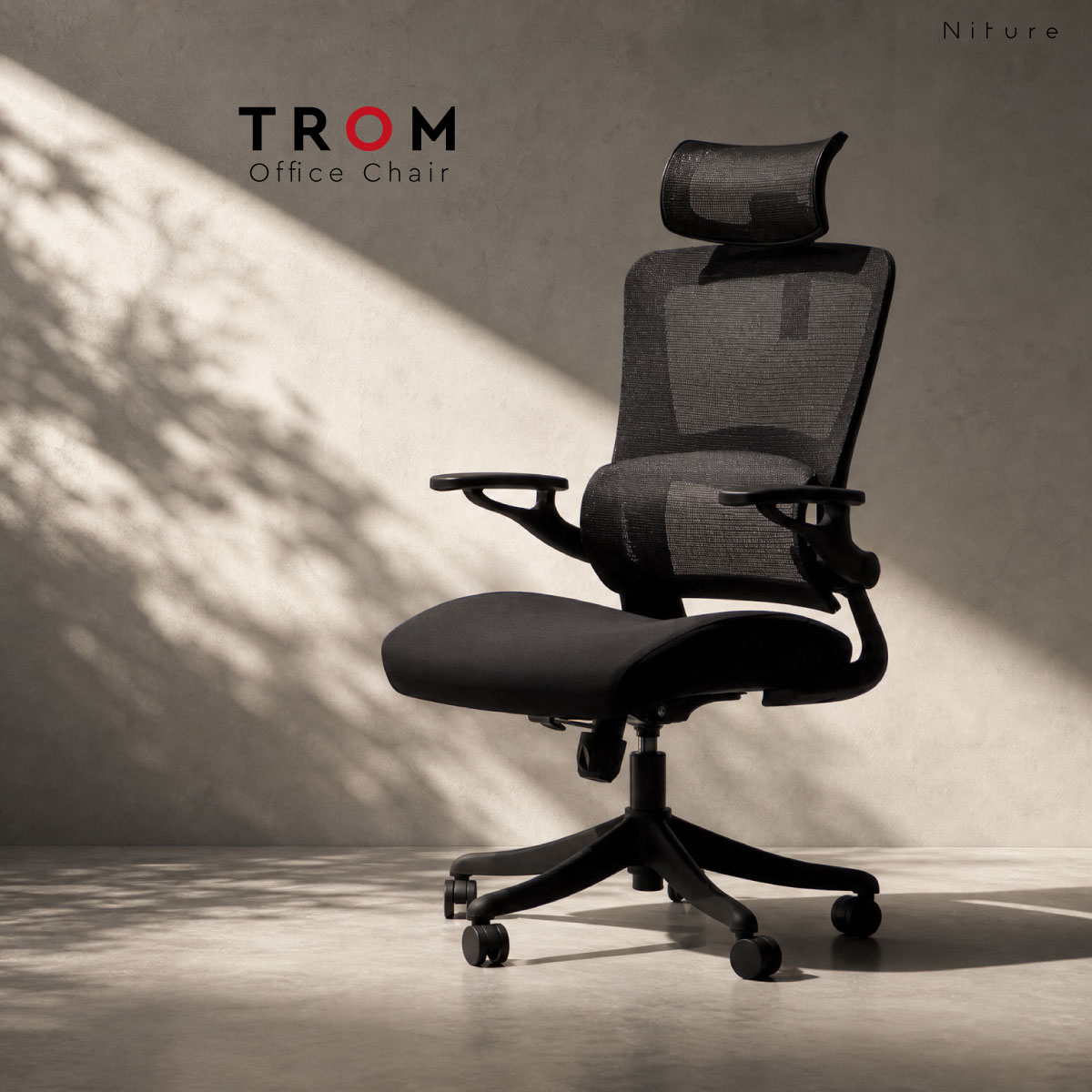
Hammock 1 Ergonomic Chair

Niture Hammock Series

Focused Support. Felt Where It Matters.

Hammock 1 Ergonomic Chair

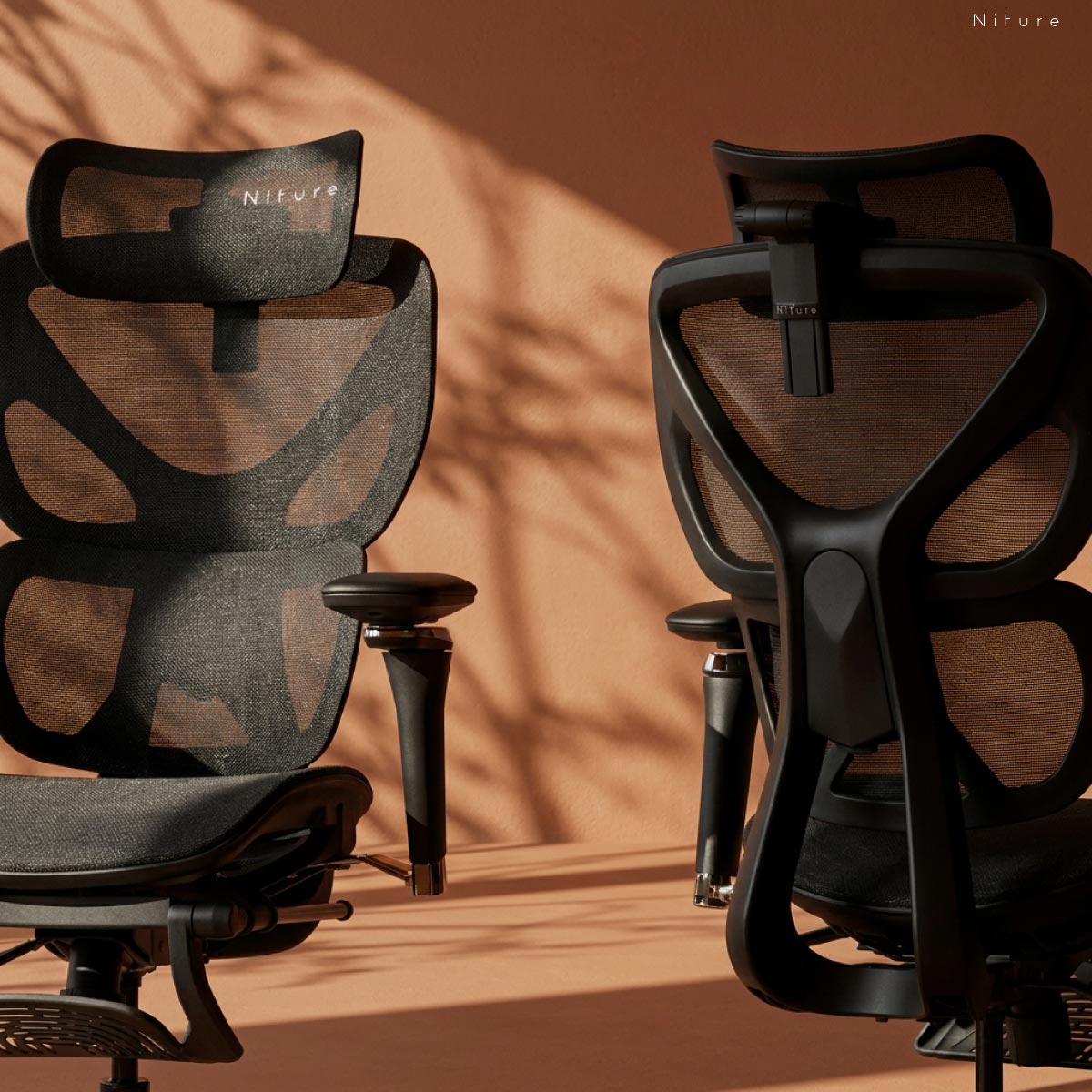
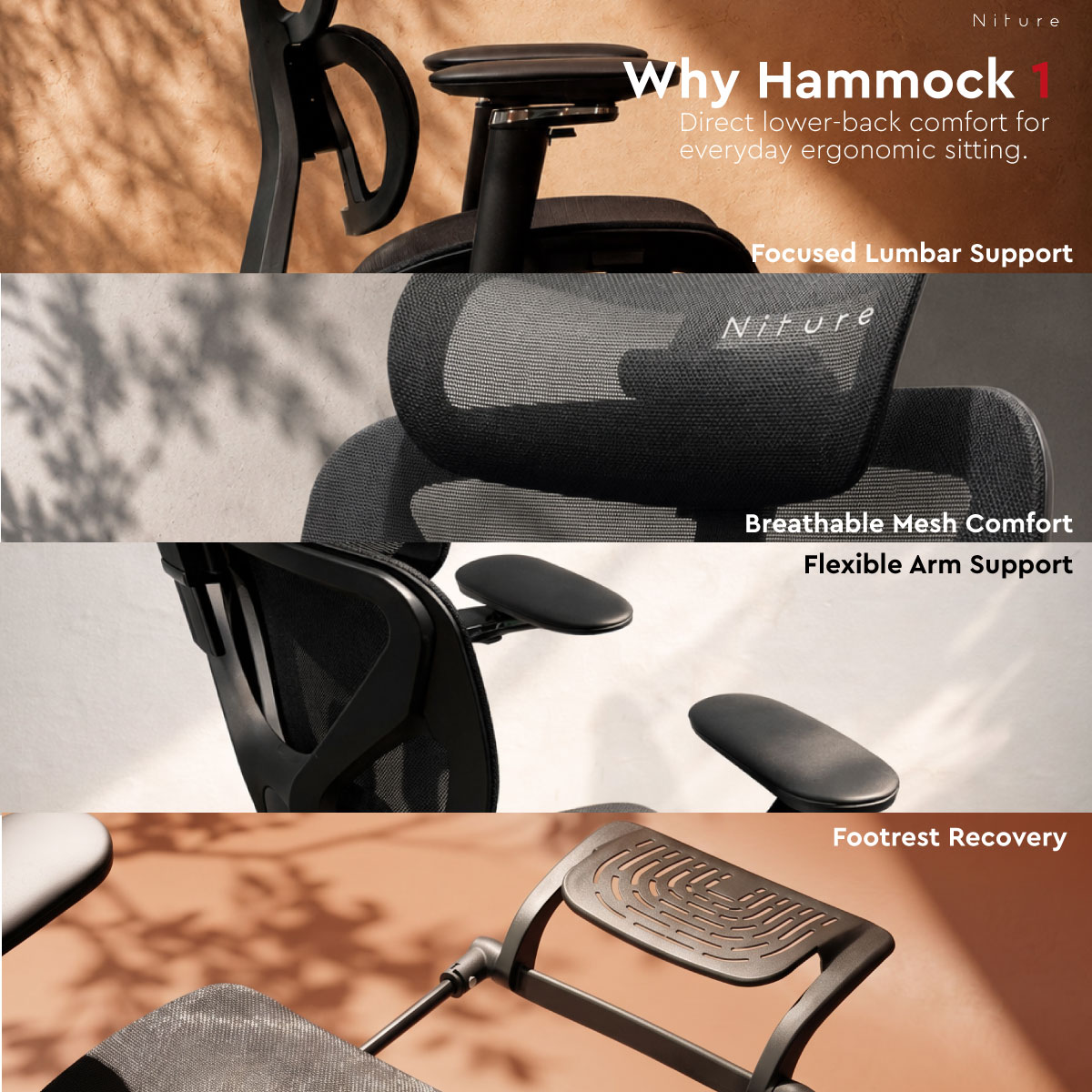
Hammock 1 uses a single lumbar support to create a more concentrated and noticeable supporting sensation around the lower back.

It combines breathable mesh, adjustable seat depth, a 4D headrest, 5D Dual-Axis armrests, synchronized recline and a retractable footrest for everyday ergonomic sitting.

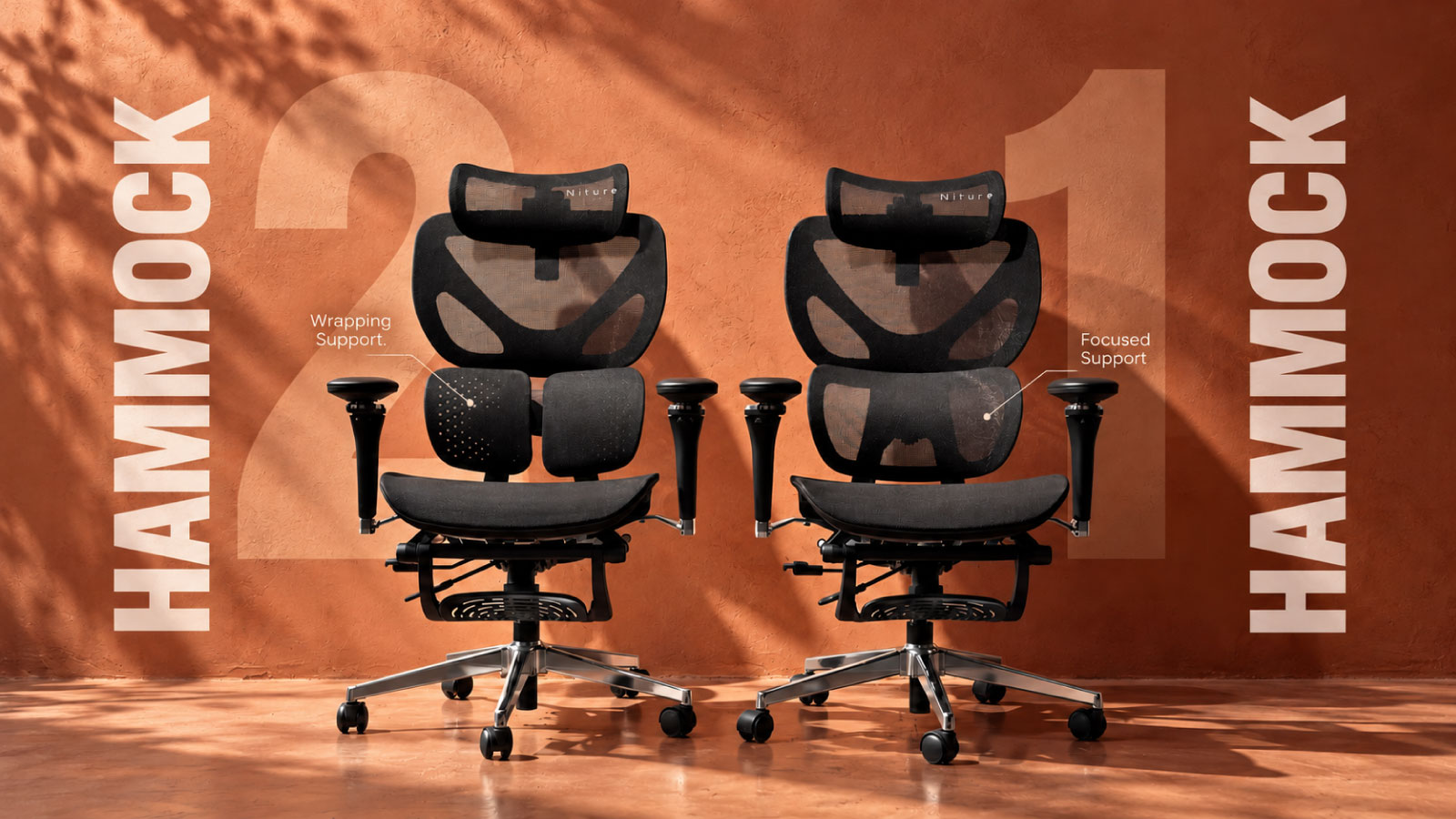
Hammock 1 vs Hammock 2 Same platform. Different lumbar feel.

Choose Hammock 1 if you prefer more focused lower-back contact. Hammock 2 provides a broader, more wrapping support sensation.

Single Lumbar Support Focused lower-back feel
51 × 51 cm Seat Pan Physical width × depth
≈160 cm+ Fit Starting Point Confirm by body proportions
110 kg Maximum Load Recommended maximum

Height is only a starting point. Seat depth, thigh length, lumbar position, torso length, armrest reach and headrest position determine whether the chair fits your body.

Hammock 1 vs Hammock 2

Same Ergonomic Platform.
Different Lumbar Experience.

Hammock 1 and Hammock 2 share the same core ergonomic adjustments, dimensions and chair platform.

The main difference is the lumbar design: Hammock 1 uses one lumbar support, while Hammock 2 uses twin lumbar supports. That changes how the support feels against your lower back.

Comparison of Hammock 1 single lumbar support and Hammock 2 twin lumbar support
Hammock 1 Focused Support
Hammock 2 Wrapping Support
Hammock 1 Single Lumbar Support
1 Lumbar
Support

More Focused Lower-Back Support

A single lumbar section concentrates the contact area more centrally against the lower back.

This creates a more noticeable and supportive sensation for users who prefer to clearly feel the lumbar support against the lower-back curve.
Focused Concentrated Supportive
Hammock 2 Twin Lumbar Support
2 Lumbar
Supports

More Wrapping Lower-Back Support

Twin lumbar sections distribute contact more broadly across the lower-back area.

The result is a more wrapping and embracing sensation for users who prefer support to spread around the lower back rather than concentrate at one central point.

Wrapping Broader Embracing
What Stays the Same

The Core Adjustment Platform Is the Same

Hammock 1 is not the basic version of Hammock 2, and Hammock 2 is not simply an upgraded Hammock 1. Their main functional difference is the lumbar support design.

51 × 51 cm Seat Pan Same physical seat size
Seat Depth Same adjustment range
4D Headrest Same adjustment range
5D Armrests Same adjustment platform
Seat Height Same adjustment range
Recline + Footrest Same movement platform
Choose Hammock 1 if... You prefer a more concentrated and noticeable support point against the lower back.
Choose Hammock 2 if... You prefer the lumbar support to feel broader and more wrapping around the lower back.

Neither lumbar design is universally better. Body shape, lumbar curvature and personal preference affect which support sensation feels more natural. If possible, try both chairs before deciding.

Hammock 1 single lumbar support showing focused lower-back contact
Single Lumbar Support Focused Lower-Back Contact
Single Lumbar Support

More Focused Support at the Lower Back

Hammock 1 uses one lumbar support section to create a more concentrated contact area against the lower back.

Because the support is delivered through one central lumbar section, the contact feels more defined and noticeable around the lumbar curve.

This gives Hammock 1 its characteristic focused and supportive lower-back feel , particularly for users who prefer to clearly feel where the chair is supporting them.

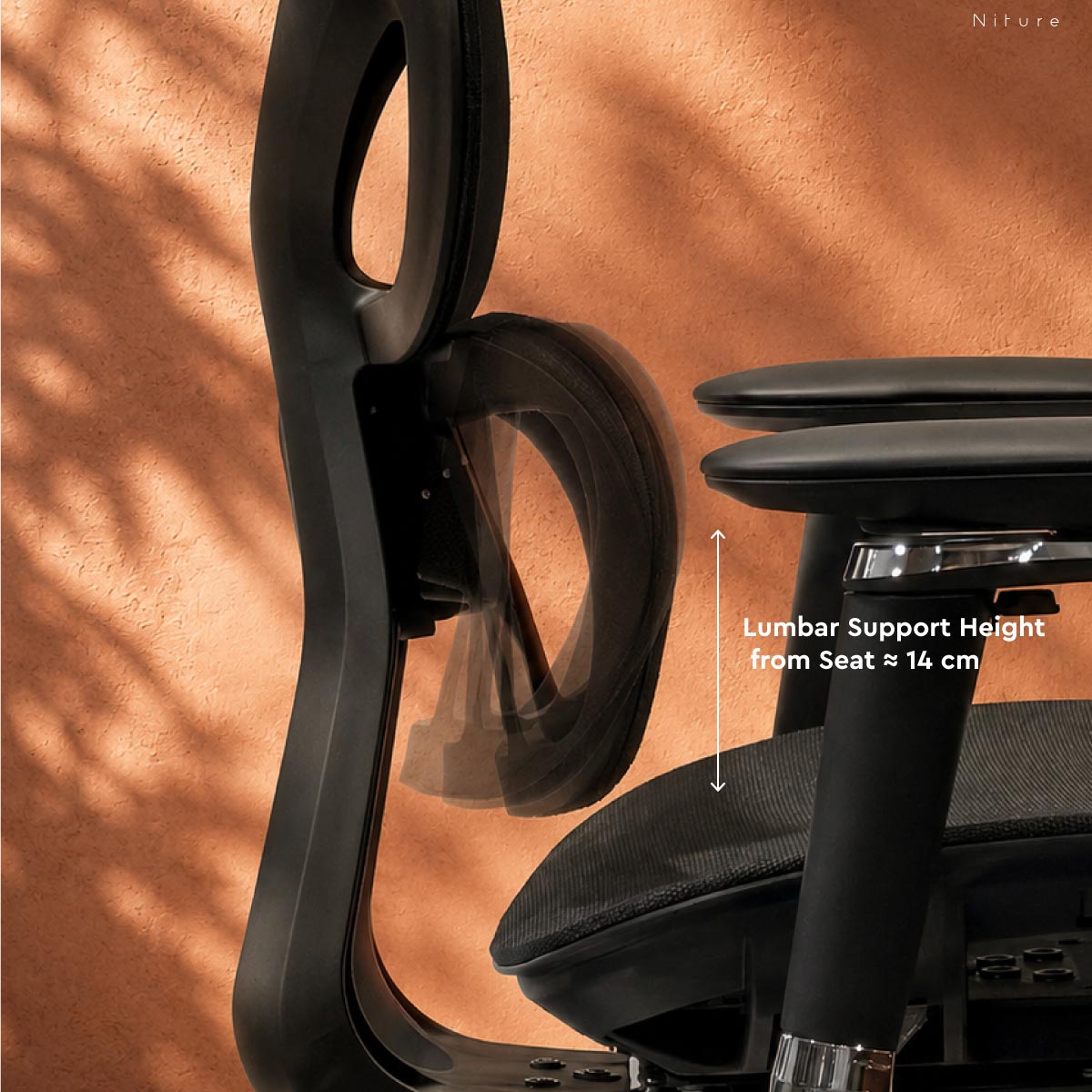
Lumbar Support Height from Seat Approx. 14 cm

A reference dimension for checking where the lumbar support contacts your lower back. Confirm the contact position when seated.

Contact Pattern More Concentrated

Support is centred through one main lumbar contact zone.

Sitting Sensation More Noticeable

The lumbar contact is easier to feel directly against the lower-back curve.
Best Preference Focused Support

Best suited to users who prefer a defined support point rather than a broader wrapping sensation.

Why It Feels Different
01

One Support Zone

A single lumbar section concentrates contact through one central area rather than splitting that contact across two lumbar sections.

02

More Defined Contact

The support can feel more pronounced because the contact is focused around the central lower-back region.

03

Preference Matters

Some users prefer this more noticeable support sensation; others may prefer the broader wrapping feel of Hammock 2.

Hammock 1 Single Lumbar Support Focused · Concentrated · More noticeable
Different Feel
Hammock 2 Twin Lumbar Support Broader · Wrapping · More embracing

Support feel is personal. A more noticeable lumbar sensation is not automatically better for every user. Body shape, lumbar curvature and personal preference determine which support style feels more natural.

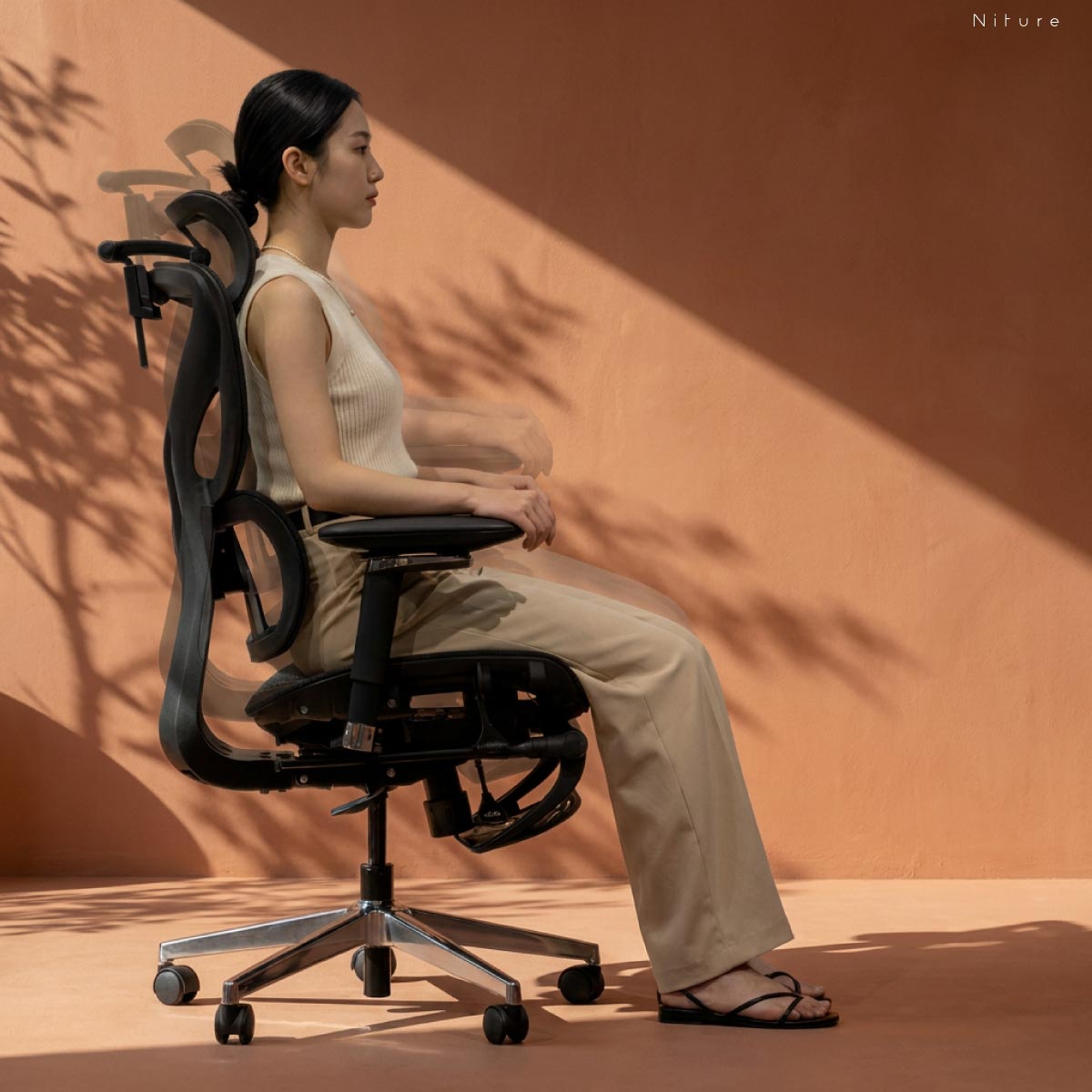
3-Position Seat Depth Adjustment

Fit the Seat to Your Thigh Length

Hammock 1 provides approximately 44–50 cm of usable seat depth measured from the lumbar support across 3 positions, allowing the seat to accommodate different thigh lengths.

Moving the seat forward provides more thigh support, while moving it backward reduces the usable sitting depth.

The aim is to support most of the thighs while maintaining comfortable clearance behind the knees and allowing your lower back to remain naturally against the lumbar support.

Usable Depth from Lumbar
44–50 cm
Positions 3
Usable Range ≈ 6 cm
Hammock 1 seat depth adjustment, three positions and approximately 44 to 50 cm usable depth measured from lumbar support
From Lumbar ≈ 44–50 cm
Adjustment 3 Positions
Seat Pan 51 × 51 cm
What Correct Seat Depth Should Feel Like
Too Short Limited Thigh Support

Too little usable seat depth may leave a larger portion of the thighs unsupported.

Better Fit Supported with Knee Clearance

The seat supports most of the thighs while maintaining comfortable clearance behind the knees.

Too Long Pressure Behind the Knees

Excessive usable depth may press behind the knees or cause you to sit forward away from the lumbar support.

How We Measure Seat Depth

Usable Seat Depth

The approximately 44–50 cm usable range is measured from the effective lumbar-support contact point to the front edge of the seat, across three adjustment positions.

Physical Seat Pan

The Hammock 1 seat pan is specified as 51 × 51 cm, while its physical seat depth is approximately 50 cm. These physical dimensions are different from the usable sitting depth measured from the lumbar support.

Fit tip: Do not choose seat depth from overall height alone. Two people of the same height can have different thigh lengths, so the correct setting depends on body proportions and knee clearance.

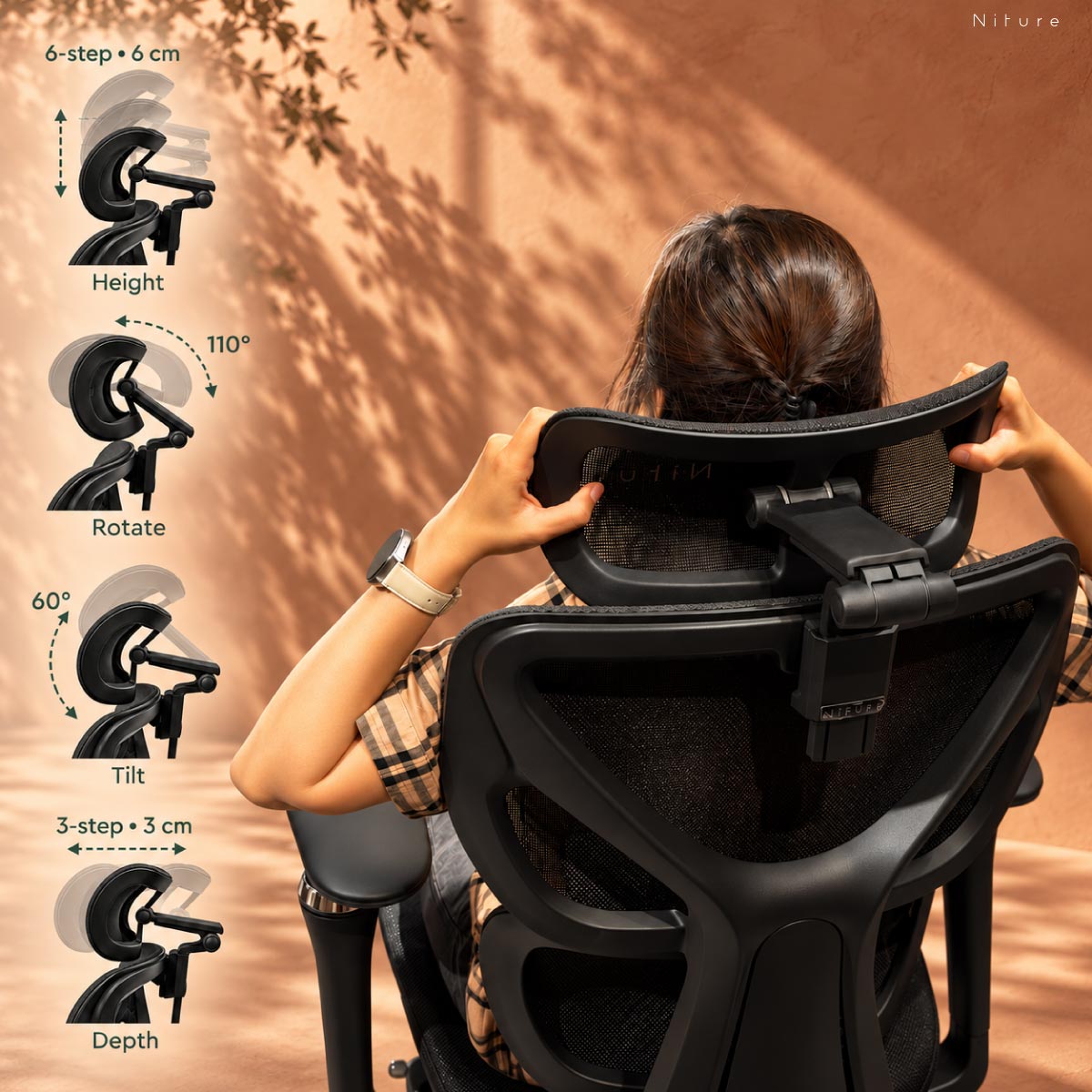
Hammock 1 4D headrest showing height depth tilt and rotation adjustments
Height 6 cm 6 Steps
Depth 3 cm 3 Steps
Tilt 60° Angle Range
Rotate 110° Rotation Range
4D Neck-Focused Headrest

Position the Headrest Around Your Neck

Hammock 1’s upgraded 4D headrest provides 6 height positions across 6 cm, 3 depth positions across 3 cm, 60° of tilt and 110° of rotation .

The four adjustment directions allow the headrest to move closer to your neck curve instead of simply sitting behind the back of your head.

This helps accommodate differences in torso length, shoulder height and neck position between users.

Height 6 Steps · 6 cm

Move the headrest up or down to align the support with your neck and upper-back position.

Depth 3 Steps · 3 cm

Move the headrest forward or backward to bring support closer without forcing the head forward.

Tilt 60°

Change the support angle to better match your neck position in upright or relaxed sitting.

Rotate 110°

Rotate the headrest surface to fine-tune how it contacts the neck and lower head area.

Headrest Height from Seat Approx. 59–80 cm

Measured from the seat surface to the headrest reference position. Check the neck contact point while seated.

What Good Headrest Fit Should Feel Like
01

Reach the Neck Curve

The headrest should reach close enough to the neck that you do not have to lean backward just to find support.

02

Avoid Forward Head Pressure

If the headrest pushes your head forward, reduce the depth, change the height or adjust the angle until the contact feels more natural.

03

Recheck During Recline

Neck position changes when you recline, so use the tilt and rotation adjustments to fine-tune support for different sitting positions.

Fit tip: Overall height is only a starting point for headrest fit. Torso length, shoulder height and neck length also determine whether the headrest reaches the right position.

5D Dual-Axis Armrests

Bring the Armrests to Your Arms

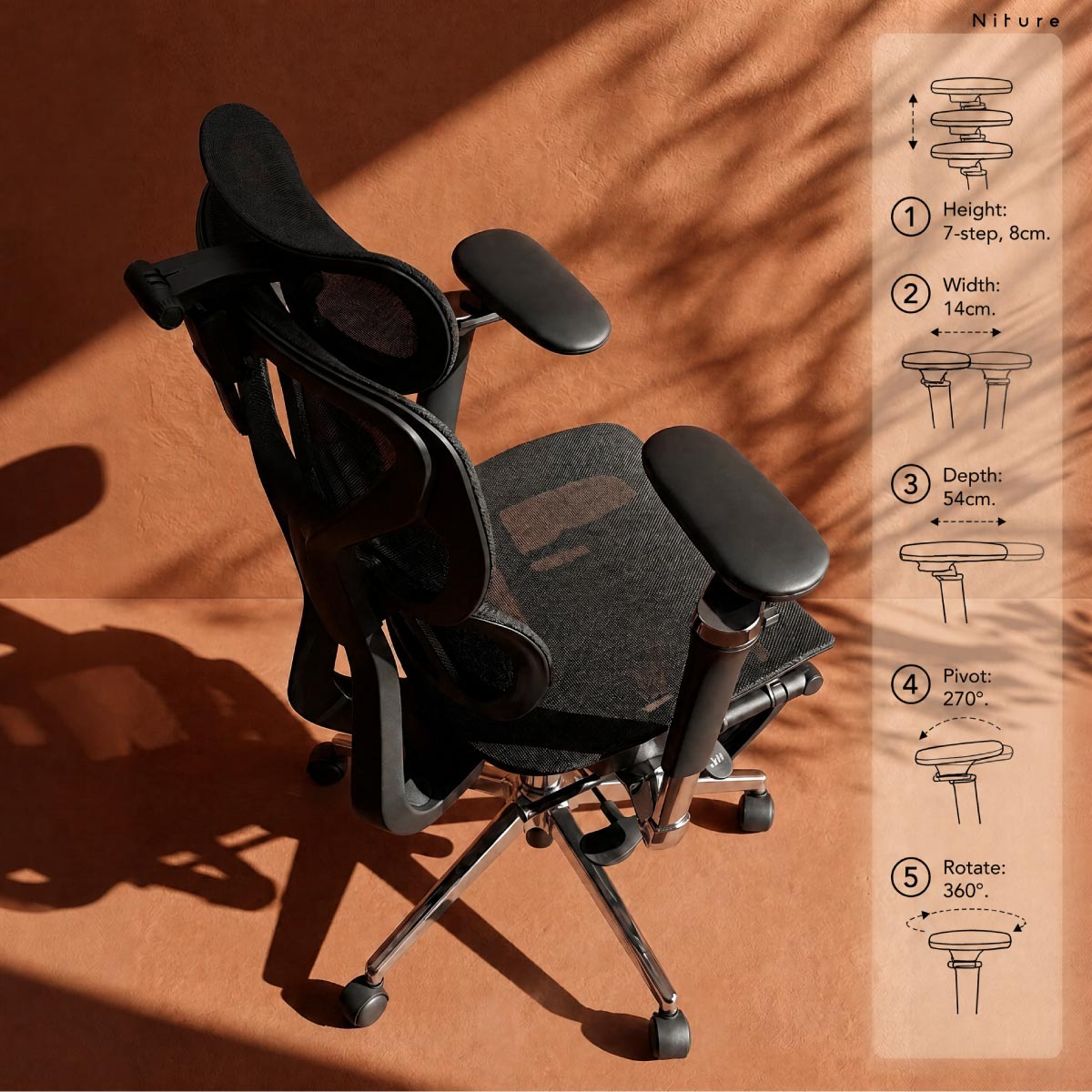
Hammock 1's 5D Dual-Axis armrests combine 8-step height adjustment, width adjustment, 360° pad rotation, up to 270° pad pivot and up to 54 cm of fore–aft reach .

Unlike a conventional armrest that relies mainly on a short sliding arm pad, the Dual-Axis structure uses two rotational axes to reposition the entire armrest over a much wider area.

This allows the support to move closer to your elbows for typing, mouse work, phone use, gaming or more relaxed sitting positions.

Dual-Axis Fore–Aft Reach
54 cm
Movement System Two Rotational Axes
Height 8 Steps · 9 cm

Raise or lower the armrests to support the forearms without lifting the shoulders.

Width Up to 14 cm

Adjust the armrest position laterally to better suit different shoulder widths and elbow positions.

Pad Rotation 360°

Rotate the arm pad to change its orientation for different working and relaxed positions.

Pad Pivot Up to 270°

Pivot the armrest assembly through a wide arc to bring support closer to where your forearms naturally rest.

Dual-Axis Fore–Aft Reach Up to 54 cm

Two rotational axes work together to reposition the armrest forward or backward across a much wider reach than a conventional short sliding pad.

Hammock 1 5D Dual-Axis armrest showing height width rotation pivot and fore-aft reach
Height 8 Steps · 9 cm
Dual-Axis Reach Up to 54 cm
Width Up to 14 cm
Armrest Height from Seat 20–29 cm
Inner Armrest Width 38–64 cm

Approximate fitting measurements. Confirm your preferred armrest position during an actual chair fitting.

What Does Dual-Axis Mean?
A1
First Rotational Axis Changes the position of the armrest assembly.
A2
Second Rotational Axis Extends the positioning range further forward, backward or inward.

Wider Reach Without a Long Sliding Track

The fore–aft movement does not come from simply sliding the arm pad forward and backward.

Instead, two rotational joints work together to change the position of the armrest. This creates up to 54 cm of overall fore–aft positioning reach while allowing the arm pad to approach the body from different angles.

What Good Armrest Fit Should Feel Like
01

Relax the Shoulders

Set the height so your forearms are supported without needing to lift or shrug the shoulders.

02

Keep the Elbows Close

Use the width and Dual-Axis positioning to bring the armrests closer to where your elbows naturally rest.

03

Match the Task

Reposition the armrests for typing, mouse work, phone use, gaming or reclined sitting instead of relying on one fixed arm position all day.

Fit tip: Armrests should support the forearms without forcing the shoulders upward or pushing the elbows too far away from the body. Adjust the armrests after setting your seat height and desk position.

Adjustable Seat Height

Set Your Sitting Height Around the Desk

Hammock 1 provides an approximate 45–53 cm seat-height range, giving around 8 cm of vertical adjustment through a TÜV-certified Class 4 gas lift.

The correct seat height should allow your feet to remain supported while keeping your knees comfortable and your shoulders relaxed when working at the desk.

Seat height should also be considered together with desk height. A chair may fit your legs correctly but still place your arms too low or too high relative to a fixed desk.

Seat Height
45–53 cm
Adjustment ≈ 8 cm
Lift System Class 4
Hammock 1 seat height adjustment showing approximately 45 to 53 centimetres
Minimum ≈ 45 cm
Maximum ≈ 53 cm
Travel ≈ 8 cm
What Correct Seat Height Should Feel Like
Too Low Knees Sit Too High

Sitting too low can increase hip and knee flexion and make it harder to align your forearms naturally with the desk.

Better Fit Feet Supported, Shoulders Relaxed

Your feet remain supported while your knees, hips and elbows settle into a comfortable working position.

Too High Feet Lose Support

If the seat is too high, the feet may hang or pressure may increase underneath the thighs.

Seat Height Works Together with the Desk
01

Support the Feet

Start by setting the chair so your feet can rest naturally on the floor or an appropriate external foot support.

02

Check Desk Height

Once your legs are positioned correctly, check whether the keyboard and desk surface are at a suitable height for your elbows.

03

Relax the Shoulders

Your forearms should reach the working surface without requiring the shoulders to lift or the elbows to reach upward.

Fit tip: Do not raise the chair simply to reach a desk if doing so leaves your feet unsupported. Chair height, desk height and foot support should work together as one ergonomic setup.

Synchronized Recline

Move from Focused Work to Relaxed Sitting

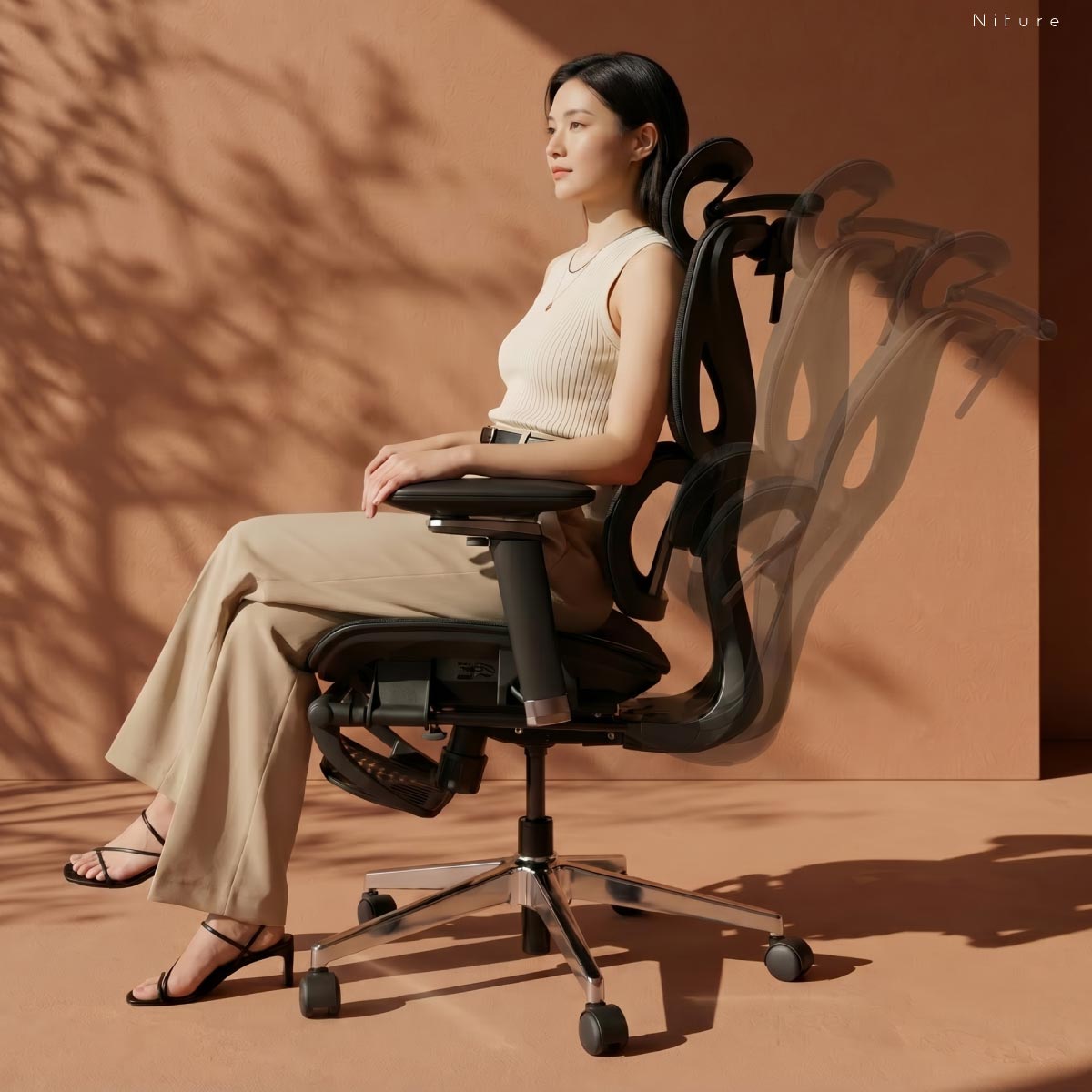
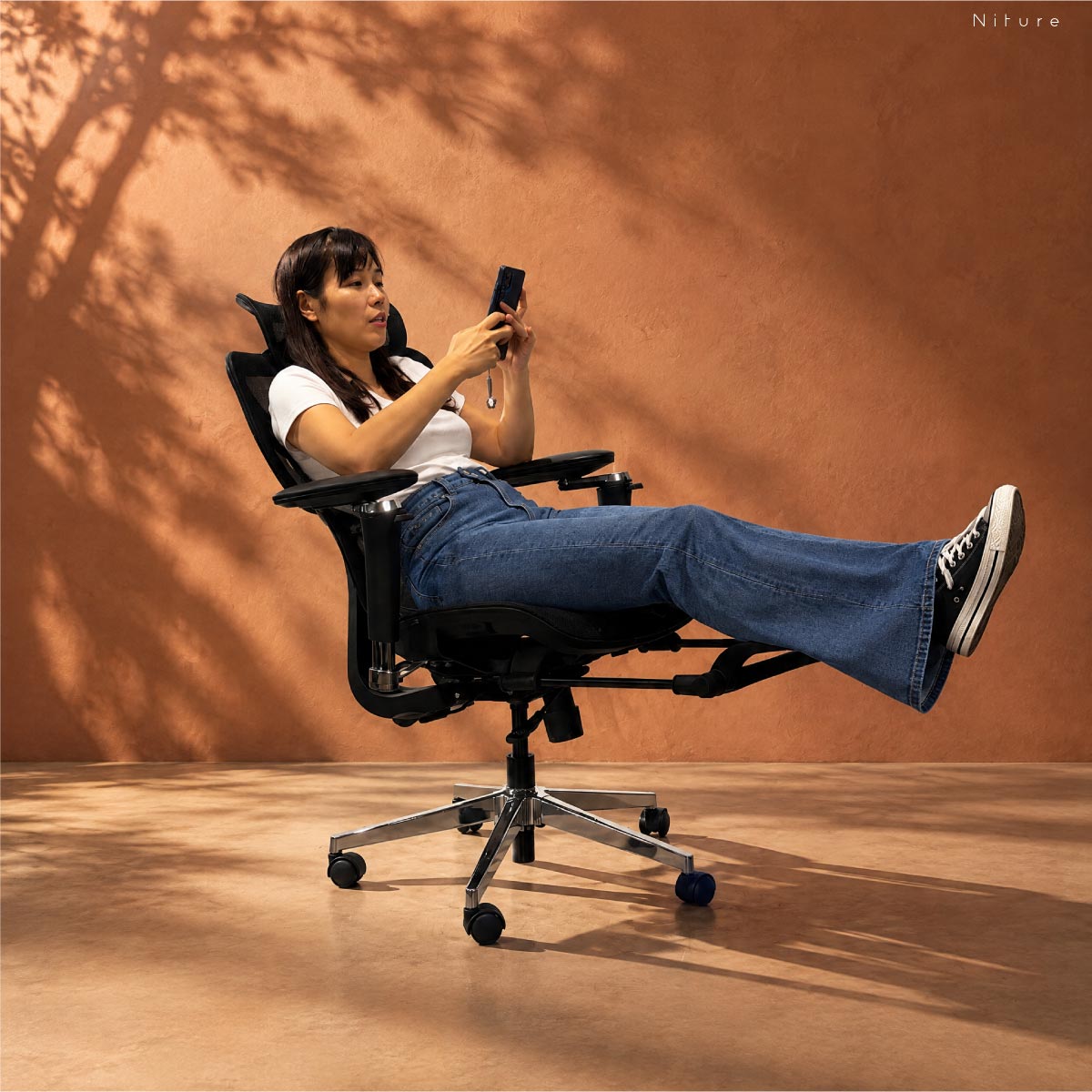
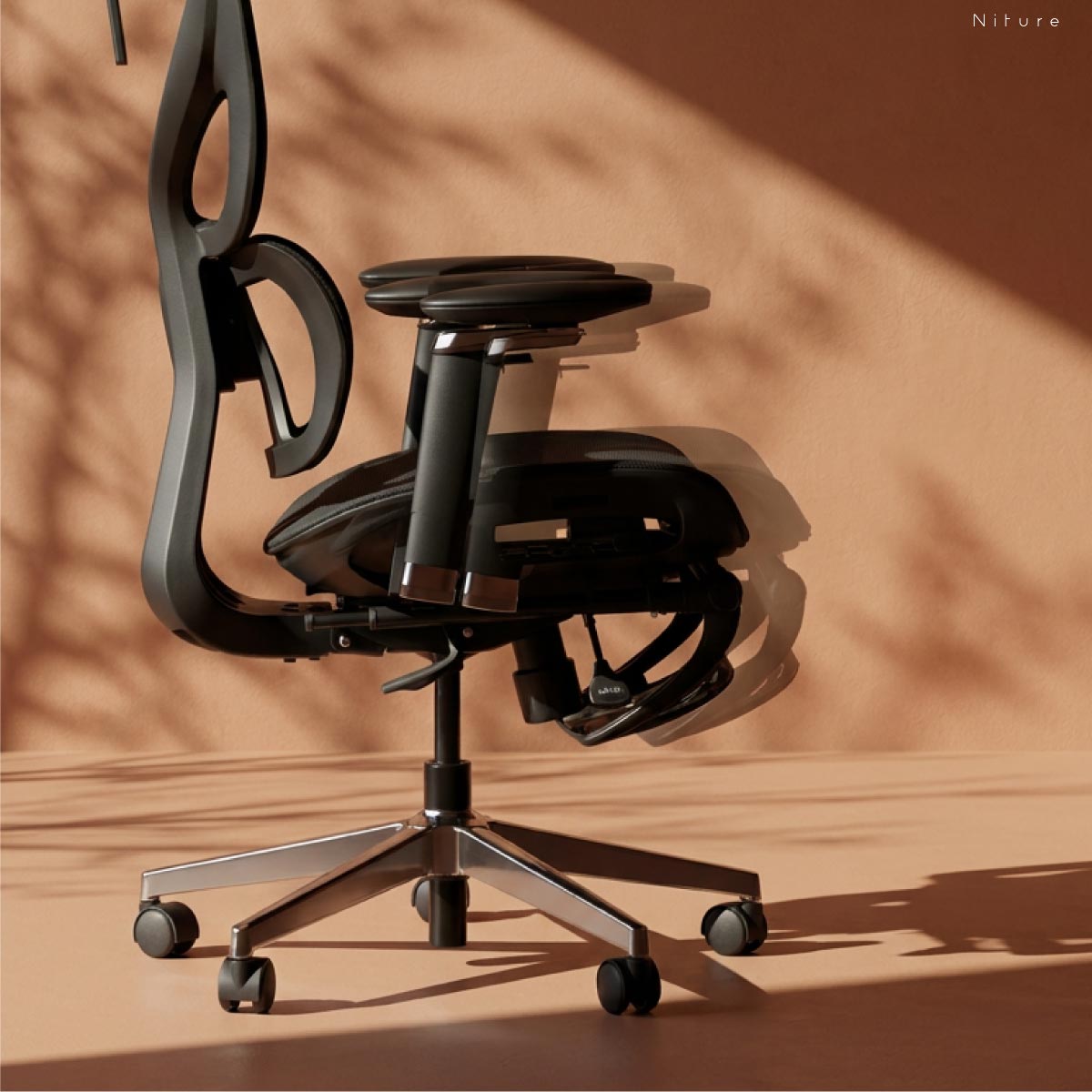
Hammock 1 uses a synchronized recline mechanism with 3 locking positions and up to approximately 135° of maximum recline.

The recline gives you supported alternatives to sitting upright continuously throughout the day.

Stay more upright for focused desk work, move into an intermediate recline for lighter tasks, or recline further during short recovery periods.

Maximum Recline
135° Approx.
Locking 3 Positions
Mechanism Synchronized
Hammock 1 synchronized recline showing three locking positions and approximately 135 degree maximum recline
Maximum ≈ 135°
Locking 3 Positions
Movement Synchronized
Three Locking Positions
01

Upright Work

Use the more upright position for typing, mouse work and tasks that require closer interaction with the desk and screen.

02

Intermediate Recline

Open the sitting angle for reading, calls, browsing or lighter tasks while remaining supported by the backrest.

03

Maximum Recline

Recline up to approximately 135° for more relaxed sitting and short recovery periods between focused work sessions.

What Does Synchronized Recline Mean?

Seat and Backrest Move Together

As you recline, the seat and backrest move in a coordinated motion rather than the backrest simply folding backward independently.

A More Open Sitting Angle

The coordinated movement allows the body to move from a focused upright position into a more open reclined posture while remaining supported by the chair.

How We Measure Recline

Seat Plane to Backrest Angle

The approximately 135° maximum recline is measured as the included angle between the seat plane and the backrest when the chair reaches its maximum reclined position.

Movement tip: Reclining gives you another supported posture, but it should not replace regular movement. Change positions, stand and walk periodically during longer sitting sessions.

Retractable Footrest

Extend Your Legs When It Is Time to Recover

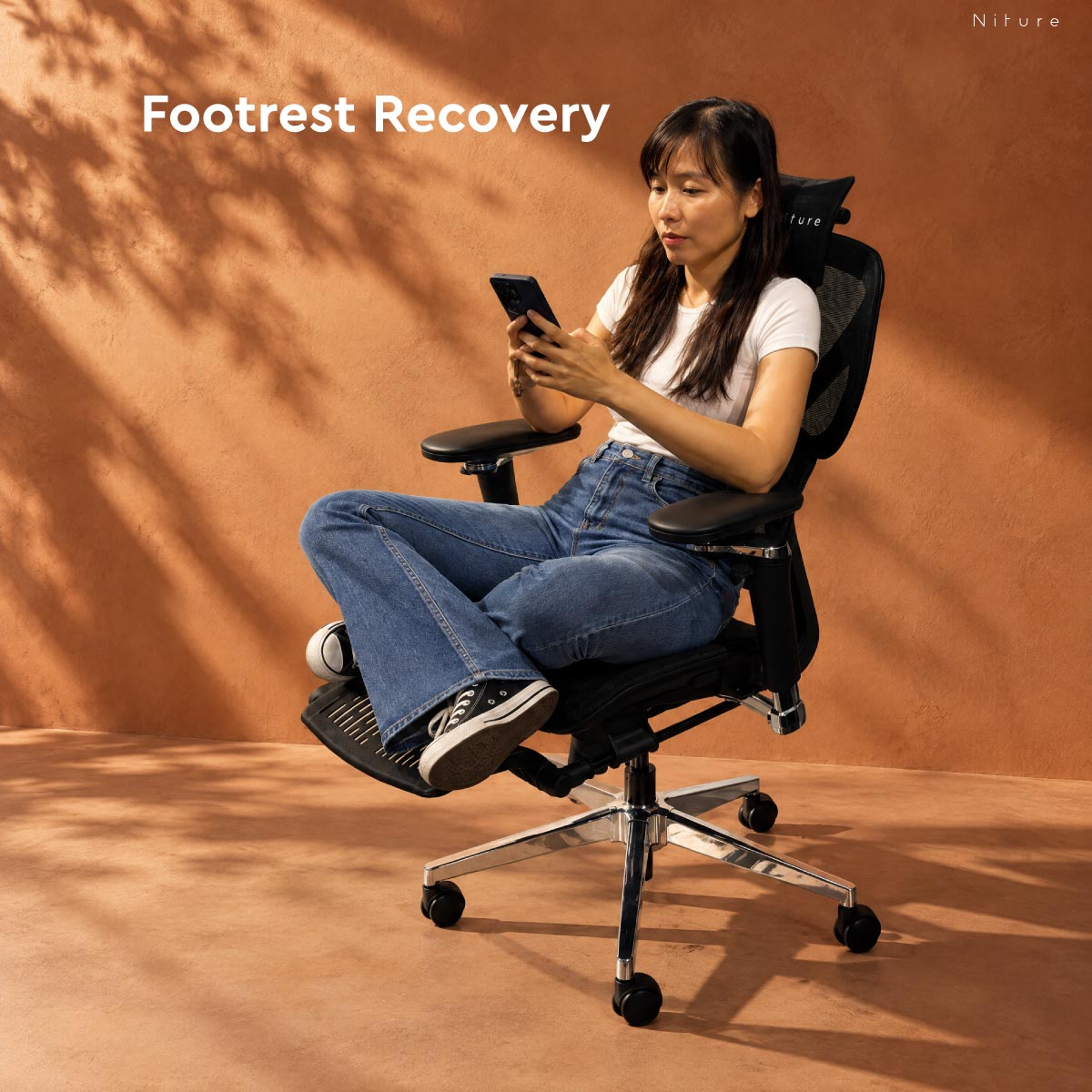
Hammock 1 includes a retractable footrest that stores beneath the seat during normal desk work and extends when you want a more relaxed sitting position.

Used together with the synchronized recline, the footrest provides temporary support underneath the lower legs and lets the body move away from a continuously upright posture.

When you return to focused work, simply retract the footrest underneath the seat so your feet can return to the floor or another suitable foot support.

Work Mode Footrest Retracted

Keep the footrest stored while your feet remain supported on the floor during normal desk work.

Recovery Mode Footrest Extended

Extend the footrest when reclining for reading, calls, browsing or short recovery periods.

Hammock 1 retractable footrest shown stored and extended
Storage Under Seat
Operation Retractable
Primary Use Recovery
More Than One Sitting Position
01

Change Leg Position

Extending the legs gives the body another position instead of keeping the knees and hips at the same angle throughout the day.

02

Support Reclined Sitting

The footrest works naturally with the synchronized recline when you move temporarily into a more relaxed posture.

03

Return Easily to Work

When the break is over, retract the footrest beneath the seat and return to your normal working position.

Use the Footrest for the Right Purpose

During Desk Work

Your feet should normally remain supported on the floor or an appropriate external foot support. The retractable footrest should not be used to compensate for an incorrect working seat height.

During Recline

Extend the footrest when you recline and want temporary support beneath the lower legs. Think of it as a recovery position rather than your primary working posture.

Movement tip: The footrest gives you another supported sitting position, but no reclined position should replace regular movement. Change posture, stand and walk periodically during longer work sessions.

Close-up of Hammock 1 breathable mesh seat and backrest
Material Breathable Mesh
Seat Mesh
Backrest Mesh
Breathable Mesh Comfort

More Airflow for Everyday Sitting

Hammock 1 uses breathable mesh across the seat and backrest to promote airflow and help reduce heat buildup during longer sitting sessions.

This makes the chair particularly practical for warm home offices, study spaces and workplaces where ventilation and surface breathability matter.

The mesh also flexes under load, creating a responsive sitting surface without relying on thick foam cushioning.

Airflow Better Ventilation

Open mesh construction allows more air to move through the seat and backrest while you sit.

Surface Response Flexible Support

The mesh responds under body weight rather than creating the dense feel of a thick upholstered cushion.

Climate Practical for Warm Environments

Breathable surfaces can feel more comfortable in Malaysia's warm and humid working conditions.

Mesh or Cushion?
Hammock 1 Mesh

Airier and More Responsive

  • More airflow around the body
  • Less heat retention than thick foam
  • Flexible surface response
  • No thick-cushion compression feel
Cushion Preference

Softer Initial Feel

Some users still prefer the softer and more padded sensation of a foam seat. Mesh and cushion comfort are personal preferences rather than one being universally better.

If seat feel matters strongly to you, compare both surface types in person before deciding.

Comfort tip: Mesh feel can vary depending on body weight, clothing, sitting duration and personal preference. A showroom trial remains the best way to judge whether the surface firmness suits you.

Body Fit

Height Is a Starting Point. Your Proportions Decide the Fit.

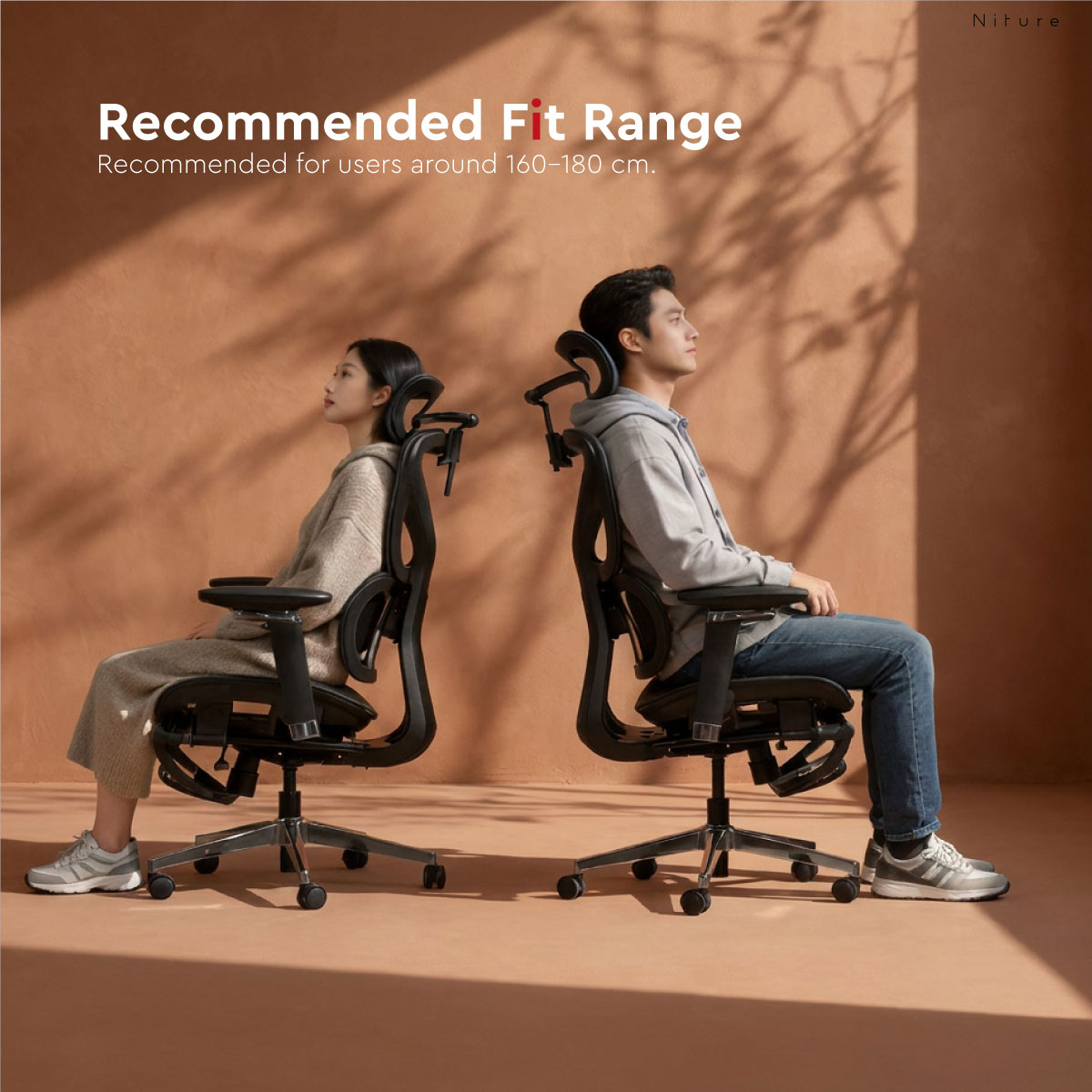
Hammock 1 is best considered from around 160 cm and above, but overall height alone cannot tell you whether the chair will fit correctly.

Seat depth, thigh length, torso length, lumbar position, shoulder height and headrest reach all influence whether the chair fits your body comfortably.

Recommended Starting Point ≈160 cm+

Use height as an initial filter, then confirm seat depth, lumbar contact and headrest reach against your own body.

Maximum Load 110 kg
Seat Pan 51 × 51 cm
Usable Seat Depth ≈44–50 cm
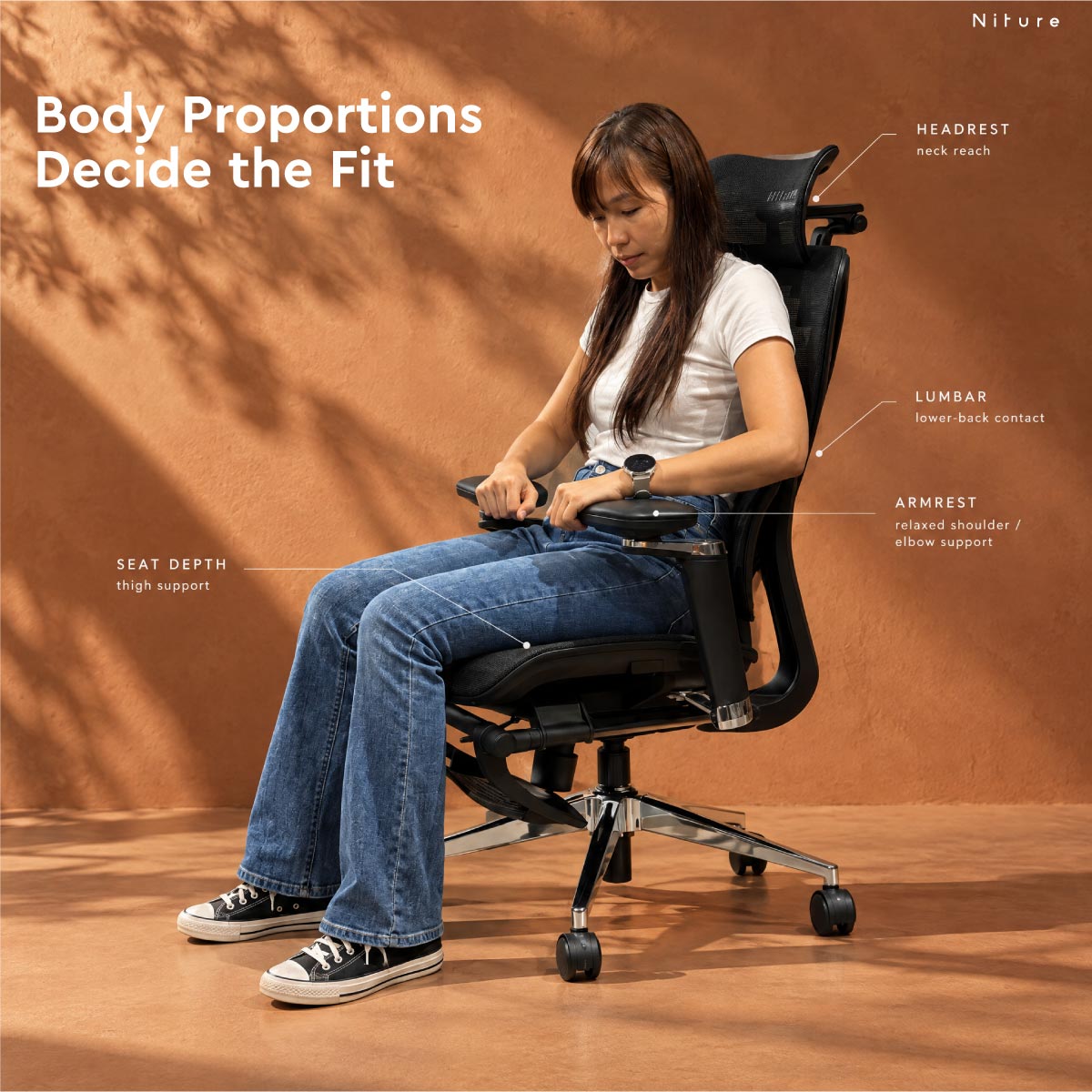
Hammock 1 ergonomic chair body fit showing seat depth lumbar support armrest and headrest checks
Seat Thigh Support
Lumbar Lower-Back Contact
Armrests Relaxed Shoulders
Headrest Neck Reach
Four Fit Checks That Matter More Than Height Alone
01

Seat Depth

The seat should support most of your thighs without pressing into the back of the knees. Hammock 1 provides approximately 44–50 cm of usable seat depth.

02

Lumbar Position

Hammock 1's single lumbar support should meet your lower-back curve naturally rather than contacting too high, too low or with uncomfortable pressure.

03

Armrest Position

The armrests should reach your elbows while the shoulders remain relaxed and the upper arms stay close to the body.

04

Headrest Reach

The 4D headrest should reach close to your neck curve without requiring you to push your head backward or forcing the head forward.

How to Read the Height Recommendation
Below ≈160 cm Trial Recommended

Pay particular attention to minimum seat height, usable seat depth and whether the headrest can reach the neck comfortably.

Around 160 cm and Above Recommended Starting Range

This is the general starting point for Hammock Series fit, but body proportions should still be checked individually.

Taller Users Check Seat and Headrest Reach

Taller users should confirm that thigh support, backrest height and headrest positioning remain suitable for their proportions.

Niture fitting principle: Height is an initial filter, not a final answer. Seat depth, torso length, lumbar position and headrest reach can make two people of the same height experience the same chair very differently.

Technical Specifications

Hammock 1 Dimensions and Adjustment Range

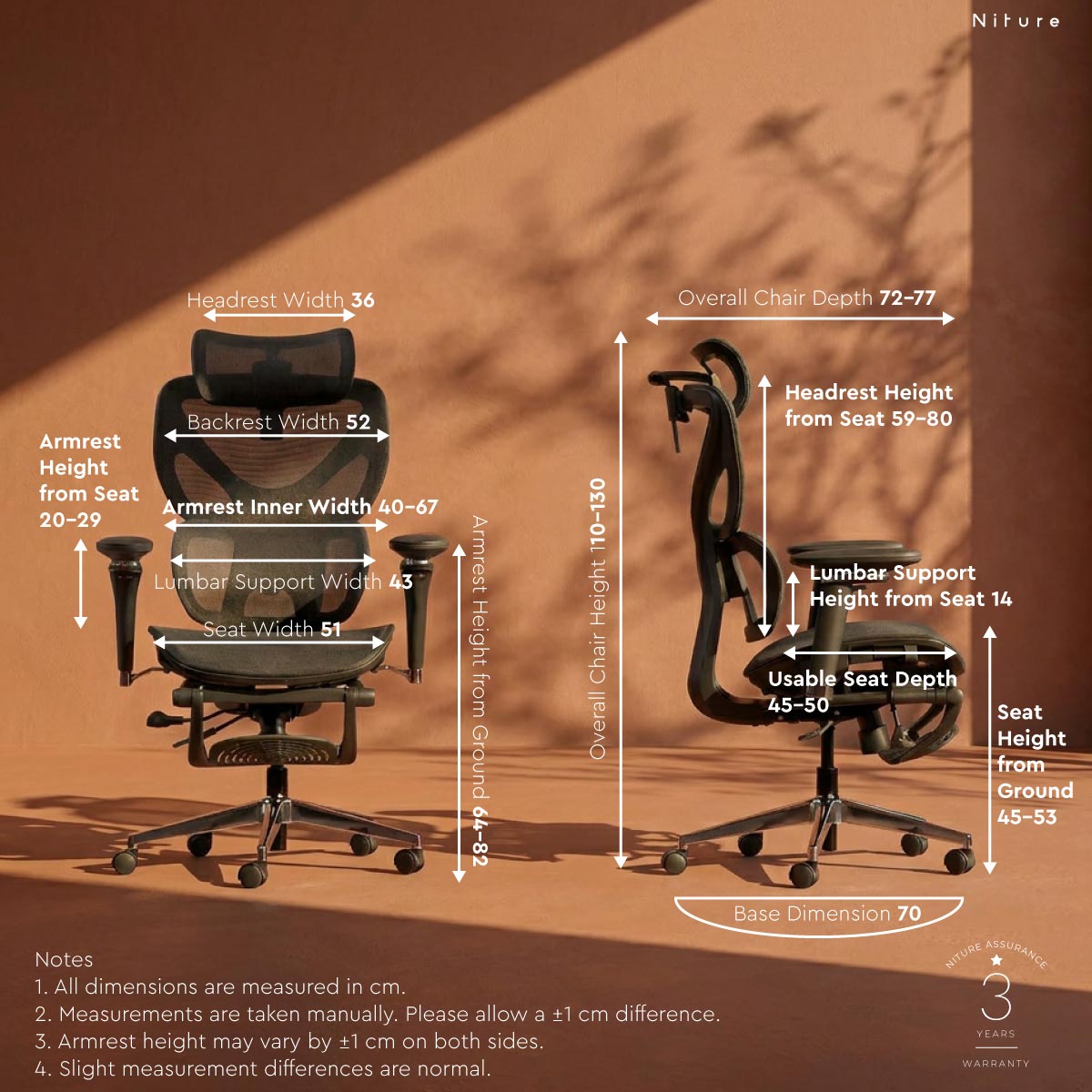
A consolidated reference for Hammock 1's physical dimensions, body-fit measurements, adjustment ranges and key construction specifications.

Hammock 1 ergonomic chair dimension drawing
Seat Pan 51 × 51 cm Physical width × depth
Usable Seat Depth from Lumbar ≈ 44–50 cm 3 adjustable positions
Seat Height ≈ 45–53 cm Approximately 8 cm vertical adjustment
Maximum Recline ≈ 135° 3 locking positions
Maximum Load 110 kg Hammock Series recommended maximum
Full Specification
Specification Hammock 1
Body Fit & Dimensions
Recommended Fit Around 160–180 cm as a starting height range; confirm using body proportions and showroom trial
Maximum Recommended Load 110 kg
Physical Seat Pan 51 cm width × 51 cm depth
Physical Seat Depth Approx. 50 cm
Seat Depth Adjustment 3 positions · approx. 6 cm usable range
Seat Height Approx. 45–53 cm
Seat Height Adjustment Approx. 8 cm continuous gas-lift range
Body-Fit Reference Measurements
Usable Seat Depth from Lumbar Approx. 44–50 cm
Lumbar Height from Seat Approx. 14 cm
Headrest Height from Seat Approx. 59–80 cm
Armrest Height from Seat Approx. 20–29 cm
Inner Armrest Width Approx. 38–64 cm
Lumbar Support
Lumbar Design Single lumbar support
Lumbar Support Character Focused, concentrated and more noticeable lower-back contact
4D Headrest
Headrest Height Adjustment 6 steps · 6 cm
Headrest Depth Adjustment 3 steps · 3 cm
Headrest Tilt 60°
Headrest Rotation 110°
5D Dual-Axis Armrests
Armrest Height Adjustment 8 steps · 9 cm
Armrest Width Adjustment Up to 14 cm
Arm Pad Rotation 360°
Armrest Pivot Up to 270°
Dual-Axis Fore–Aft Reach Up to 54 cm overall positioning reach
Recline & Recovery
Recline Mechanism Synchronized recline
Maximum Recline Approx. 135°
Recline Locking Positions 3 positions
Footrest Retractable · stored beneath seat
Material & Construction
Seat Material Breathable mesh
Backrest Material Breathable mesh
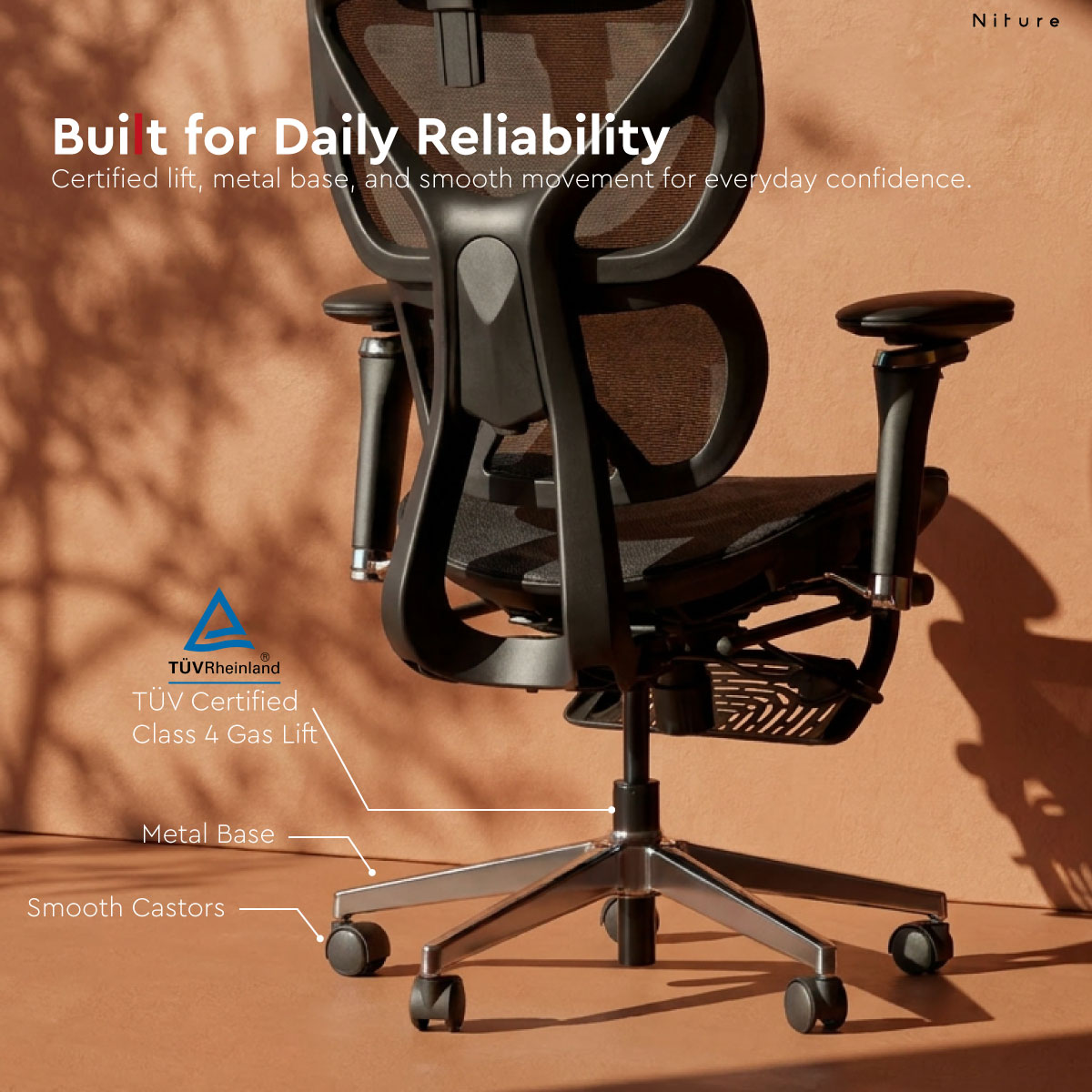
Gas Lift TÜV-certified Class 4 gas lift
Base Metal base
Castors Twin-wheel castors
Ownership
Warranty 3 years
Showroom Trial Available at Niture Puchong showroom
Understanding the Measurements
Physical Seat Dimensions 51 × 51 cm

The seat pan dimensions describe its physical width and depth. The approximate physical seat depth is 50 cm when measured on the chair. These are not the same as the usable depth from the lumbar support.

Usable Seat Depth ≈ 44–50 cm

Measured from the effective lumbar-support contact point to the front edge of the seat, across three adjustment positions.

Recline Angle ≈ 135°

Measured as the included angle between the seat plane and backrest at maximum recline.

Measurement note: Dimensions are measured manually and may vary slightly between individual units or production batches. Where a value is shown as approximate, allow for normal measurement tolerance. Body-fit measurements should be confirmed through actual chair adjustment and fitting.

Adjustment Video Guide

Set Up Hammock 1 Around Your Body

Follow the adjustment guide to set seat height, seat depth, lumbar position, armrests, headrest and recline in a logical order.

The goal is not to copy one universal chair setting. Use the controls to bring the chair closer to your own proportions, desk height and working position.

Guide Type Chair Setup
Recommended After Assembly
Recheck After Desk Setup
Recommended Setup Order

Adjust the chair from the seat upward. This makes it easier to establish your leg position first before fine-tuning the upper-body support points.

01

Seat Height

Start with your feet supported and your knees in a comfortable position.

02

Seat Depth

Adjust the seat until your thighs are supported without pressure behind the knees.

03

Lumbar Contact

Sit fully back and confirm that the single lumbar support meets your lower-back curve comfortably.

04

Armrests

Bring the armrests to your elbows while keeping your shoulders relaxed.

05

Headrest

Adjust height, depth, tilt and rotation until the headrest reaches naturally toward the neck area.

06

Recline & Footrest

Test the three recline positions and extend the footrest when using a more relaxed recovery posture.

Final Fit Check

Your Chair Should Fit the Way You Work

After the chair is adjusted, sit at your actual desk and recheck the relationship between your chair, keyboard, screen and working surface.

  • Feet remain supported in your primary working position.
  • There is comfortable clearance behind the knees.
  • Lumbar support meets the lower back without excessive pressure.
  • Shoulders remain relaxed while the forearms are supported.
  • Headrest reaches the neck area without pushing the head forward.
  • Screen and desk height do not force you to compensate with posture.

Setup tip: There is no single perfect setting for every task. Small adjustments may be useful when moving between focused desk work, calls, reading and reclined recovery.

Frequently Asked Questions

Hammock 1 FAQ

Common questions about fit, lumbar support, adjustments, materials and how Hammock 1 differs from Hammock 2.

What is the main difference between Hammock 1 and Hammock 2?

Hammock 1 and Hammock 2 share the same core ergonomic platform, dimensions and adjustment system. The main difference is the lumbar support design.

Hammock 1 uses a single lumbar support that creates a more focused, concentrated and noticeable lower-back contact. Hammock 2 uses twin lumbar sections that create a broader, more wrapping sensation.

Neither design is universally better. The better choice depends on your body shape and preferred support sensation.

What height is Hammock 1 recommended for?

Around 160 cm and above is a useful starting point for considering Hammock 1, but height alone does not determine chair fit.

Seat depth, thigh length, torso length, lumbar position and headrest reach should also be checked. Users near the lower or upper end of the expected range are encouraged to try the chair in person.

Is Hammock 1 suitable for shorter users?

It can depend strongly on body proportions. Shorter users should pay particular attention to the minimum seat height, usable seat depth and headrest reach.

The seat provides approximately 44–50 cm of usable depth, so users with shorter thigh lengths should confirm that comfortable clearance remains behind the knees.

Is the lumbar support adjustable?

Hammock 1 uses a single lumbar support designed to create focused contact around the lower back.

Its defining feature is the concentrated support sensation rather than a multi-part or Smart-Glide lumbar system. Your sitting position and body proportions determine where and how strongly that contact is felt.

How much seat-depth adjustment does Hammock 1 have?

Hammock 1 provides approximately 44–50 cm of usable seat depth across 3 positions, giving around 6 cm of usable adjustment.

The physical seat pan itself measures approximately 51 cm wide × 51 cm deep. Physical seat size and usable seat depth are different measurements.

How far can Hammock 1 recline?

Hammock 1 uses a synchronized recline mechanism with 3 locking positions and a maximum recline of approximately 135°.

The recline angle is measured between the seat plane and the backrest at maximum recline.

Does Hammock 1 include a footrest?

Yes. Hammock 1 includes a retractable footrest stored beneath the seat.

It can be extended during reclined or recovery sitting and retracted again for normal desk work. It is intended as an additional relaxed sitting position rather than a substitute for correct seat and desk height.

Is Hammock 1 a full-mesh chair?

Hammock 1 uses breathable mesh across both the seat and backrest.

The mesh allows more airflow than a thick upholstered surface and provides a flexible sitting surface, which can be practical in Malaysia's warm working environment.

What is the maximum recommended weight for Hammock 1?

The Hammock Series has a maximum recommended load of 110 kg.

Weight capacity should be considered together with body dimensions and fit rather than used as the only criterion when choosing a chair.

Can I try Hammock 1 before buying?

Yes. Hammock 1 is available to try at the Niture Puchong showroom.

A fitting lets you compare Hammock 1's focused single lumbar support against Hammock 2's broader twin-lumbar feel while also checking seat depth, armrest position and headrest reach against your own body.

What warranty does Hammock 1 come with?

Hammock 1 comes with a 3-year warranty.

Warranty coverage is subject to Niture's current warranty terms and conditions.

Still Unsure Whether Hammock 1 Fits You?

Compare lumbar feel, seat depth, headrest reach and armrest position in person instead of deciding from height alone.

Try It in Puchong
Free Ergonomic Chair Fitting

Feel the Difference Before You Decide.

Specifications can narrow the choice. Your body confirms the fit.

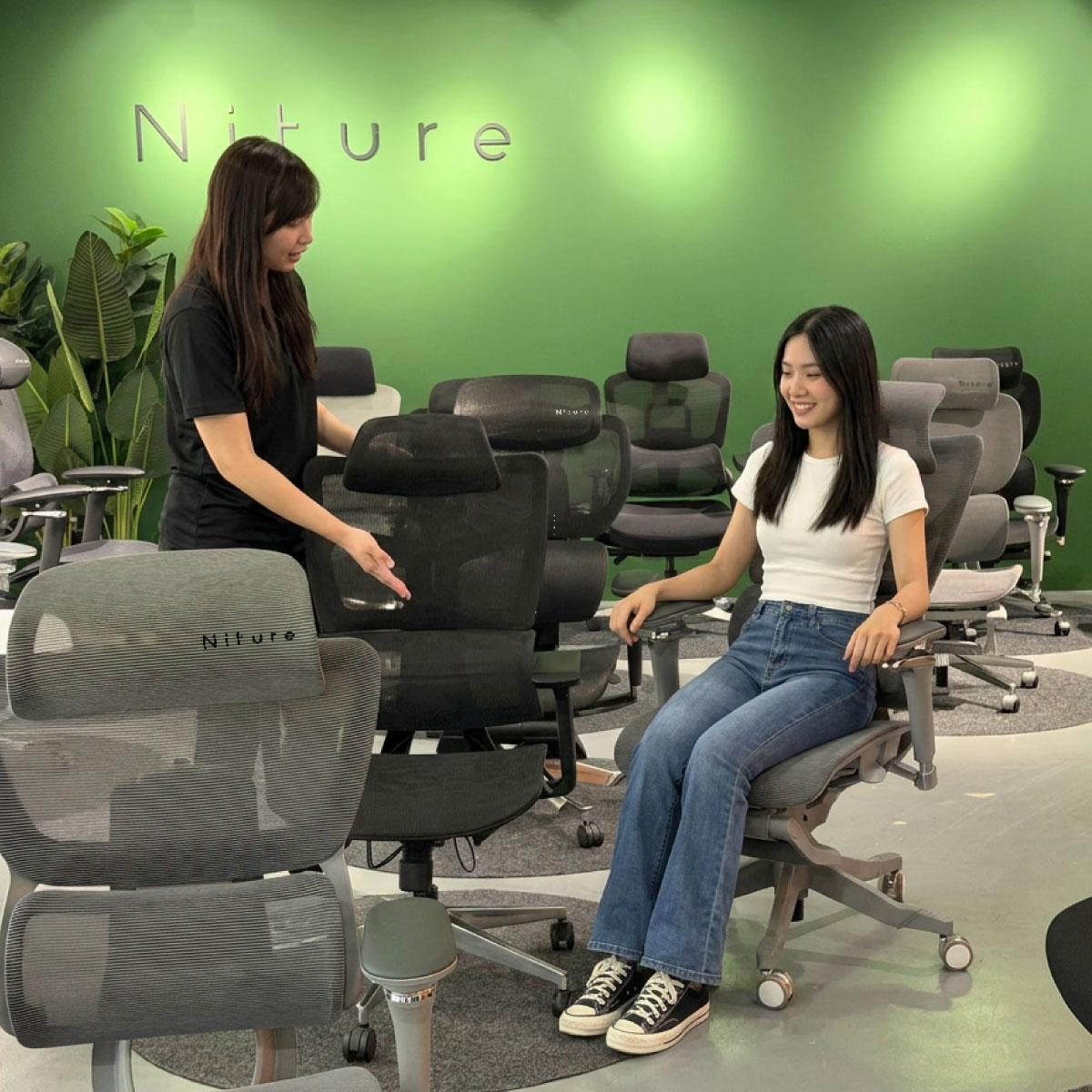
Visit the Niture Puchong showroom to try Hammock 1, compare its focused single-lumbar support with Hammock 2's broader twin-lumbar feel, and adjust the chair around your own proportions.

Fitting Fee Free
Typical Duration ≈ 30 Minutes
Walk-In Welcome
Showroom Hours Mon–Sun · 11 AM–5 PM
Customer trying an ergonomic chair during a fitting at Niture Puchong showroom
What to Check in Person

Don't Just Sit. Compare the Support Points.

A useful showroom trial is not about whether the chair feels comfortable for the first 30 seconds. Adjust it properly and check whether the main support points match your body.

01 Compare Lumbar Feel

Try Hammock 1's more focused single-lumbar contact beside Hammock 2's broader wrapping sensation.

02 Check Body Proportions

Confirm usable seat depth, knee clearance, armrest reach, lumbar position and headrest-to-neck reach.

03 Test Different Positions

Sit upright, recline, reposition the armrests and test the footrest rather than judging the chair from one posture.

No appointment is required for general chair fitting. Walk in during showroom hours. If you need a specific consultant, arranging a time in advance may be helpful.

Reviews

There are no reviews yet.

Only logged in customers who have purchased this product may leave a review.

Not sure which ergonomic chair to choose? Use our smart filter to quickly narrow down options by features, materials, and comfort preferences. Search Now...

Payment Options

Choose the payment method that suits you best. We accept Visa, Mastercard, FPX, and Buy Now Pay Later (BNPL) options.

Enjoy peace of mind with our reliable warranty coverage. Our dedicated support team is always ready to assist with after-sales service. Learn More...

Shipping & Delivery

Get your ergonomic furniture delivered safely and on time. We provide fast, secure, and trackable shipping options to ensure your order reaches you in perfect condition.

36% OFF

Original price was: RM1,399.00.Current price is: RM899.00.

Not sure which ergonomic chair to choose? Use our smart filter to quickly narrow down options by features, materials, and comfort preferences. Search Now...

Payment Options

Choose the payment method that suits you best. We accept Visa, Mastercard, FPX, and Buy Now Pay Later (BNPL) options.

Enjoy peace of mind with our reliable warranty coverage. Our dedicated support team is always ready to assist with after-sales service. Learn More...

Shipping & Delivery

Get your ergonomic furniture delivered safely and on time. We provide fast, secure, and trackable shipping options to ensure your order reaches you in perfect condition.

26% OFF
Niture SINC 2 11.11 Mega Sale

SINC 2 Ergonomic Chair

Price range: RM1,850.00 through RM1,999.00

Select options This product has multiple variants. The options may be chosen on the product page