
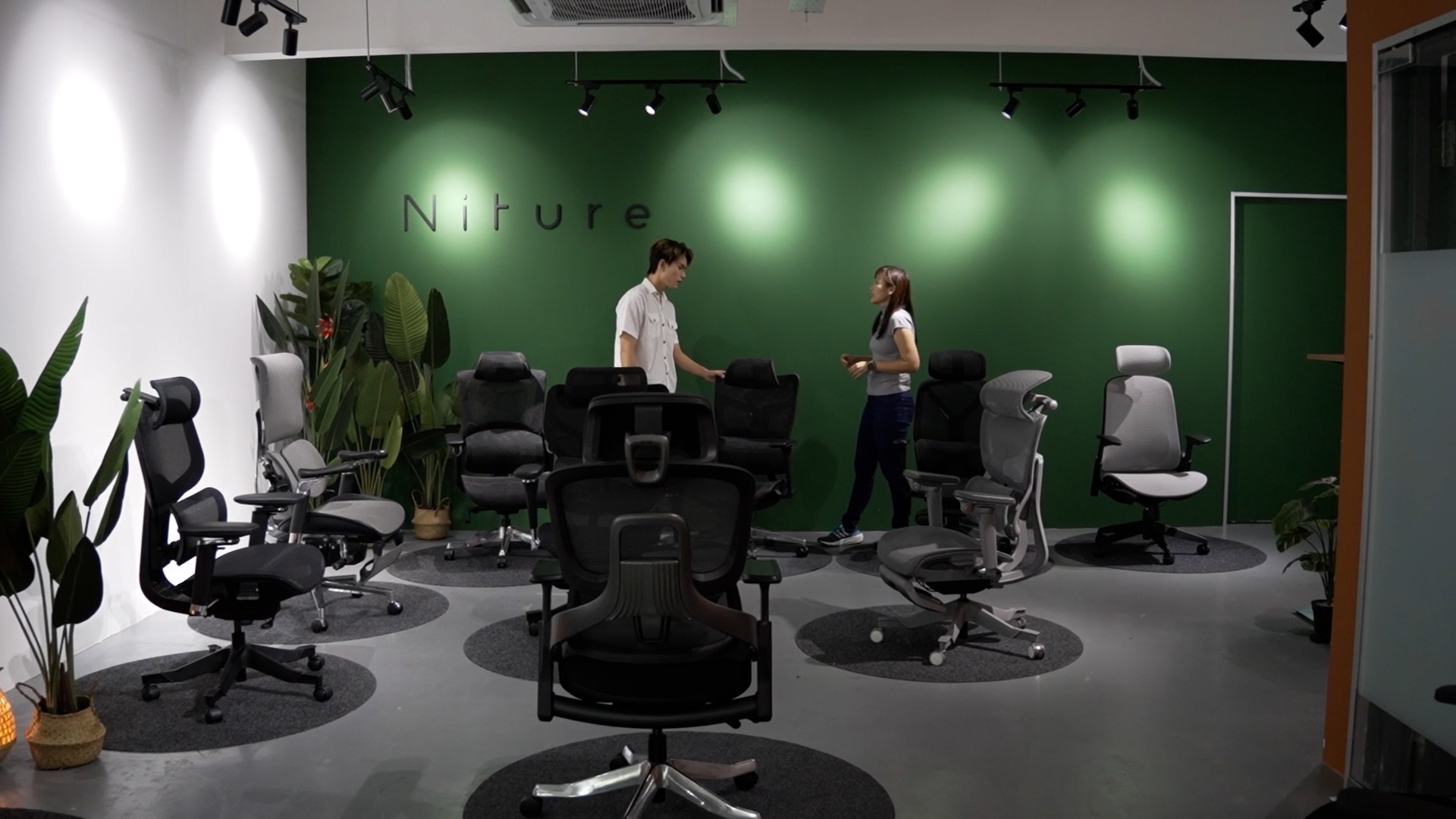
Personalized Ergonomic Chair Fitting in Puchong
Find a Chair That Fits Your Body, Not Just Your Height.
Experience free personalized ergonomic chair fitting at Niture's Puchong showroom. Our team helps you explore suitable chairs, adjust their support and compare how they fit your body before deciding.
Beyond height recommendations. We consider body proportions, actual chair dimensions and your preferred sitting experience to help you make a more informed choice.
Niture Chair-Fitting Service at a Glance
A personalized showroom experience to help you explore suitable ergonomic chairs, understand their adjustments and compare how they support your body before making a decision.
- Fitting Fee
- Free
- Visit Type
- Walk-In
- Typical Duration
- ≈30 min
- Available Chairs
- All Models
Personalized chair-fitting guidance at no charge.
No appointment is needed for a general fitting.
Additional time is possible when more comparisons are needed.
Test and compare all current Niture ergonomic chair models.
You Don't Need to Know Which Chair to Choose First.
Share how you normally sit, what you expect from your chair and what feels unsuitable in your current setup. Our team helps you explore relevant Niture models and experience their available adjustments before deciding.
A recommended user-height range is only a starting point. The actual fit also depends on your body proportions, support preferences and seated experience.
Why Body Proportions Matter More Than Height Alone
Overall height helps narrow down ergonomic chair options, but it cannot tell you where the chair's support points will meet your body. Two people of the same height may need different chair settings because their proportions differ.
Same Height. Different Fit.
Imagine two people with the same overall height, but a different balance between torso length and leg length. They may require different chair settings.
Longer Torso, Shorter Legs
A longer seated torso may place the shoulders and neck higher relative to the seat. Shorter lower legs may also affect the chair height needed for reliable foot support.
Backrest and headrest reach, together with seat height and lower-leg support.
Shorter Torso, Longer Legs
A shorter seated torso may require different upper-back and headrest positions. Longer upper legs may also change how much seat depth feels comfortable.
Thigh support and usable seat depth, alongside backrest and headrest fit.
The takeaway: Even when two people fall within the same manufacturer's recommended height range, they may not find the same chair or adjustments suitable. These examples illustrate possible differences, not guaranteed fitting outcomes.
Three Ways Proportions Influence Chair Fit
During a fitting, the relationship between your body and the chair matters more than overall height alone.
Where Your Legs Meet the Seat
Upper-leg and lower-leg proportions influence whether you can sit back comfortably while maintaining adequate thigh and foot support.
Where Your Back Meets the Support
Torso proportions influence how the backrest and lumbar support contact your body. A comfortable support position can differ between users.
Where Your Arms and Neck Reach
Arm proportions, shoulder position and neck reach influence whether armrests and headrests can support your preferred sitting positions.
How Do You Find Out Which Chair Fits?
Rather than choosing by height alone, Niture's showroom fitting considers your proportions, preferred support and actual seated experience. The next section explains the process.
How Niture's Personalized Chair Fitting Works
Our guided showroom fitting follows four practical steps. We begin with your sitting requirements, identify suitable chair models, check their fit against your body and help you compare the experience before deciding.
Start with the Person, Not the Chair.
Chair specifications provide useful reference points, but fitting also depends on body proportions, adjustment settings and personal comfort. Our aim is to help you understand those differences through actual seated testing.
-
01Understand
Understand Your Sitting Needs
We begin by discussing how you work, study or relax in your chair. Your body proportions, sitting duration, current chair experience and workstation arrangement help guide the fitting.
What We Look ForYour main activities, preferred support feel, body-fit concerns and any limitations you experience with your current chair.
OutcomeA clearer understanding of your fitting priorities.
-
02Shortlist
Identify Suitable Niture Chairs
We help narrow down the Niture models worth testing based on their support characteristics, dimensions, adjustment ranges, your budget and the way you prefer to sit.
What We Look ForChair models with potentially suitable seat dimensions, lumbar and headrest positions, arm support and preferred sitting characteristics.
OutcomeA manageable shortlist of chairs to test.
-
03Fit & Adjust
Check the Chair Against Your Body
While you are seated, we help adjust the chair and assess how its support positions relate to your body. Niture's six published chair-fit measurements provide useful references for this assessment.
What We Look ForWhether the available seat, lumbar, armrest and headrest positions accommodate your proportions while allowing comfortable back and lower-body support.
OutcomeAn understanding of which adjustments work for you and where the chair may have limitations.
-
04Compare
Compare Support Before Deciding
After adjustment, you can compare shortlisted chairs while sitting upright, changing position and reclining. Our team helps explain the differences in support, movement and available controls.
What We Look ForYour preferred lumbar contact, arm and neck support, recline resistance and movement experience. Smart-Glide can also be demonstrated on SINC models.
OutcomeA better-informed choice based on actual fit, adjustments and personal preference.
What Exactly Do We Check?
The next section explains Niture's six measurable chair-fit references, including seat height, usable seat depth, lumbar-support position, armrest height and inner width, and headrest reach.
What We Check During an Ergonomic Chair Fitting
Niture uses six measurable chair-fit references to assess how a chair's dimensions and adjustment ranges relate to your body proportions. We also evaluate sitting comfort, movement and compatibility with your workstation.
From Chair Dimensions to Personal Fit
Published chair dimensions provide approximate reference ranges. During a fitting, we consider these measurements alongside your actual seated position and adjust the available controls to assess whether the chair suits your proportions.
-
01 Lower-Body Fit
Seat Height from Ground
The vertical distance from the floor to the chair's sitting surface. This determines whether the chair can reach a suitable height for your lower legs and workstation.
What We CheckWhether your feet can rest securely on the floor or a suitable foot support while maintaining a comfortable seated position.
-
02 Thigh & Leg Fit
Usable Seat Depth
The distance from the lumbar-support contact point to the front edge of the seat. It represents the effective seating depth when the lower back is supported.
What We CheckWhether you can sit back against the lumbar support while maintaining sufficient thigh support and comfortable clearance behind your knees.
-
03 Lower-Back Fit
Lumbar Support Height from Seat
The vertical position of the lumbar support relative to the seat surface. Depending on the chair design, this may describe a support position or a broader contact zone.
What We CheckWhether the lumbar support contacts your lower back at a comfortable height, without feeling too high, too low or excessively concentrated.
-
04 Forearm Support
Armrest Height from Seat
The vertical distance between the seat's sitting surface and the armrest support surface. Available adjustment ranges vary by model.
What We CheckWhether your forearms can be supported without raising your shoulders or leaving your arms unsupported during normal tasks.
-
05 Arm Positioning
Armrest Inner Width
The clear distance between the inner sides of the armrests. This helps indicate whether the chair can accommodate your preferred arm position.
What We CheckWhether your arms can rest comfortably beside your body without the armrests feeling too narrow or requiring excessive outward arm movement.
-
06 Neck Support
Headrest Height from Seat
The vertical position of the headrest relative to the seat surface. It helps assess whether the headrest can accommodate your torso length and preferred neck-support position.
What We CheckWhether the headrest can reach a comfortable support position, particularly during reclining, without pushing your head excessively forward.
Why Usable Seat Depth Can Change When the Lumbar Support Moves
Niture measures usable seat depth from the lumbar-support contact point to the front edge of the seat. On chairs with adjustable lumbar depth, moving the lumbar support forward changes that contact point and can reduce the effective seating depth, even when the seat slider stays in the same position.
The front-to-back dimension of the seat structure. This is not necessarily the usable seating depth.
How far the seat slider moves mechanically, approximately 5–6 cm depending on the model.
The effective distance between the lumbar-contact point and front seat edge, accounting for the relevant adjustment positions.
SINC Air: Why Two Seat-Depth Ranges Can Both Be Correct
SINC Air provides both seat-depth adjustment and lumbar-support depth adjustment. The measured usable depth depends on the positions of these components.
The usable seat-depth range measured across the seat-slider positions when lumbar-support depth is at its 0 cm position.
The overall usable seat-depth range when both the seat-slider and lumbar-support depth positions are taken into account.
These figures describe different measurement conditions rather than conflicting specifications. Neither range should be confused with the seat slider's mechanical travel alone. Explore SINC Air specifications →
Two Additional Checks Beyond Measurements
Measurements help assess whether the chair can accommodate your body. The actual fitting also considers how it supports movement and works with your workstation.
Recline & Movement Support
We demonstrate relevant recline controls, resistance settings and available lock positions. On SINC Series models, we can also demonstrate how Smart-Glide responds as you change sitting angle.
Chair & Workstation Compatibility
We consider how chair settings relate to your desk height, keyboard, mouse and monitor arrangement. These factors can affect arm support, reach and working posture.
Use Measurements to Shortlist. Confirm the Fit in Person.
Chair dimensions are useful starting points, but individual support preferences and sitting comfort matter too. Compare suitable Niture models with a personalized showroom fitting.
Which Niture Ergonomic Chair Should You Test?
Niture chairs differ in support design, sitting character and adjustment ranges. Use the fit references below to identify models worth trying, then compare how each chair supports your body during a personalized showroom fitting.
Explore the SINC Series
All SINC models use Smart-Glide movement support, but their lumbar systems, sitting character and body-fit ranges are not identical.
SINC Air
A lifestyle-oriented Smart-Glide chair for users who prefer a naturally more reclined sitting position during work and relaxation.
- Usable seat depth ≈40–51 cm
- Armrest inner width ≈34.5–59.5 cm
Check whether its relaxed back angle suits your tasks, then compare lumbar contact, armrest positioning and neck support while upright and slightly reclined.
SINC Lite
An accessible entry into movement-supportive sitting, with adjustable seat, lumbar, backrest, armrest and headrest positions.
- Usable seat depth ≈44–50 cm
- Armrest height from seat ≈21.5–30.5 cm
Adjust the seat depth and lumbar position first. Then check whether the armrests reach your elbows and the headrest supports your neck comfortably.
SINC
A versatile Smart-Glide chair for long-hour work, regular posture changes and a balance between focused sitting and supported recline.
- Seat-depth range ≈44–50 cm
- Backrest height adjustment 4 levels
Check lumbar position and headrest reach after setting the seat depth. Compare Smart-Glide movement and lower-back contact with SINC Lite and SINC 2.
SINC 2
Designed for users who prefer more noticeable lumbar contact and a support-focused sitting experience with extensive body-fit adjustments.
- Usable seat depth ≈38.3–49.5 cm
- Armrest inner width ≈33–61 cm
Adjust the lumbar support until the contact feels present without excessive pressure. Pay attention to minimum seat depth, headrest reach and armrest positioning.
SINC 3
A heavier-duty Smart-Glide chair with a firmer, more structured sitting character for users who prefer noticeable support.
- Seat fit Depth + height
- Support fit Lumbar + neck
Compare the firmness of the lumbar contact with other SINC models. Test thigh support, armrest position and recline resistance before deciding.
UltraSinc
Niture's flagship chair with premium Wintex Mesh, adaptive lumbar support, extensive adjustment and coordinated arm support during recline.
- Usable seat depth ≈42–50 cm
- Headrest height from seat ≈55–86 cm
Explore the adaptive lumbar and upper-back adjustments. Compare headrest reach, armrest positioning and the coordinated support during Smart-Glide movement and recline.
Explore the Hammock Series
Hammock 1 and Hammock 2 share the same general chair platform and adjustment approach. Their primary distinction is the character of the lumbar support.
Hammock 1
A practical everyday ergonomic chair with a single lumbar-support section that creates a more focused lower-back contact sensation.
- Usable seat depth ≈44–50 cm
- Lumbar height from seat ≈14 cm
Check where the single lumbar support contacts your lower back. Confirm seat depth, headrest reach and armrest inner width, then compare the support with Hammock 2.
Hammock 2
Everyday ergonomic support with twin dynamic lumbar surfaces that create a broader, more wrapping lower-back contact experience.
- Usable seat depth ≈43–50 cm
- Lumbar contact zone ≈7–25 cm from seat
Feel how the twin lumbar surfaces contact your lower back, then compare that broader contact with Hammock 1's focused feel. Check thigh support and neck position as well.
The dimensions shown above are approximate. Usable seat depth is measured from the lumbar-support contact point to the front edge of the seat, not simply from the physical seat-pan dimensions. Lumbar height may describe a support position or, for some designs, a wider contact zone. Recommended user heights, adjustment ranges and support characteristics help you shortlist a chair, but an actual fitting is needed to confirm your preferred fit.
Need Help Narrowing Down Your Options?
Use the Niture Chair Fit Guide to explore your shortlist, or compare the SINC models in greater detail before testing them in our showroom.
See a Niture Ergonomic Chair Fitting in Action
See Niture's personalized chair-fitting approach at our Puchong showroom. This short demonstration introduces the role of chair adjustments and individual support preferences during a fitting consultation.
Niture personalized ergonomic chair-fitting demonstration at the Puchong showroom.
Watch on YouTube ↗A video can introduce the fitting experience, but it cannot confirm how a chair will support your body. During your own showroom visit, you can sit, adjust and compare suitable Niture models in person.
Visit Our Puchong Showroom
Niture's showroom is located in Bandar 16 Sierra, Puchong, Selangor. Find our address, opening hours and directions below to plan your personalized chair-fitting visit.
Find Us at Sierra Zentro 1
28G & 28-1, Sierra Zentro 1
Jalan Sierra 10/3
Bandar 16 Sierra
47120 Puchong
Selangor, Malaysia
- Monday–Sunday
- –
- Public Holidays
- Closed
Contact our team if you're planning to visit around a public holiday.
No appointment is required for a general showroom visit or personalized chair fitting during operating hours.
Prefer a Particular Niture Consultant?
You may request a specific consultant before visiting. Contact our team in advance so we can check availability and confirm whether an appointment is needed. General walk-in fittings do not require an appointment.
Before your visit: It can help to know your usual sitting duration, workstation setup and any difficulties you've experienced with your current chair. You don't need to select a Niture model in advance.
Corporate Ergonomic Consultation & After-Sales Support
Niture helps workplace teams plan suitable ergonomic seating and supports existing customers with chair adjustments after purchase. Explore the available services below.
Corporate Ergonomic Chair Consultation
Planning seating for an office or multiple employees? Niture can help businesses evaluate ergonomic chairs and workspace requirements before making purchasing decisions.
What We Can Discuss-
✓
Employee & Workspace Needs
Team size, different body-fit requirements, sitting activities and workstation arrangements.
-
✓
Chair Selection & Purchasing
Suitable chair models, product comparisons, quantities and relevant purchasing arrangements.
-
✓
Workplace Consultation Options
Discuss whether an on-site consultation or product demonstration would be appropriate for your project.
Workplace consultations depend on project scope, location and availability. Please confirm the arrangements and any applicable charges with Niture before scheduling.
Post-Purchase Chair Adjustment Support
A chair may feel different at home or work because your desk, sitting habits and equipment differ from the showroom setup. Niture can help you understand and adjust your chair after delivery.
How We Can Help-
✓
Adjustment Guidance
Understand your chair's available seat, lumbar, armrest, headrest and recline controls.
-
✓
Model-Specific Video Guides
Refer to Niture adjustment demonstrations where available for your chair model.
-
✓
Further Setup Assistance
Ask our team about adjustment difficulties or chair setup in your actual working environment.
Tell us your Niture chair model and the adjustment you need help with. Photos or a short video may help our team understand the issue more clearly.
Frequently Asked Questions About Niture Chair Fitting
Find answers about Niture's showroom fitting service, chair testing, adjustment assistance and consultation arrangements.
Have Another Question?
Our team can help with questions about your showroom visit or Niture ergonomic chairs.
Ask Niture on WhatsApp ↗10 Common Questions, Answered
Select a question to view its answer.
01 Is Niture’s ergonomic chair fitting free?
Yes. Niture’s personalized ergonomic chair fitting at the Puchong showroom is free. You can test suitable chair models, receive adjustment guidance, and compare how the chairs support your body before deciding which model is right for you.
02 Do I need to make an appointment?
No appointment is required for a general chair fitting. You may walk into the Niture showroom during operating hours. An appointment may be required when you would like to request a particular consultant.
03 How long does an ergonomic chair fitting take?
A typical Niture chair fitting takes approximately 30 minutes. It may take longer depending on your body proportions, requirements, questions, and the number of chair models you would like to compare.
04 Can I request a particular consultant?
Yes. You may request a particular Niture consultant. An appointment may be required so that the consultant’s availability can be confirmed for your visit.
05 Are all Niture chair models available for testing?
Yes. All current Niture chair models are available for fitting and comparison at the Niture Puchong showroom.
06 Can I test more than one chair?
Yes. Niture encourages visitors to compare suitable chair models so they can understand differences in seat feel, lumbar support, headrest reach, armrest position, recline, and movement.
07 Will Niture help me adjust the chair?
Yes. The Niture team can explain and adjust relevant chair features according to your body proportions and sitting preferences, including the seat, lumbar support, backrest, headrest, armrests, recline, and footrest where available.
08 Does Niture provide assistance after purchase?
Yes. Niture provides chair-adjustment video guides, and customers are welcome to contact the team whenever they need further setup or adjustment assistance.
09 Can Niture provide consultation at our office?
Yes. Corporate clients may request an on-site consultation at their workplace. The consultation must be arranged in advance and is subject to location, requirements, and availability.
10 Is the chair fitting a medical assessment?
No. Niture’s chair fitting is a product-fitting and ergonomic guidance service. It is not a medical examination, diagnosis, or treatment. Customers with persistent pain, numbness, injury, or other medical concerns should consult an appropriately qualified healthcare professional.
Words Lie. Body Doesn't.
Specifications Help You Shortlist. Your Body Helps You Decide.
Measurements and recommendations can guide your choice, but they cannot replace the experience of sitting in a chair and discovering how its support feels against your body.
At Niture, we encourage you to compare suitable models, explore their adjustments and make a decision based on your own fitting experience.
Find Your Fit. Visit Niture.
Experience a free personalized ergonomic chair fitting at our Puchong showroom. Try suitable chairs in person, with guidance from the Niture team.
Walk-ins welcome. No appointment required for general showroom fittings.